

The iPhone 13 series supports eSIM, and it does it well. Whether you want to ditch physical SIM cards, manage two numbers, or add a travel plan, Apple’s 2021 lineup makes it easy to go fully digital. But there are a few things worth understanding before you make the switch.
Table of contents
What Is eSIM and Why Does It Matter
An eSIM (embedded SIM) is a digital version of the plastic SIM card. It’s built into the iPhone and lets you activate a mobile plan without inserting or swapping anything. For travelers or people who manage personal and work numbers, that flexibility is a big deal.
Since the iPhone 13, Apple has steadily expanded eSIM support across carriers and regions. Every model, whether it be iPhone 13, 13 mini, 13 Pro, or 13 Pro Max, can use eSIM. In most regions, you can even run two eSIMs at once, giving you dual-SIM capability without a physical slot.
Don’t miss the best of The Mac Observer
Set us as a preferred source and our Apple reporting ranks higher in your Google Search results and Discover feed — one tap, no account changes.
The change built on what Apple first introduced with the iPhone 12 lineup, which laid the groundwork for dual eSIM support. You can still see how the earlier generation handled it in this iPhone 12 eSIM comparison.
Setting Up eSIM on iPhone 13

Image Source: Apple
Apple’s setup process is straightforward, but you’ll want to make sure your carrier supports it first.
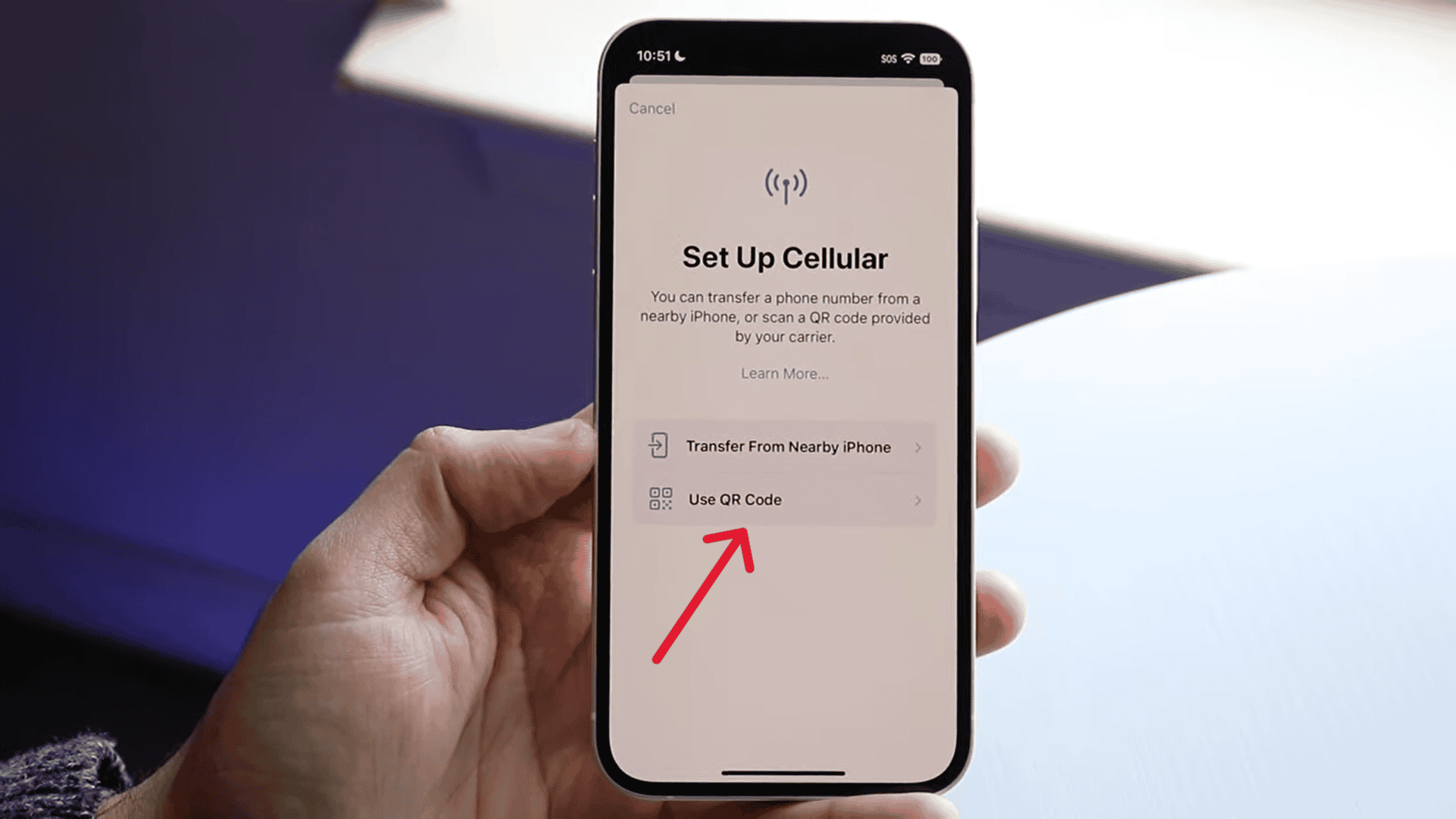
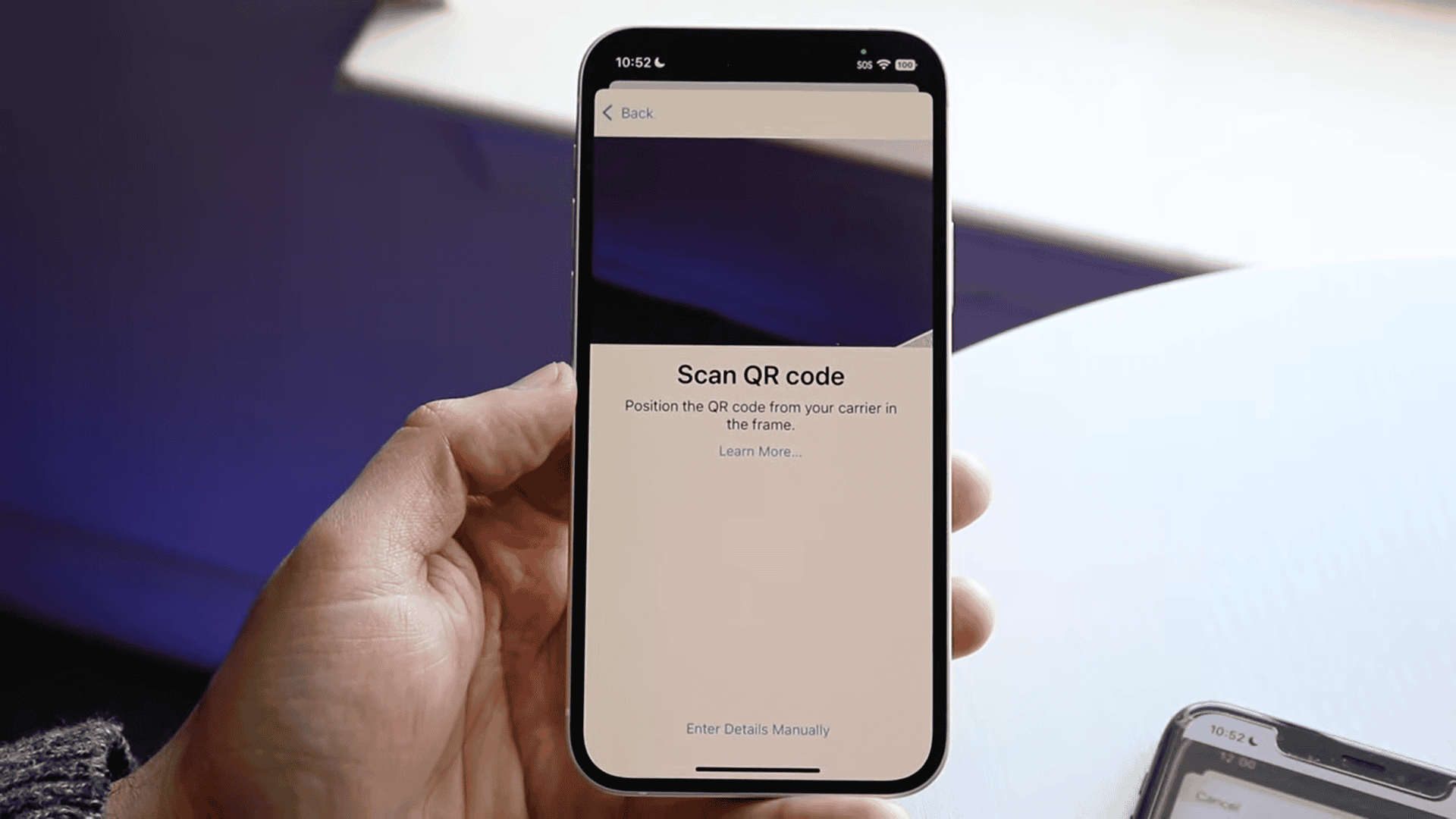
- Go to Settings › Cellular › Add Cellular Plan.

- Scan the QR code your carrier provides or enter activation details manually.
- Label each line (for instance, “Work” and “Personal”).
- Choose which line is used for data, calls, and messages.


You can store multiple eSIM profiles on your iPhone 13 and switch between them anytime in Settings › Cellular.
If you’re managing two numbers on the same device, using Dual SIM on iPhone explains how both lines integrate in Messages, Contacts, and call settings so you can control how each number behaves without confusion.
Supported Carriers and Regions
Apple lists all carriers that support eSIM activation on its official support page. In most countries, major networks such as AT&T, T-Mobile, and Verizon in the U.S., EE in the U.K., and Rogers in Canada provide full support.
However, carrier behavior still varies. Some models sold in China, for example, don’t include eSIM hardware at all, while certain regional carriers restrict eSIM activations on prepaid or business accounts.
If your iPhone 13 shows an error during activation or fails to detect the eSIM plan, the fix is often a simple issue, like unsupported carrier profiles or outdated software are common. This MacObserver guide on eSIM errors breaks down the most reliable troubleshooting steps that apply to iPhone 13 users, too.
Benefits of Using eSIM on iPhone 13
Travel flexibility: Add a local plan for data without removing your main number.
No physical cards: No tools, no trays, and no chance of losing a SIM when switching carriers.
Multiple profiles: Keep personal and work numbers separate, but active at the same time.
Cleaner setup: eSIMs activate instantly through QR codes or carrier apps.
The dual eSIM support on iPhone 13 means you can manage two data plans entirely digitally, something older models couldn’t do simultaneously.
What to Keep in Mind
While the iPhone 13 supports eSIM globally, not every carrier does. Some require you to start with a physical SIM before converting to eSIM. Others may need reactivation if you transfer your plan to a new device.
If you upgrade later, Apple’s newer iOS versions make eSIM transfer easier, but re-provisioning still depends on your carrier’s system. Always back up your iPhone before switching or deleting eSIM profiles.
Final Thoughts
The iPhone 13 fully supports eSIM, offering the flexibility to run dual lines, switch data plans, and travel without swapping physical cards. Carrier support and regional rules remain the only real variables, but once it’s set up, eSIM works quietly and reliably in the background.
For anyone juggling multiple plans or preparing to travel, the iPhone 13 is one of the most eSIM-friendly phones you can own.


Discussion