

The name Nero has long been associated with powerful, reliable CD and DVD burning for Windows users. Programs like Nero Burning ROM set the industry standard for creating everything from simple data discs to complex audio and video DVDs. As Mac users seek similar robust functionality, they often search for a dedicated version of Nero’s renowned software for macOS.
However, the Nero suite’s core focus on disc burning remains largely on the Windows platform, meaning Mac users need to explore other excellent, specialized tools. Fortunately, the macOS ecosystem offers several top-tier applications that easily fill the void left by a dedicated Nero for Mac, offering stability and comprehensive features.
Table of contents
Best Disc Creation Software for Apple Users
Mac users require disc creation software that handles high-quality audio CDs, data backups, and media projects with ease and stability. While native macOS tools cover basic burning, a comprehensive suite is necessary for advanced features such as disc image creation, format conversion, and professional-level disc authoring. In today’s digital landscape, the expectation for software is high, demanding tools that are not only efficient but also integrated with modern technologies, including specialized solutions like the Best AI Software for Mac. These alternatives not only replicate the functionality of Nero but also seamlessly integrate with the Apple environment.
Don’t miss the best of The Mac Observer
Set us as a preferred source and our Apple reporting ranks higher in your Google Search results and Discover feed — one tap, no account changes.
1. Roxio Toast Titanium

Roxio Toast is arguably the most recognizable and feature-rich alternative to Nero for Mac users. It is often considered the gold standard for disc burning and media management on macOS. Toast handles an extensive range of formats, allowing users to burn data, audio, and high-definition video onto CDs, DVDs, and Blu-ray discs. Beyond simple burning, it excels at capturing video, converting files, and copying discs, making it a comprehensive media toolkit. Its professional audio features are particularly appealing to musicians and enthusiasts, offering capabilities similar to those found in specialized DJ Software for Mac.
2. Burn

For users who primarily need a simple, free, and straightforward application, Burn is a highly recommended open-source option. This utility covers the essentials: burning data discs, creating standard audio CDs, and making video DVDs. While it lacks the advanced authoring features of a paid suite like Toast, its ease of use and reliability for basic disc creation make it an excellent, no-cost utility for quick jobs. It’s perfect for the user who only occasionally needs to create a standard data backup or a simple audio compilation.
3. Finder and Disk Utility

It is essential not to overlook the powerful disc creation tools already built into macOS. The Finder allows for basic data CD and DVD creation simply by setting up a Burn Folder, which is the easiest way to archive files. For more advanced, system-level tasks like creating and burning ISO disc images, the Disk Utility application is the native tool of choice. For audio CD creation, the Music application (formerly iTunes) handles burning high-quality audio discs directly from a user’s digital library.
4. Wondershare UniConverter
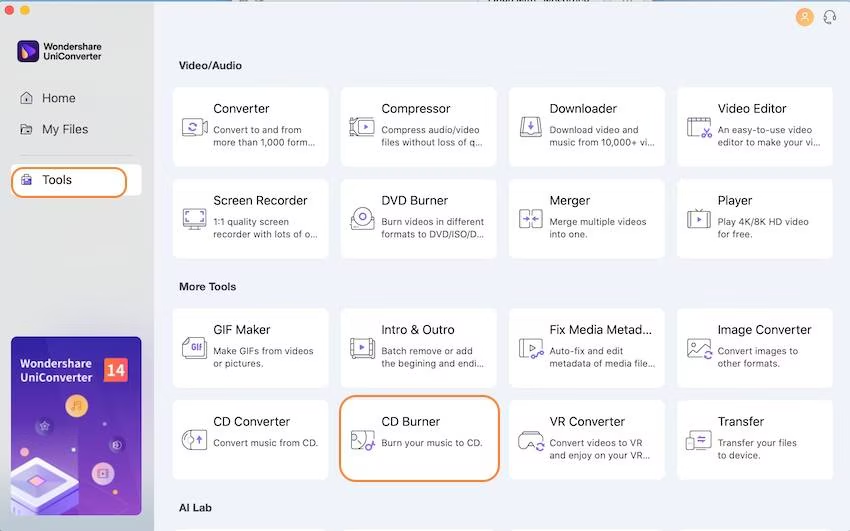
While primarily known as a powerful conversion and editing application, Wondershare UniConverter includes a robust DVD and CD burning function. This makes it an ideal choice for Mac users who often need to prepare, edit, or convert video files before burning them to a disc. Its seamless workflow integrates media conversion and disc burning into one cohesive application, which is a modern approach to managing multimedia content, similar to dedicated solutions for Best Mac Software for Video Editing.
FAQ
No, the full-featured Nero Burning ROM suite is not available as a native macOS application. Its main focus remains on the Windows operating system.
Roxio Toast Titanium or Wondershare UniConverter are generally considered the top choices, as they offer advanced authoring features, menu creation, and extensive format support necessary for video projects.
Yes, you can use the built-in Disk Utility to burn bootable disc images, such as ISO files, for operating systems or specialized recovery tools.
Maximizing Mac Media Archiving Efficiency
Choosing the right CD or DVD burning software on a Mac means selecting a tool that matches your requirements, whether it’s the professional-grade feature set of Roxio Toast or the simplicity of the Burn application. These alternatives ensure that Mac users have access to reliable, high-speed disc creation utilities for data backup, media archiving, and sharing projects. Utilizing the right software on your Mac not only secures your digital assets but also enhances productivity, a goal shared by specialized tools like Clipping Software for Mac.


Discussion