

Digital distractions fill our world today. Tracking tasks is vital for high productivity. It helps you achieve your goals. High-quality native list software helps Mac users. This offers a significant advantage. These apps harmonize with the macOS environment. They provide beautiful interfaces and deep system integration. They work with Siri, Calendar, and notifications. The right software fits your workflow. Options range from simple lists to powerful project management tools.
Table of contents
Finding the Best Task Managers for macOS
The Mac platform offers many list and task management tools. Each one appeals to a different user. You might follow the GTD method strictly. You could be a creative person valuing design. You might need robust collaboration features for your team. An ideal application exists for you. Top-tier options balance ease of use with necessary power. They allow sophisticated organization. Your digital lists become extensions of your mind. They do not add extra stress. Many of these top 5 productivity apps for macOS in 2025 offer extensive features. They surpass simple listing capabilities.
1. OmniFocus

Many consider OmniFocus the gold standard. Mac power users rely on it heavily. It suits those who follow the GTD framework. This application handles complex projects. It manages intricate task hierarchies beautifully. It provides unmatched flexibility for managing commitments.
Don’t miss the best of The Mac Observer
Set us as a preferred source and our Apple reporting ranks higher in your Google Search results and Discover feed — one tap, no account changes.
The software lets users define projects. They also set contexts and perspectives. Users can filter and focus on specific tasks. They see tasks based on criteria or situations. Advanced features ensure task accountability. Task dependencies and review cycles exist. It suits managers juggling multiple large responsibilities.
2. Things 3

Things 3 earned many awards for its design. It features a sleek, minimalist appearance. This makes it a pleasure to use on Apple devices. Its interface is intentionally uncluttered. It focuses attention only on tasks due today.
However, Things 3 is feature-rich. It organizes tasks into Projects and Areas. The “Upcoming” list gives a clear future view. The app provides an excellent native Mac experience. Intuitive drag-and-drop works well. Useful keyboard shortcuts blend into macOS.
3. Todoist
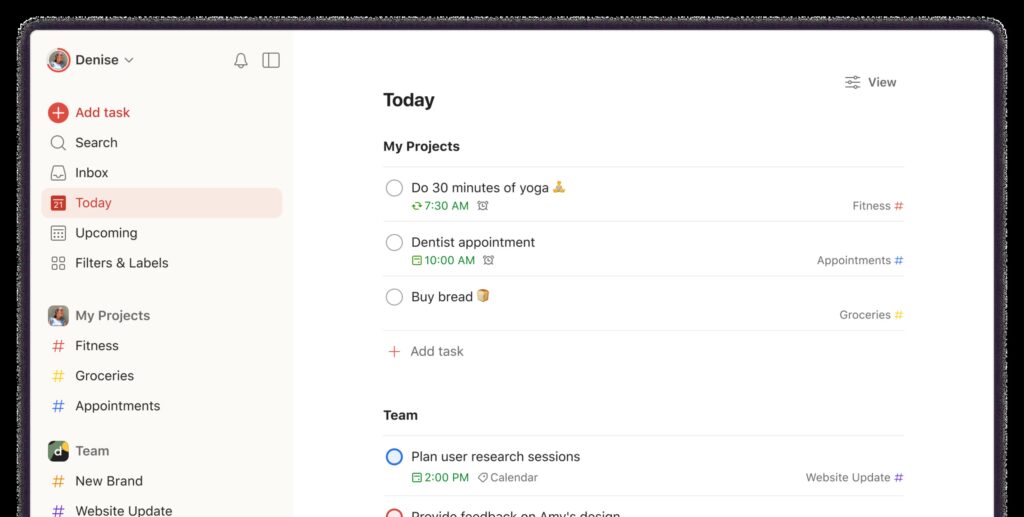
For users needing powerful, flexible apps, Todoist is great. It works well across many platforms. This includes macOS, Windows, Android, and the web. Therefore, Todoist is a leading contender. This acclaimed platform excels at both personal organizing and team work.
Todoist supports natural language input well. You can type “Email the report by tomorrow at 4 pm.” The app automatically sets the due date and time. It also provides advanced filtering options. You get project templates and many third-party integrations. This makes it a valuable asset for teams and B2B needs.
4. TickTick

TickTick offers unique all-in-one features. It goes beyond simple task management functions. It combines a to-do list and a calendar. It includes a habit tracker and a Pomodoro timer. This helps users prioritize focus and stop procrastinating.
The application is highly versatile. It works across various operating systems. Still, it maintains a native feel on the Mac. It supports the Eisenhower Matrix for prioritization. It also uses the Pomodoro Technique. This makes it a robust tool for combining productivity systems. Sometimes simple tweaks boost concentration. You can also explore the underrated Safari feature that keeps me focused.
5. Apple Reminders

The free, built-in Apple Reminders is often underrated. Recent macOS versions gave it major upgrades. It offers the deepest, most effortless integration. This is true for users fully in the Apple ecosystem.
Reminders supports smart lists effectively. These lists group tasks automatically. They sort by tags, dates, or location. It syncs instantly across all your Apple devices. This happens via iCloud. It lacks advanced features of paid apps. For example, it does not include dedicated change tracking software for Mac. However, its seamless Siri integration and no-cost appeal make it practical. It is great for simple, daily task management.
FAQ
Apple Reminders is the best starting point. It is free, pre-installed, and simple to use. Things 3 is also excellent. It has an intuitive, elegant interface and an easy learning curve.
Yes, many offer collaboration features. Todoist and TickTick provide robust options. They let you share projects and assign tasks. You can track progress with your team.
OmniFocus is designed specifically for GTD principles. It offers dedicated features for projects and reviews. This makes it the top choice for GTD users.
Selecting the Right Mac Productivity Tool
Take time to choose the right list software. It is vital for streamlining your workflow. It will also enhance your daily productivity. The Mac platform offers an excellent selection of tools. Options range from OmniFocus’s power to Todoist’s collaboration. You will find a perfect match for your style. Professionals managing large projects need integrated systems. Therefore, considering the best project management software for Mac is the next logical step.


Discussion