

We’re taking a look at how to disable Apple TV keyboard notifications with your iPhone.
While some many prefer receiving the notifications, many also do not. This tip today will help you silence these notifications for good.
Table of contents
How to Stop Apple TV Notifications on Your iPhone
The Apple TV is a powerful streaming device for users, and it comes with a multitude of services and features. One feature users may find useful is ability to use their iPhone as a keyboard for the device. This can be particularly helpful, as the Apple TV remote does not feature a QWERTY keyboard, which many consider helpful when searching for content.
Don’t miss the best of The Mac Observer
Set us as a preferred source and our Apple reporting ranks higher in your Google Search results and Discover feed — one tap, no account changes.
However, one feature some users may not appreciate the fact that users will receive a notification whenever their iPhone is near their Apple TV.
Considering the notification also appears when you use your Apple TV remote to select a search field, or when you’re selecting a search filed in Apple TV apps, some users may want to get rid of it. That’s why today, we’re taking a look at how to disable Apple TV keyboard notifications on your phone.
How to Stop Apple TV Notifications on iPhone.
- From your iPhone, open the Settings App
- Select Notifications
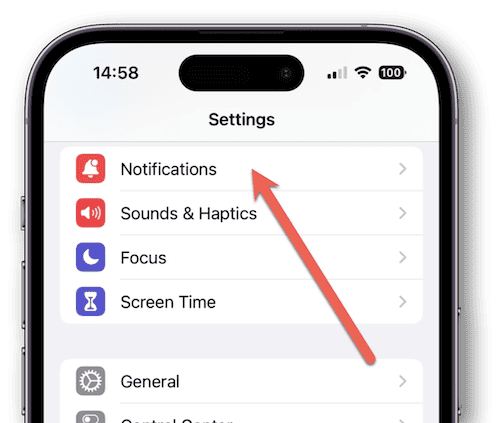
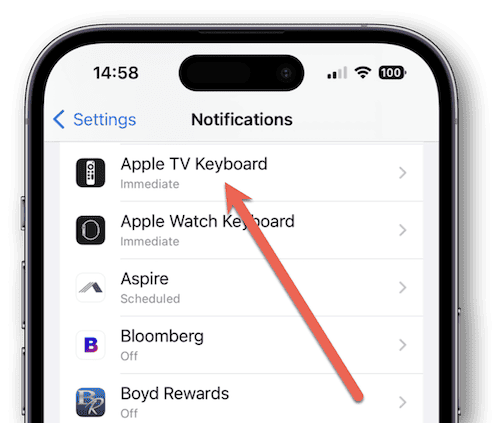
- Tap Apple TV Keyboard
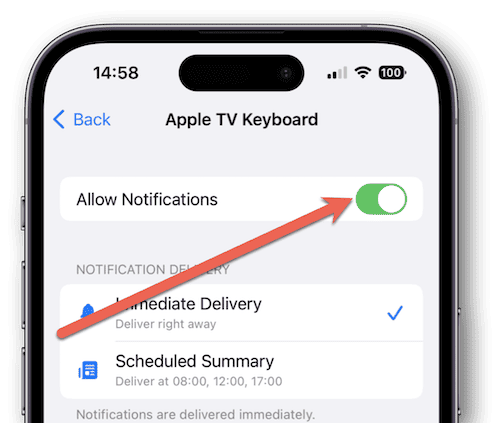
- Toggle Allow Notifications
The toggle should now be white instead of green. In the photo, the notifications are still enabled.


And that’s all there is to it! Once users disable notifications, they’ll be able to enjoy their Apple TV experience with a little more peace of mind. Of course, if you want to turn notifications back on, simply follow the same steps as before.
This feature can be particularly useful for those with more than one Apple TV in their house. Even having two Apple TVs in a household can cause an onslaught of notifications being sent to your iPhone, so be sure to disable notifications if you want to peacefully stream.
Be sure to follow The Mac Observer for more news.



I’ve recently started getting notifications on my iPhone to connect my profile to my Apple TV (I already use my profile on my Apple TV) . Annoying and I just close it. How can I turn it off? All notifications are already off.
Btw, Apple TV appeals under TV Apple in my list.
This notification is a proximity-based Handoff request, indicating that your Apple TV is broadcasting a “setup” or “add user” signal—often because the “Add User” menu was accessed on the TV but not exited properly, leaving the device in a persistent discovery mode. To stop it, you must clear this state on the Apple TV (not the phone): turn on the TV, navigate to Settings > Users and Accounts, enter the Add New User screen, and then immediately press Menu/Back to exit, followed by a full restart via Settings > System > Restart. On your iPhone, ensure Settings > General > AirPlay & Continuity > Automatically AirPlay is set to Never. Regarding the “TV Apple” label, this is simply the device’s current network name; you can correct this in the list by renaming the unit to something standard (e.g., “Living Room”) under Settings > General > About > Name on the Apple TV.
You are a life saver, thank you for this!
Thank you so much! I have spent so much time trying to get rid of the notifications. I never thought to look for a deceptive title.
I’m using my iPhone and randomly receiving connect phone to Apple TV speaker notifications. I’ve never used an Apple TV, never have airplay or mirroring turned on and am not currently using Bluetooth, so why are these random notifications suddenly occurring?
My notifications are off but then again Apple TV isn’t an option under notifications though I don’t have one either. Never happened until today and it’s troubling. Is it something stupid? iOS 26 has been an absolute nightmare across the board so nothing surprises me but this is a weird one. Thought to inquire. Thanks.