

Recently, Many users have been unable to access the Spotify app on their Apple Watch. This issue might be due to a minor software bug that’s easily fixable. So, I have created this short guide to help you out. Let’s check out the steps below.
How To Fix Spotify Not Opening On Apple Watch
If you have already tried restarting the device or uninstalling and reinstalling the app, yet it still isn’t working, you need to update the Spotify app. The update comes with bug fixes that address the error. This must be done directly from the Apple Watch, not your iPhone.
Time needed: 5 minutes
Here is how you can update the Spotify app:
- Open the App Store on your Apple Watch
- Scroll down and open your Account.
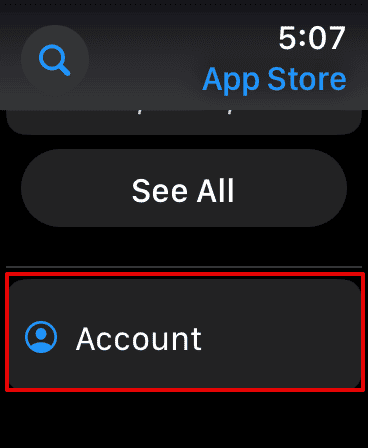
- Then, tap on Updates.

- Here, look for the Spotify app and select Update beside it.
Wait for a few seconds while the update finishes. Try reopening the app and check if the issue is resolved.
Don’t miss the best of The Mac Observer
Set us as a preferred source and our Apple reporting ranks higher in your Google Search results and Discover feed — one tap, no account changes.
After updating the app, you can restart the Apple Watch. Or you can contact Apple support for other troubleshooting methods to help you further.
For further reading, check out how to reset your Apple Watch without a paired iPhone.




Discussion