

If you want to use Apple’s Keynote on Windows for free, the good news is, you can! While Apple does not provide a Keynote desktop app for Windows, there are several methods that let you create, edit, view, and share Keynote files on a PC.
This guide covers all the practical options to download (if required) and use Keynote on a Windows PC.
Table of contents
- How to use Keynote on Windows?
- 1. Use Keynote via iCloud in your browser
- 2. Convert a .key file using online converters
- 3. Access Keynote via remote connection to a Mac
- 4. Extract Keynote file contents without conversion (Preview-only)
- 5. Use third-party presentation software
- 6. Mirror Your iPhone or iPad Screen to Windows
- 7. Virtual machine or hackintosh setup (Advanced)
- Tips
- Frequently Asked Questions
- Summary
- Conclusion
How to use Keynote on Windows?
1. Use Keynote via iCloud in your browser
- Create or sign in with a free Apple ID.
- Open iCloud Web in Chrome, Edge, or Firefox.
- Click the Keynote icon. You can start a new presentation or upload an existing .key file.
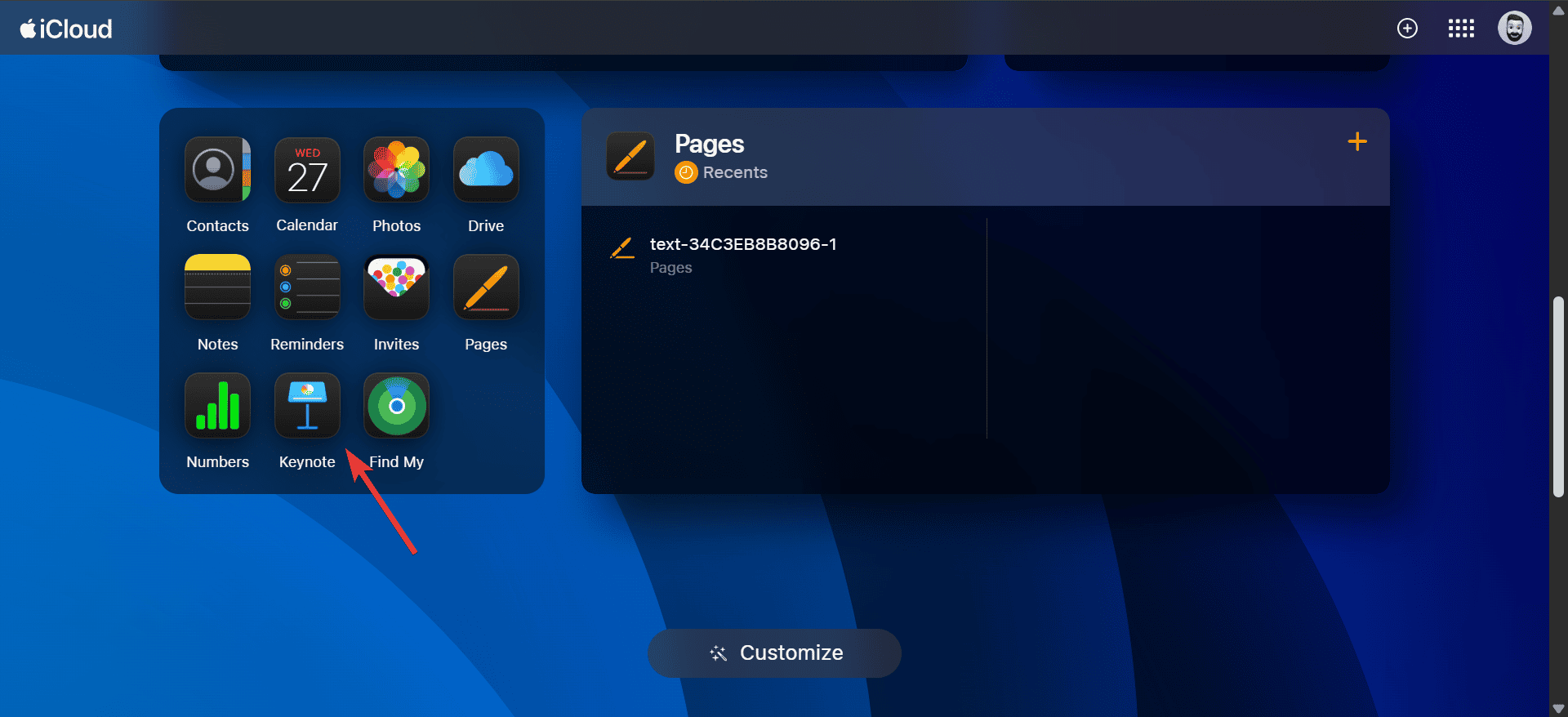
- Edit your slides using the full set of tools, similar to PowerPoint Online.
- Present directly from the browser using Slide Show mode.

This is the most straightforward and official way to use Apple’s Keynote on Windows.
- From iCloud Keynote, you can save your work in .key format, export to PowerPoint (.pptx), or download as a PDF.
- Share your presentation link with collaborators. You can allow view-only or editing access.
- Presentations can also be printed directly from the browser.
2. Convert a .key file using online converters
If you receive a Keynote file but don’t want to use iCloud, you can convert it to another format.
- Use online tools like CloudConvert or Zamzar to convert .key files to PowerPoint or PDF.
- Once converted, you can open and edit them in PowerPoint, Google Slides, or other software.
Using an online converter, you can also access Numbers‘ files on Windows.
3. Access Keynote via remote connection to a Mac
- If you have a Mac at home or in the office, use a remote desktop tool like TeamViewer or AnyDesk.
- Log in from your Windows PC and run Keynote on the Mac remotely.
- This method gives you the full desktop Keynote experience without installing macOS on your Windows system.
Remember, this works best with a stable, high-speed internet connection. Also, using a remote connection, you can use Apple’s Freeform on Windows.
4. Extract Keynote file contents without conversion (Preview-only)
A .key file is essentially a compressed package. You can rename the file extension from .key to .zip and then extract it. If you get a warning before modifying the file’s extension, go ahead and confirm the change.

- Inside, you will find preview images of the slides, which you can use to view the content without opening Keynote.
- This method is useful if you only need to see the slides quickly without editing.
5. Use third-party presentation software
Several third-party tools support .key files indirectly:
- LibreOffice Impress: Can sometimes open .pptx files converted from Keynote.
- Google Slides: After converting a Keynote file to PowerPoint format, you can upload and edit it in Google Slides.
- WPS Office: Offers compatibility with various formats once the file is converted.
6. Mirror Your iPhone or iPad Screen to Windows
- Install a screen-mirroring tool like AirDroid Cast on your Windows PC.
- Cast your iPhone or iPad screen showing the Keynote app. Control slides with your keyboard and mouse.
- Great for live presentations or editing directly from your device to your PC display.
7. Virtual machine or hackintosh setup (Advanced)
For tech-savvy users:
- You can run macOS on a virtual machine like VMware or VirtualBox and install Keynote there.
- Another advanced method is setting up a Hackintosh, though this is not officially supported by Apple and requires technical knowledge. With a Hackintosh, you can also install Xcode on Windows.
- These approaches give you the full Keynote desktop app on a Windows PC, but they are complex and not recommended for casual users.
Tips
- Always use a modern, updated browser for smooth performance with iCloud Keynote.
- A stable internet connection helps avoid delays when editing large files.
- Test animations and transitions before presenting, as some effects may not look identical on Windows.
- For maximum compatibility, export to PowerPoint when sharing with colleagues who don’t use Apple software.
- Use PDF exports for read-only versions that preserve formatting.
Frequently Asked Questions
No. There is no official Keynote desktop app for Windows. You can only use it through iCloud or work with converted files.
Yes. You can invite others to edit presentations with you, and changes appear in real time.
Most of them work in iCloud Keynote, but a few advanced effects may look slightly different compared to macOS.
Yes, but not directly. You need to convert it to another format or extract its contents to view the slides.
Summary
- Sign in to iCloud.com and use Keynote online.
- Download or export presentations in multiple formats.
- Convert .key files to PowerPoint or PDF with online tools.
- Extract slide images by renaming .key to .zip.
- Use Google Slides, LibreOffice, or WPS Office after conversion.
- Advanced users can run Keynote in a virtual macOS environment.
Conclusion
Even though Apple does not offer a Windows version of Keynote, there are many ways to access and use it. The easiest solution is through iCloud in your browser, which gives you almost the same experience as the Mac version. If you only need to view or share, conversions and quick extraction methods work well.
And for those who want the full Keynote desktop app, running macOS in a virtual machine is also possible. With these options, Windows users can enjoy the design quality of Keynote without switching computers!

![How to Clear Cache on iPhone [Safari & Apps]](https://www.macobserver.com/wp-content/uploads/2025/08/how-to-clear-cache-on-iPhone.webp)


