
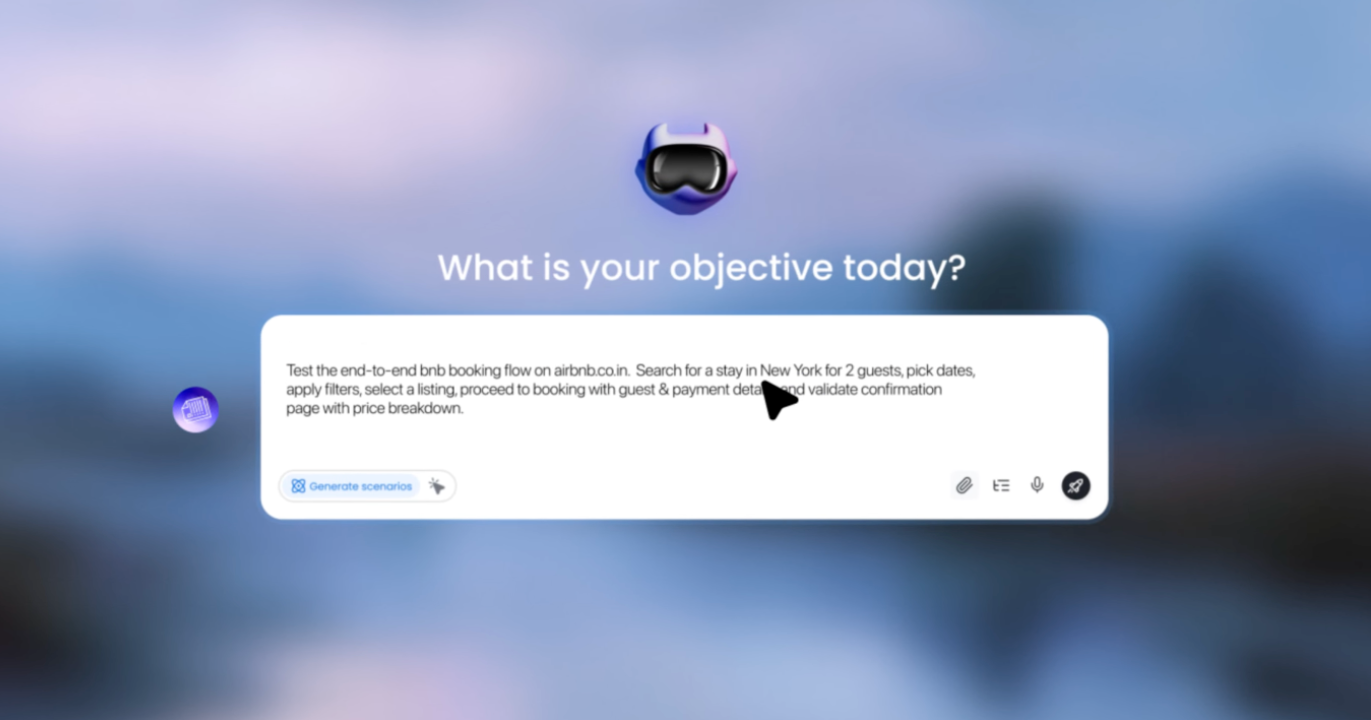
Even with automation tools, creating scalable QA tests that don’t break when the UI changes remains a major challenge. TestMu AI, on the other hand, is pushing things further by eliminating QA as a task you manage at all. The company aims to turn quality assurance into a job you hand off to an AI assistant, just as you would hand a ticket to a teammate.
Today, we’re taking a look at four of the platform’s core products that comprise its holistic ecosystem: KaneAI, Agent Testing, Real Device Cloud, and Browser Cloud. We’ll take a look at how TestMu AI was designed around AI-native workflows and how it works as a testing solution suitable for a local iPhone coder yet scalable at the enterprise level.
Upfront, we found KaneAI and Agent Testing performed well in their use cases, and the Browser Cloud offers a much-needed hub with everything agent builders need. Meanwhile, the Real Device Cloud brings everything together and ensures your software and apps function for your intended audience. With TestMu AI describing itself as the “World’s first full-stack Agentic AI Quality Engineering platform,” we put each product to the test.
Don’t miss the best of The Mac Observer
Set us as a preferred source and our Apple reporting ranks higher in your Google Search results and Discover feed — one tap, no account changes.
What TestMu AI Actually Is
Touting itself as a “Full Stack Agentic AI Quality Engineering platform,” TestMu AI’s underlying idea is that instead of relying on a multitude of tools for writing tests, running them on actual devices, and relying on a manual process for reviewing results, TestMu AI wraps everything up into an AI agent that can plan, write, execute, and analyze tests with little hand-holding.
To put it another way:
TestMu AI is a full-stack agentic AI Quality Engineering platform that empowers teams to test intelligently and ship faster. Engineered for scale, it offers end-to-end AI agents to plan, author, execute, and analyze software quality. AI-native by design, the platform enables testing of web, mobile, and enterprise applications at any scale on real devices, in real browsers, and in custom real-world environments.
Understand that TestMu AI isn’t just a scrappy startup — the company claims more than 18,000 enterprise customers. This includes recognizable names like Microsoft, OpenAI, NVIDIA, Vimeo, GitHub, Workday, Louis Vuitton, and NBCUniversal. Its scope also includes 2.8 million developers and testers across more than 90 countries running 1.5 billion tests annually.
TestMu AI is also no stranger to appearing on analysts’ radars, including recognition as a Challenger in the 6 October 2025 Gartner Magic Quadrant for AI-Augmented Software Testing Tools report (Joachim Herschmann, Sushant Singhal, Ross Power, C.A. Swan). Moreover, the platform was recognized in The Forrester Wave: Autonomous Testing Platforms report in Q4 2025 for its pivot toward adding test authoring and automated generation capabilities. Suffice it to say, TestMu AI is breaking new ground.
The Products
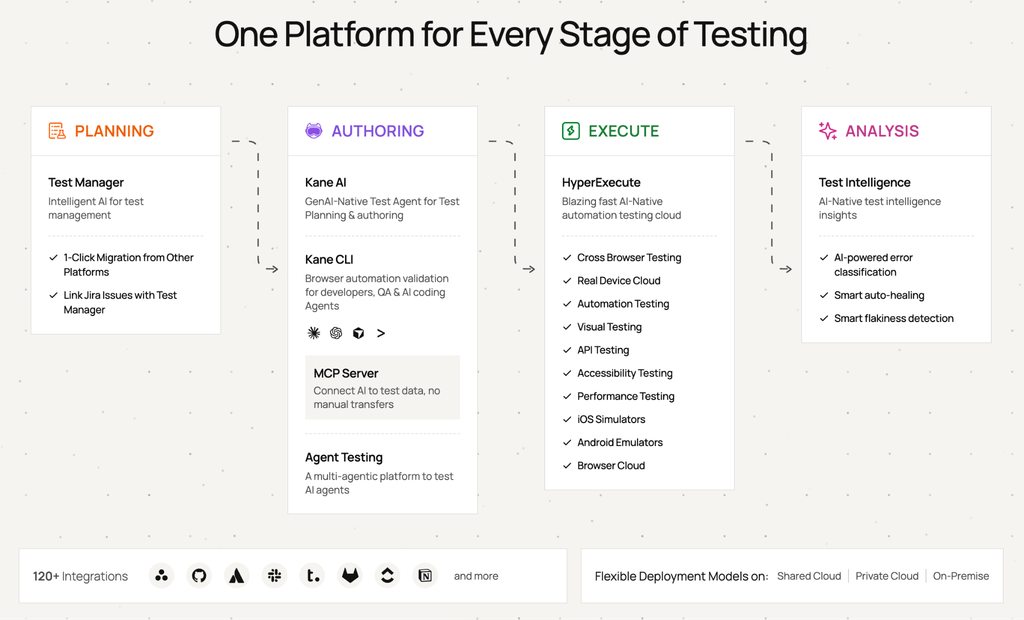
Before we get into our views on each product, it’s worth mentioning that TestMu AI isn’t positioning these tools as separate point solutions. For framing, it’s all about a connected quality layer. This means infrastructure in which autonomous agents plan strategy, predict failure points, and help teams release faster and more reliably, rather than running blind tests in isolation.
For many teams, the default is to run Playwright within their existing CI infrastructure. That approach offers considerable control and avoids another subscription, but teams must handle browser infrastructure, scaling, reporting, maintenance, and test management themselves. TestMu AI effectively trades some of that control for an integrated platform designed to handle infrastructure and increasingly automate the work around testing itself.
Teams already invested in Selenium, Cypress, Playwright, or Appium won’t need to rip and replace anything either. Scripts run without modification, and 120+ existing integrations (including GitHub, Jenkins, and Slack) are built to slot into current pipelines rather than replace them.
TestMu AI’s lineup breaks down into four products:
- KaneAI — write and maintain tests in plain English
- Agent Testing — test chatbots, voice agents, and AI systems that don’t behave the same way twice
- Real Device Cloud — run tests on actual phones (not Android emulation or iOS simulation), tablets, and desktops
- Browser Cloud — cloud browser infrastructure built for AI agents
All TestMu AI core products are hosted on a single, unified cloud infrastructure and are compliant with SOC 2 Type II, ISO 27001, GDPR, and HIPAA.
KaneAI
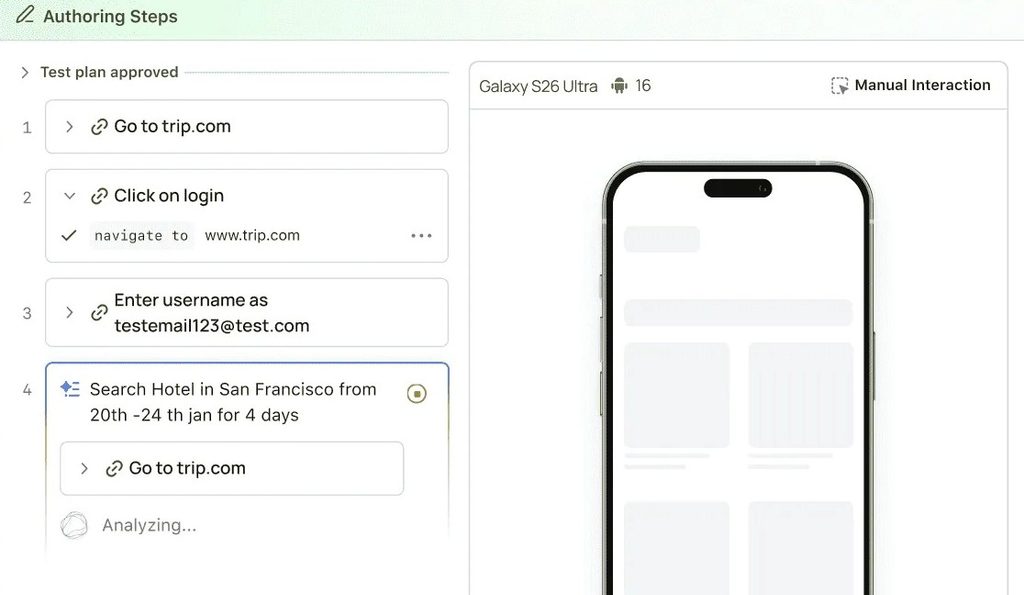
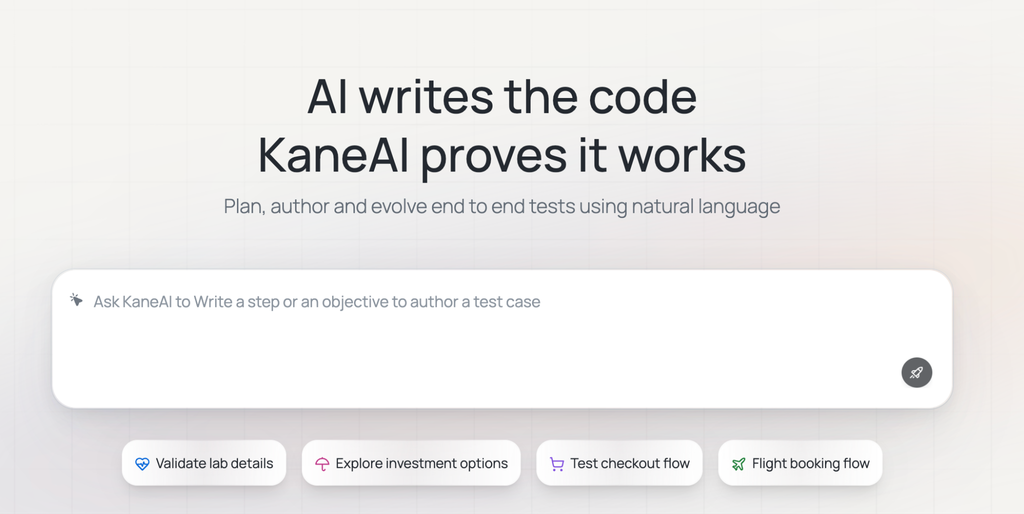
Billed as a GenAI-native testing agent, the pitch for KaneAI almost sounds too good to be true: use plain English to describe the test you want, and the agent plans, writes, runs, and repairs it — all without relying on scripting. Write tests in plain English. KaneAI handles the rest.
It was the “no-code” approach that had us raising our eyebrows, as we’ve seen a variety of low-code testing tools fall to pieces the moment a workflow gets even slightly complicated.
Testim, Mabl, and Katalon also aim to reduce the amount of traditional test scripting required. The key distinction is how deeply AI is integrated into the workflow, with KaneAI designed around conversational interaction rather than simply adding AI features to an existing automation platform.
KaneAI holds up better than expected, and its self-healing feature truly impressed us. When a UI element moves or a selector changes (one of the most common reasons automated tasks break), KaneAI detects the failure and repairs the test rather than leaving it broken.
However, self-healing introduces an important risk: a passing test isn’t necessarily proof that nothing changed. If a selector changes because a developer accidentally broke the UI, automatically finding another element could potentially hide the regression.
This is where KaneAI’s approach is more reassuring. TestMu says healed changes are surfaced for human review rather than silently committed. The platform records the original and updated locator, provides a before-and-after diff, and maintains an audit trail. Reviewers can accept, reject, or edit the proposed change.
That distinction matters. KaneAI isn’t simply making broken tests green and moving on. It attempts to separate maintenance from genuine application failures while keeping humans in the loop. TestMu also combines auto-healing with root-cause analysis to help distinguish genuine regressions from test or environment issues.
Additionally, KaneAI’s contextual intelligence can ingest codebases, Jira tickets, PDFs, images, audio, and video, and convert them into structured test scenarios. This includes generating test cases directly from GitHub pull requests.
Moreover, common flows like login, navigation, and checkout are converted into reusable test modules, so teams don’t have to rebuild the same sequence from scratch for every new test. Tests also aren’t locked into KaneAI’s own format.
Export options also include:
- Playwright
- Selenium
- Cypress
- Appium
Such variety means users aren’t stuck if they choose to move to another platform, but you will lose the self-healing and natural-language authoring that brought you to TestMu AI in the first place.
There’s also support for:
- Web on desktop and mobile
- Native iOS and Android apps
- API endpoints
- Database validation
- Network conditions
All from one interface.
This is in addition to native TOTP support for testing two-factor login flows without having to wire up separate authenticators.
TestMu AI provided data from a customer pilot showing. The education technology company automated 400 SAP test cases in 3.5 months, achieving a 60% reduction in manual testing time and a 50% increase in test coverage, resulting in a 35% improvement in deployment velocity.
Additionally, a financial institution scaled from 4 to 14 KaneAI licenses after an initial pilot delivered 40% faster test execution. According to the data, one investment firm even ran three separate expansions within 12 months, each one reportedly delivering a 45% reduction in test cycle time.
TestMu AI also offers Kane CLI, a free-to-use local counterpart that runs end-to-end browser flows straight from your terminal using the same natural-language authoring. It’s aimed at developers who want fast, local validation – think CI pipeline checks or quick sanity runs – without spinning up a cloud session. Kane CLI comes bundled with every KaneAI plan, including Starter, and can also be run standalone at no extra cost.
KaneAI is priced per agent, billed annually, in three tiers. Starter runs $19/agent/month, includes 2,000 credits (roughly 25 test creations at 40 steps each), and allows local authoring only through the Kane CLI. Pro runs at $99/agent/month, includes 12,000 credits (~150 test creations), and adds Cloud KaneAI Web authoring plus 100 HyperExecute execution minutes. Max runs $199/agent/month with 25,000 credits (~313 test creations) and adds Cloud KaneAI Mobile alongside Web, plus 300 HyperExecute minutes. Enterprise offers unlimited credits and custom terms.
For example, a 10-person team on Pro (web authoring) would pay $990/month with annual billing. The equivalent Max tier, adding mobile authoring, would cost $1,990/month.
Agent Testing: Filling a New Need
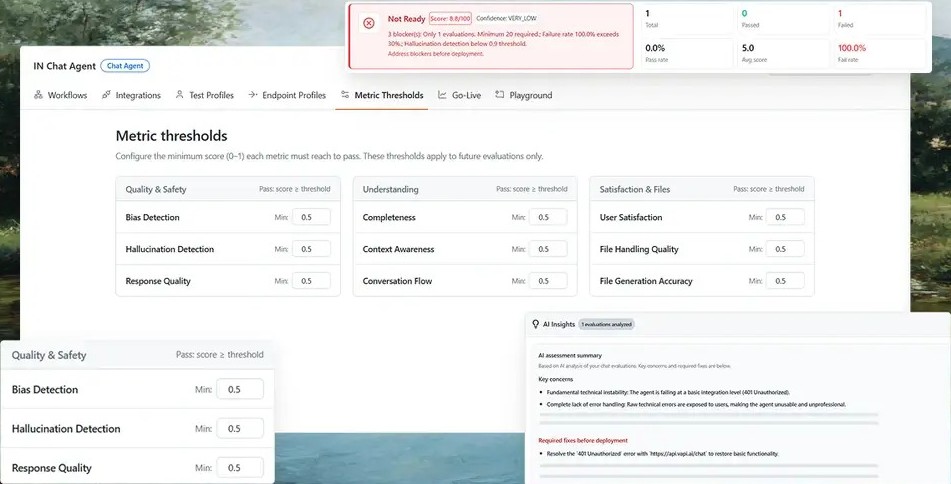
This is one that made us stop and think, as Agent Testing solves a problem that genuinely didn’t exist in QA until recently: how do you test something that gives a different answer every time you ask it?
Traditional testing tools are built around predictable outcomes. A button either submits a form or it doesn’t. AI agents are different. Ask a chatbot the same question twice, and you can get two different answers, even when both are reasonable.
That makes AI applications much harder to test. There’s no deterministic output to compare and no single element to assert against. You’re testing meaning, not markup.
That’s the thinking behind TestMu AI’s Agent Testing. Its approach is simple: if AI products behave differently from traditional software, they need a different way to test them.
Rather than a handful of human testers running scripted conversations, more than 15 specialized AI agents run scenarios in parallel. Each looks for different failure modes, including hallucinations, bias, dropped context, incomplete answers, poor tone, and resilience when dealing with difficult users. TestMu says it can generate 60 to 100+ scenarios from your documentation before running these evaluations.
Agent Testing covers five surfaces from one dashboard: chat agents, voice agents (tested across 200+ voice profiles, 50+ accents and dialects, and 15 background noise environments), inbound and outbound phone-call agents, and image analyzer agents. What we appreciate most is that the output isn’t a wall of transcripts you have to read yourself — it’s a straightforward Green/Yellow/Red verdict on whether the agent is ready to ship, backed by standardized scoring: 9 quality metrics for chat and voice, 30+ metrics for phone calls, and a 0–100 Visual Alignment Score for image agents. However, each result includes the relevant transcript evidence, so you have some insight.
Scale is where it separates itself from a manual QA process: from a single uploaded PRD or document, the platform can auto-generate 60 to 100+ test scenarios, compressing coverage that would otherwise take a human tester weeks into a matter of hours.
It’s also built for the full agent lifecycle rather than a one-time audit — pre-launch validation, regression testing after a model update, and post-production monitoring all run through the same platform, with the testmu-a2a-cli plugging AI agent quality gates directly into CI/CD pipelines so they run automatically on every release rather than getting bolted on after the fact.
Agent Testing is currently sold as a single contact-sales tier rather than published self-serve pricing – teams get pricing tailored to their scenario volume (chat, voice, phone-call, and image-agent coverage) after talking with sales. There’s no public per-credit or PAYG rate posted for this product as of publication.
Real Device Cloud: Built Upon Necessity
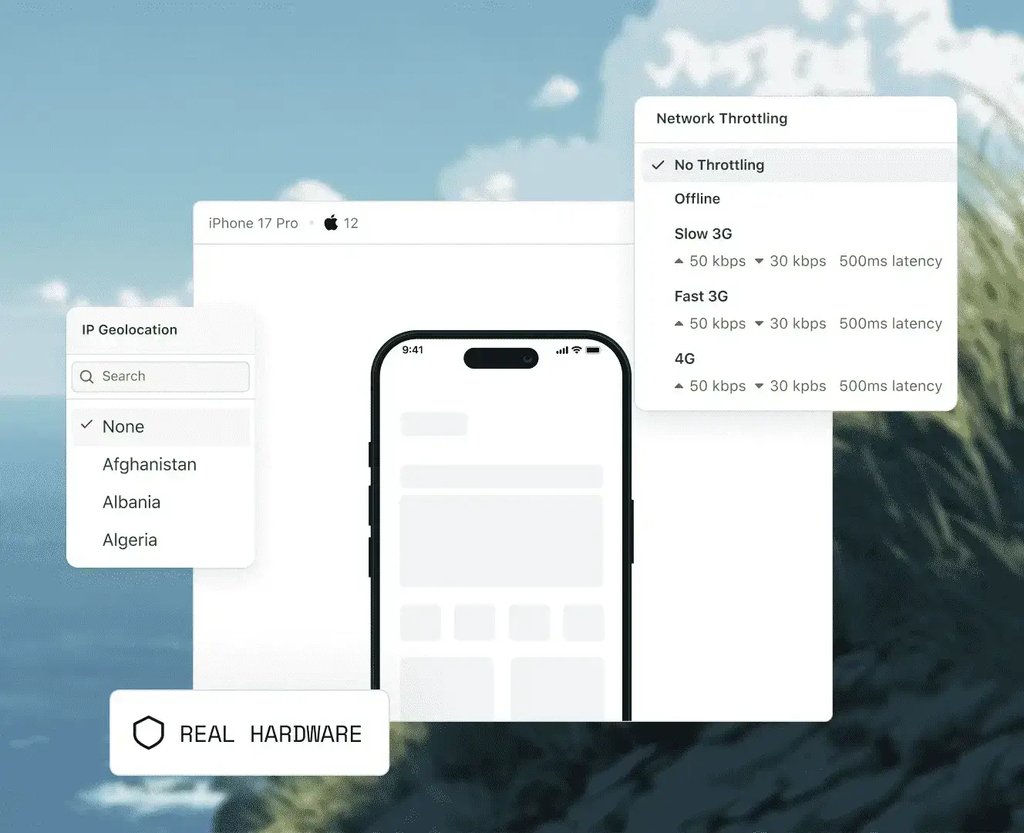
Real Device Cloud may be the least flashy of the products in the lineup, but it’s also the one virtually every mobile team quietly needs. As TestMu AI puts it, “test on the device — and the machine — your user actually uses.” Real Device Cloud gives users on-demand access to more than 10,000 real iOS and Android devices, as well as Windows and macOS desktop environments.
The real advantage is the hardware itself. Emulators and simulators can catch many obvious problems, but they can’t reproduce every quirk of a physical device. Things like battery behavior, thermal performance, hardware-specific rendering, and app behavior on older phones can be difficult to replicate.
We tested network throttling on real hardware by simulating a poor 3G connection. The device remained connected, but some requests took longer to complete, and others timed out before the app recovered. It’s worth being precise here: the phone was real, while the network conditions were simulated. That combination still gives you something an emulator or simulator alone cannot: testing against the behavior of an actual device.
Users can also pull up a live Windows 11, Windows 10, macOS Sequoia, or macOS Ventura machine directly in the browser to test how a web app behaves. Testing runs in both directions: live, manual sessions where you click around a real device, and fully automated execution via Appium, XCUITest, Espresso, and Detox from the same platform.
The advanced capability set goes deeper than we expected, including:
- Network simulation across 2G through 5G and custom bandwidth (including offline conditions).
- Geolocation testing across more than 170 countries.
- Biometric authentication testing for Touch ID, Face ID, and fingerprint sensors.
- Camera and sensor testing for QR scanning and accelerometer/gyroscope behavior.
- Multi-app sessions for installing and switching between builds mid-session.
The Real Device Cloud competes directly with established platforms such as BrowserStack and Sauce Labs. All three provide access to real devices and browsers without requiring teams to maintain physical testing infrastructure. TestMu AI’s main differentiator is how its device infrastructure fits into its broader AI-native testing ecosystem, particularly when combined with AI-powered test creation and agent testing.
There are three access tiers — shared public access, 24/7 dedicated hardware for enterprise teams, and a fully on-premises private option for regulated industries like healthcare, finance, and government that can’t send test data off-site. The infrastructure itself is SOC 2 Type II certified and GDPR/CCPA-compliant, with fully isolated sessions that automatically wipe between tests, which matters more than it might seem if you’re testing on shared hardware.
The free tier gives you 5 real-device sessions per month, up to 2 minutes each, no card required.
From there, live manual testing on real devices (Real Device Plus Live) starts at $39/month, and automated real-device testing (Real Device Plus Automation Cloud) starts at $199/month, both billed annually, with custom Enterprise pricing above that.
(Note: TestMu AI’s $15/month Virtual Live plan is emulator/simulator-based, not real hardware – it’s a cheaper adjacent product, not the entry point into Real Device Cloud itself.)
Browser Cloud: Infrastructure for a Different Kind of User
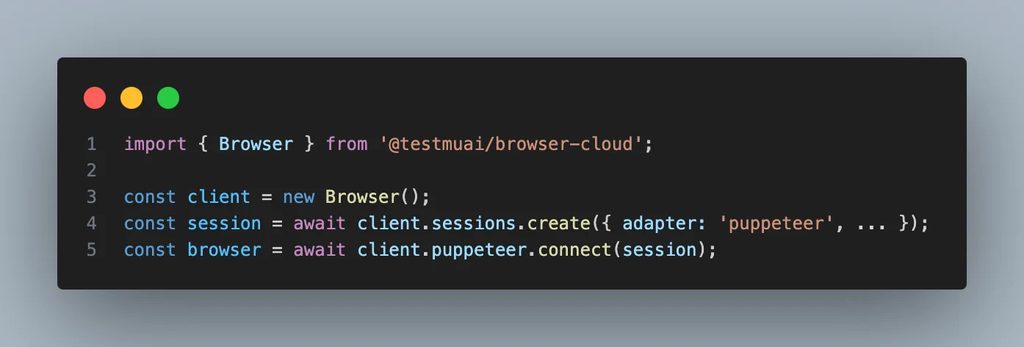
Browser Cloud enters a newer category alongside platforms such as Browserbase and Steel. It’s aimed less at human QA teams and more at the AI agents those teams are increasingly building. Instead of managing the infrastructure yourself, you can use a scalable browser to let your AI agents automate, scrape, and test.
Most browser infrastructure assumes a human is watching one tab at a time. AI agents don’t work that way — they need hundreds of sessions running in parallel; they need full JavaScript execution (not a stripped-down HTTP request that returns an empty page from a modern single-page app), and they need to reach staging environments and localhost without a separate VPN setup.
Browser Cloud handles all three: spin up concurrent live Chrome sessions via a single session.create() call—scaling up to hundreds of parallel instances depending on your plan tier—featuring sub-second cold starts and session durations of up to 24 hours without manual provisioning or cleanup. Because it runs full Chrome rather than relying on raw HTTP fetches or basic HTML parsers, JavaScript executes completely and single-page applications fully render. This gives agents the actual rendered DOM instead of an empty shell.
A few details separate this from a generic headless-browser rental. Built-in stealth — fingerprint masking, CAPTCHA solving, and ad blocking — keeps agents from getting flagged as bots. Geo-targeted proxies across more than 180 locations make every request appear to come from a local user, helping avoid IP bans and geo-restrictions. Session persistence carries cookies, local storage, and login state across sessions, so an agent can log in once and remain authenticated rather than repeating the flow on each run.
Every session captures video recording, console logs, network logs, and step-by-step command replay, which solves the classic headless-browser problem of a script failing at 3 a.m. with zero information about why. A built-in tunnel lets agents reach localhost, staging environments, or anything behind a firewall without a separate tunneling setup, and it’s framework-agnostic — Playwright, Puppeteer, Selenium, or any SDK-compatible agent, including those built on Claude, Cursor, Gemini, or OpenAI models.
Beyond straightforward QA automation, the practical use cases extend beyond what we initially assumed: general AI agent execution against the live web, web scraping that returns fully rendered DOM from JavaScript-heavy pages, multi-step workflow automation that handles cookies and client-side transitions, and even capturing real browser-rendered data at scale for foundation model training.
Browser Cloud has a relatively straightforward pricing model. A free plan provides 100 minutes of two-parallel web automation testing, while the paid Browser Cloud plan costs $29 per month when billed annually. It includes unlimited access to automation across more than 3,000 browser environments.
Pricing is based on concurrency, meaning the number of browser sessions you need running simultaneously. This makes costs easier to predict when running agents at scale
The Verdict
In our own tests, we found Real Device Cloud to be a solid infrastructure, while Browser Cloud is well-built overall. However, it was KaneAI and Agent Testing that truly stood out for us, as both are performing at a rate we haven’t seen from other products of this caliber. The former reduces the manual grind of writing and maintaining tests, whereas the latter tackles the problem of testing non-deterministic AI systems in a way that many in the industry have simply been unable to keep up with.
Should your team find itself writing every test manually or still having trouble validating an AI chatbot before it ships, TestMu AI is worth a serious look. For those who don’t have any AI agents in production yet, there may be less urgency. However, be aware that this may change faster than you would expect. The Free plan includes real-device sessions (5 per month, 2 minutes each) plus 100 minutes of Browser Cloud automation per month, with no credit card required, so it’s easy to jump in when you’re ready.




Discussion