

The Google app is getting ready to introduce a major update to its bottom bar navigation. The search giant is testing a fresh layout that replaces the older Activity and Notifications sections with a personalized space called the You tab. This upcoming interface redesign aims to make account management and search history much easier to access right from the main screen of the application.
The redesigned menu replaces older tabs with a personalized space
Right now, the application features four standard icons at the bottom of the screen. Users typically see Home, Search, Notifications, and Activity. However, recent testing shows the developers are swapping things around to create a five-tab layout. The standard Home and Search buttons will stay, but the old Activity and Notifications sections are going away. Instead, the company is adding dedicated spots for Videos, Images, and the brand new You tab.
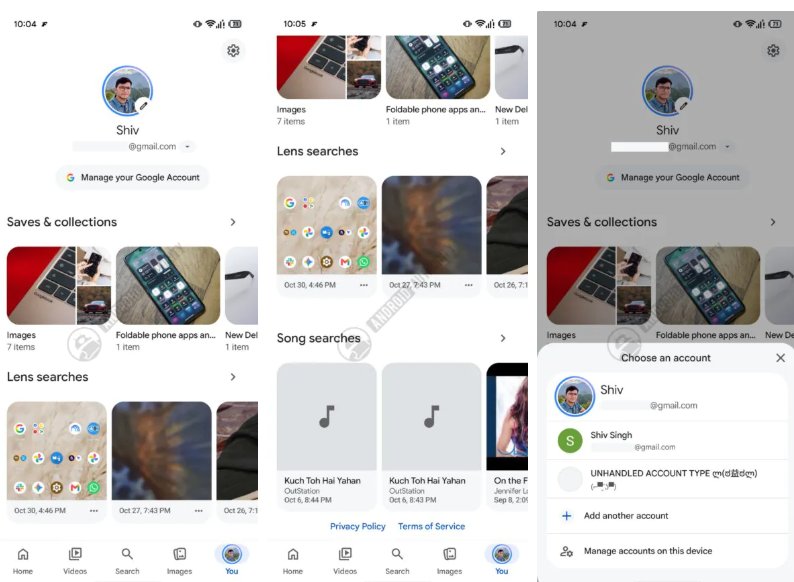
When the update rolls out, your profile picture will sit directly in the bottom bar. Tapping this new icon opens a dedicated page displaying your photo, email address, and a simple drop-down menu. This setup makes switching between different profiles much faster. You will also find the main settings gear icon tucked into the top right corner of this specific screen.
Don’t miss the best of The Mac Observer
Set us as a preferred source and our Apple reporting ranks higher in your Google Search results and Discover feed — one tap, no account changes.
The upcoming layout organizes search history and smart assistant chats
Beyond just profile management, the fresh layout acts as a central hub for everything you do inside the application. The updated section will organize your past searches into various history groups, making it simpler to find links you visited earlier in the week.
There is also a strong hint that the developers are building tools to save specific interactions. Code strings suggest a new pinning feature could arrive soon, which would let users save their favorite artificial intelligence conversations. If you frequently chat with AI models to brainstorm ideas or get daily summaries, you might soon be able to keep those specific threads locked to the top of your history list.
This interface change gives the software a more modern and personal feel. By cleaning up the bottom bar and grouping personal data into one spot, the creator is making the entire navigation experience feel much less cluttered for everyday users.




Discussion