
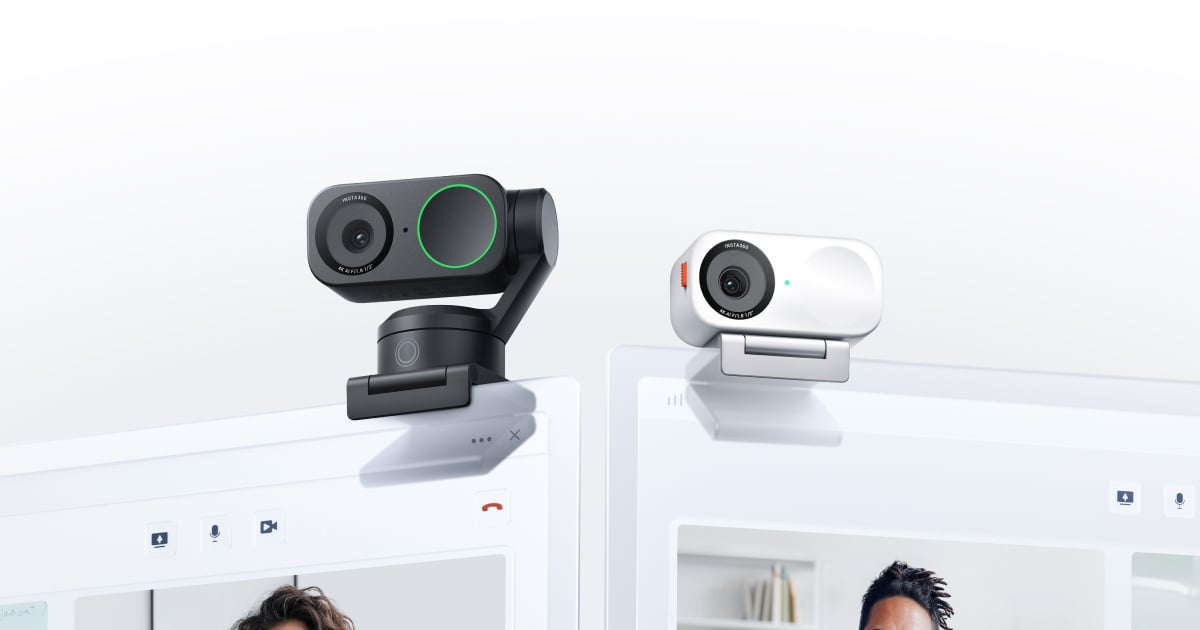
The Insta360 Link 2 is $149.99 on Amazon, down from a $199.99 list price. That’s $50 off, and Amazon tags it as a Black Friday Deal. It’s a 4K webcam on a small motorized gimbal, so it suits you if you teach, present or pace around during calls and your Mac’s own camera keeps losing you.
We checked the price, seller and stock on Amazon on November 23, 2026. Insta360 Direct, the brand’s own Amazon store, sells it and Amazon ships it. It showed in stock in Graphite Black. Insta360’s own store has the same Standard Bundle at $149.99, normally $199.99, so the $50 saving is real and Amazon simply matches the maker.
If you’d rather have a fixed camera, the Logitech MX Brio in Pale Gray is $161.49, down from $199.99. That’s $38.50 off, and Amazon.com sells and ships it. Logitech’s own store has it at $169.99, so Amazon is $8.50 cheaper than the maker’s sale price.
Don’t miss the best of The Mac Observer
Set us as a preferred source and our Apple reporting ranks higher in your Google Search results and Discover feed — one tap, no account changes.
Both webcams shoot 4K video while a MacBook Air or MacBook Neo stops at 1080p
Start with what your Mac already has. Apple’s MacBook Air spec page lists a 12MP Center Stage camera with Desk View, but its video tops out at 1080p HD. The MacBook Neo has a 1080p FaceTime HD camera.
Both of these shoot 4K at 30 frames per second, or 1080p at 60. Resolution isn’t the whole story, though. What you also get is a bigger sensor, better framing and a camera at eye level on top of your monitor instead of in the lid.
| Insta360 Link 2 | Logitech MX Brio | |
|---|---|---|
| Amazon price | $149.99 | $161.49 |
| List price | $199.99 | $199.99 |
| Maker’s own store | $149.99, normally $199.99 | $169.99, normally $199.99 |
| Sold by | Insta360 Direct, shipped by Amazon | Amazon.com |
| Sensor | 1/2 inch | 8.5MP Sony STARVIS |
| Top video modes | 4K at 30fps, 1080p at 60fps | 4K at 30fps, 1080p at 60fps |
| Field of view | 79.5 degrees diagonal | 90, 78 or 65 degrees diagonal |
| Moves to follow you | Yes, gimbal pans and tilts | No |
| Privacy | Flips down after 10 seconds idle | Built-in rotating shutter |
| Connection | USB-C cable (USB 2.0), USB-A adapter | USB-C to USB-C, needs a USB 3.0 port |
| macOS support | macOS 11 or later | macOS 10.15 or later |
The Link 2 follows you around the room and the MX Brio stays put
This is the real split. Insta360 says the Link 2’s gimbal physically pans and tilts to keep you or a group in frame. Its DeskView mode tilts the camera down by itself to show what’s on your desk, and you can start tracking, zoom or switch to Whiteboard mode with hand gestures. When you stop using it, the camera flips down after 10 seconds so it can’t see you.
The MX Brio does none of that moving. You get a wider lens with three field of view settings, up to 90 degrees, and a Show Mode that works when you tilt the camera down by hand. Logitech adds dual beamforming mics rated up to 4 feet, a privacy shutter you rotate shut, a standard tripod thread and fine controls for ISO, shutter speed and white balance through Logi Options+.
Check your ports before you order. Logitech says the MX Brio needs a USB-C port that supports USB 3.0. If you plug in through a hub or dock, make sure that port supports it. The Link 2 runs over USB 2.0 and ships with a USB-C to USB-A adapter. On software, Insta360 wants macOS 11 or later, and its virtual camera needs macOS 13. Its Natural Bokeh effect has extra system requirements, so check Insta360’s list if you want it.
Continuity Camera already turns your iPhone into a free webcam for your Mac
Before you spend $150, try the camera in your pocket. Apple’s Continuity Camera page says any iPhone XR or later on iOS 16 can work as a Mac webcam with macOS Ventura 13 or later. It runs wired or wirelessly and gives you Center Stage, Portrait mode, Studio Light and Desk View.
The catch is the setup. Apple says the iPhone has to be locked, stable and mounted with its rear cameras facing you, so you need a mount, and your phone is tied up for the whole call. Wireless use also stops working while your Mac is using AirPlay or Sidecar. If you take calls every day at one desk, a dedicated webcam that stays plugged in is less fuss.
Who should buy the Insta360 Link 2 and who should pick the MX Brio
- Get the Link 2 if you teach, demo products or walk to a whiteboard and want the camera to follow you.
- Get the Link 2 if you like a camera that physically points away when you’re not on a call.
- Get the MX Brio if you sit still and want a wider view, mics rated to 4 feet and manual image controls.
- Skip both if you take a few calls a week from a MacBook Air. Its 12MP Center Stage camera and Continuity Camera already cover you.
For most Mac desks, the Insta360 Link 2 at $149.99 is the better buy. It costs $11.50 less than the MX Brio and adds tracking you can’t get from a fixed camera. If you’ve just picked up a MacBook Neo at $649, either one is a clear step up from its 1080p camera. And if you want Logitech’s controls and a shutter, the MX Brio at $161.49 beats Logitech’s own sale price.
MacObserver may earn a commission when you buy through links on this page. It doesn’t change the price you pay.

Discussion