
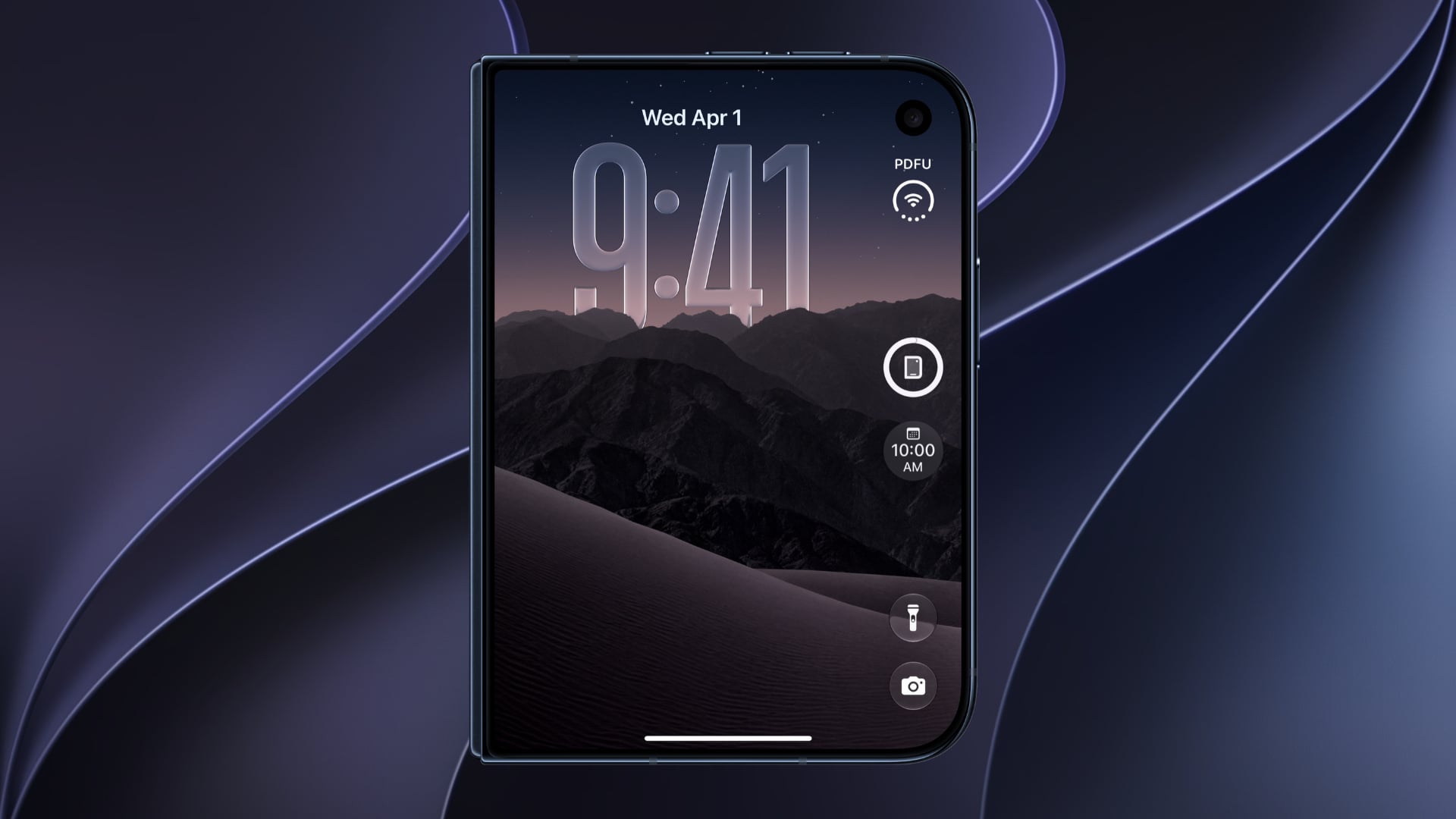
Apple has reportedly tested a new Lock Screen layout for the iPhone Duo that allows users to add two extra widgets along the right edge of the display. The experimental feature, called “Complication Column,” would give owners of Apple’s first foldable iPhone more room to view important information without unlocking their device.
The discovery comes from code researcher pdfu on X, who found references to the feature in iOS 27.1. Although Apple has already redesigned several interface elements for the iPhone Duo, this particular layout remains disabled in the current software.
How the New iPhone Duo Lock Screen Works
According to the findings, the Complication Column places two circular widgets vertically along the right side of the Lock Screen.
Don’t miss the best of The Mac Observer
Set us as a preferred source and our Apple reporting ranks higher in your Google Search results and Discover feed — one tap, no account changes.
These widgets occupy the space between the Wi-Fi and cellular indicators at the top and the customizable flashlight and camera shortcuts near the bottom.
The layout also supports the existing horizontal widget row, allowing users to display additional information without sacrificing their current setup.
For example, users could place battery information and upcoming calendar events in the new column while keeping weather conditions and other widgets along the bottom.
The discovery suggests Apple has been experimenting with ways to make better use of the iPhone Duo’s unique display layout.
Apple Has Kept the Feature Disabled
The researcher identified the experimental layout under an internal feature flag named SpringBoard/Ionic, which is currently disabled.
Apple has tested a “complication column” for iPhone Duo’s Lock Screen. It fits two circular widgets along the right edge.
The code first appeared in iOS 27.1, and no subsequent changes have been identified. That leaves its future uncertain, as Apple has neither announced the feature nor confirmed plans to release it.
Apple already moved several iPhone Duo interface controls to the sides of the display to make better use of available screen space.
The additional widget column would follow the same design approach, giving users more information at a glance while keeping the main Lock Screen relatively clear.
For now, iPhone Duo owners will have to rely on the existing widget arrangement until Apple decides whether to introduce the experimental layout in a future iOS 27 update.


Discussion