

For a long time, using Google Gemini came with an all-or-nothing trade-off for your personal data. If you wanted to save past conversations so you could look back at old notes or ideas, you also had to let the company use those chats to train its models. Now, Google is widely rolling out a privacy update for the Gemini app that finally separates those two choices.
How Google splits your chat history from model training
Previously, a single control called Keep Activity handled both storage and training inside Gemini. Turning it off meant losing quick access to your past prompts, while leaving it on meant feeding your text and files into Google’s training pipeline. With this update, that single switch is broken into separate controls so you can keep a searchable log of your chats without handing over your future prompts for artificial intelligence training.
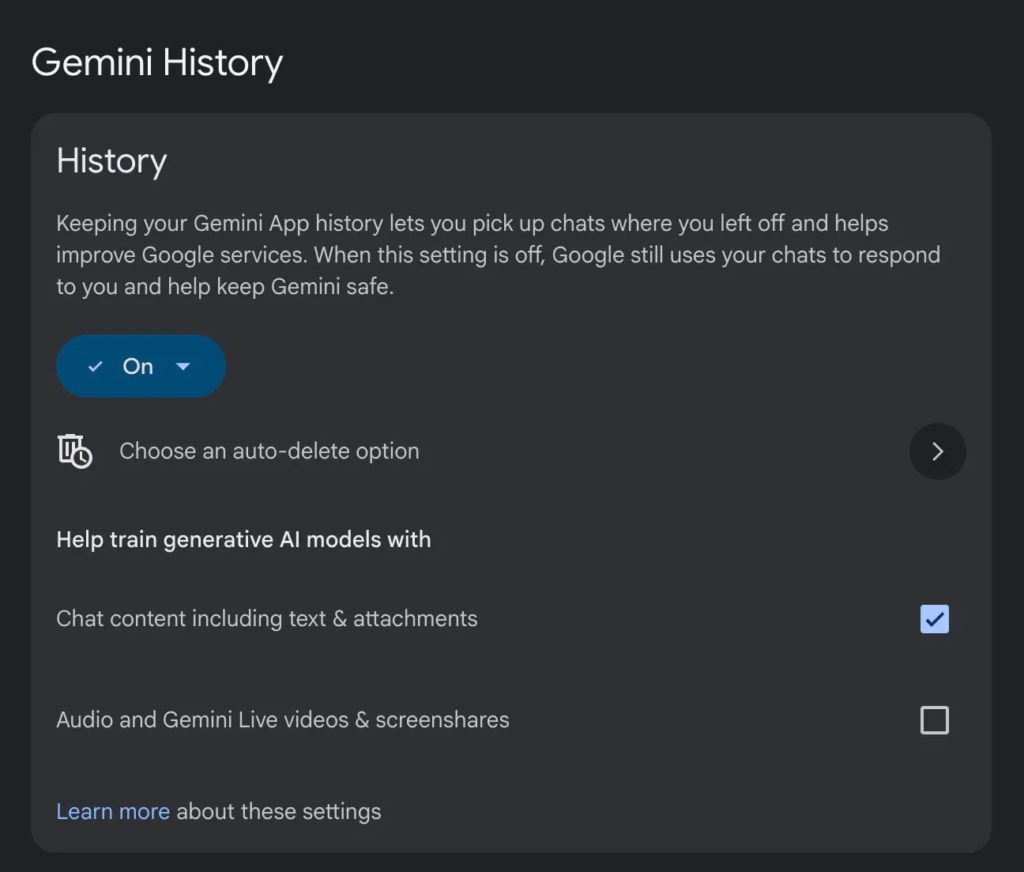
- History: This main control decides whether your conversations are saved in your account history and for how long. If you switch History off, Google still holds future chats for around two months to reply to you, handle feedback, and keep its services safe with help from human reviewers. That is a noticeable change from the old rules, which kept chat context for 24 hours and safety data for 72 hours.
- Chat content including text and attachments: Found under the model training section, this new switch lets you stop future text prompts and uploaded files from training generative AI models. Your future chats stay out of training unless you choose to send feedback on a response.
- Audio and Gemini Live videos and screenshares: Voice recordings, live camera feeds, and screen shares keep their own separate toggle, which remains an opt-in choice rather than turning on automatically.
Where to find and adjust the new privacy toggles
You can check these controls on the web by heading to gemini.google.com and clicking the settings gear icon. At the very bottom of that menu, you will see a new Gemini History option that opens your activity page at myactivity.google.com/product/gemini with a simple On or Off dropdown.
Don’t miss the best of The Mac Observer
Set us as a preferred source and our Apple reporting ranks higher in your Google Search results and Discover feed — one tap, no account changes.
Keep in mind that the text and attachment training toggle is turned on by default once the update hits your account. If you already had Keep Activity switched off before this change, Google keeps both of the new settings turned off for you automatically.
Google is sending email notices as the rollout reaches more accounts over the coming weeks. Giving people separate switches for history and training removes a major privacy compromise, letting you keep useful past chats right where you left them without turning every daily question into training material.


Discussion