
Busy group chats often turn into a jumble when multiple topics happen at the same time. Currently, Google Messages attaches a small preview of the original text above your response, which works fine for a quick answer. However, a new beta discovery shows that Google is building threaded replies for Google Messages to keep long back-and-forth discussions grouped neatly together.
How visual lines and loops will connect related messages
Code uncovered in a recent beta version of Google Messages reveals a layout that looks very similar to iMessage on the iPhone. Instead of repeating the same quoted message preview every time someone chimes in, the app uses vertical lines on the left side of the screen to link messages together.
If a message only gets one response, a single straight vertical line connects the two chat bubbles. When a topic sparks a longer back-and-forth exchange with multiple responses, that connecting line forms a small loop to show that all those messages belong to the same thread.
Don’t miss the best of The Mac Observer
Set us as a preferred source and our Apple reporting ranks higher in your Google Search results and Discover feed — one tap, no account changes.
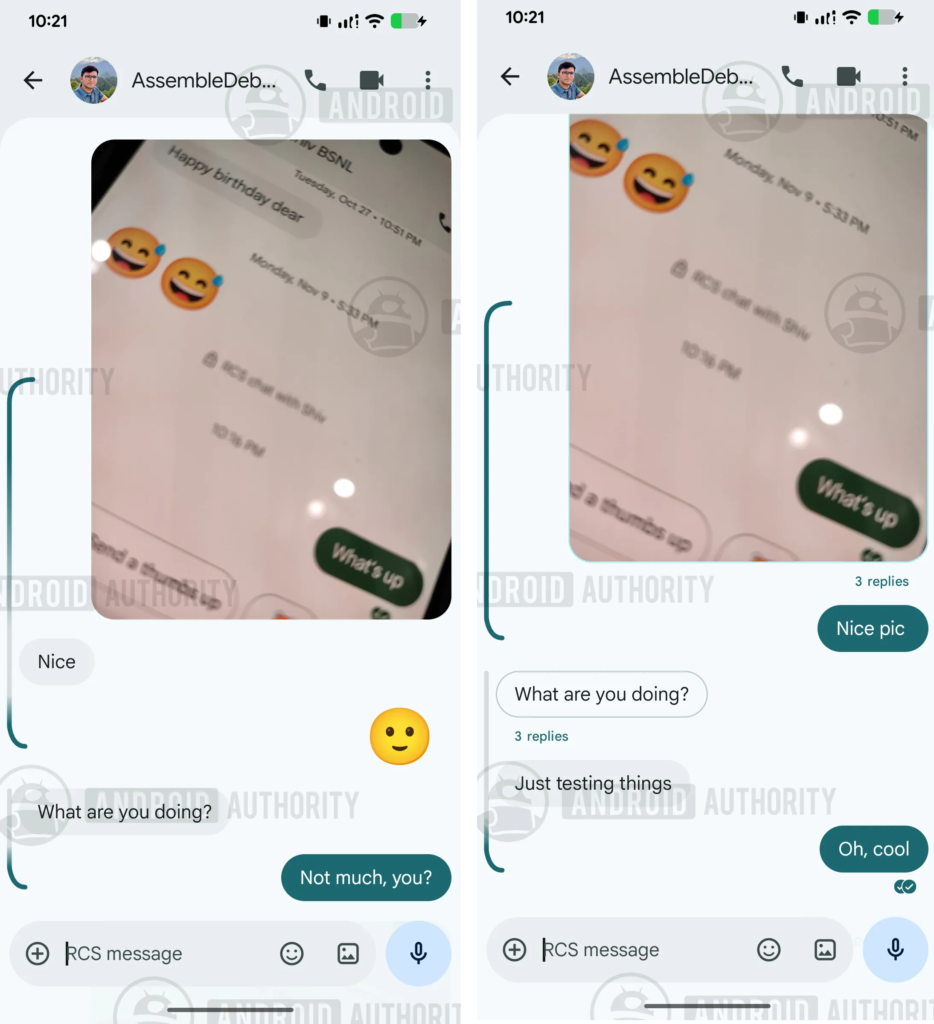
This visual setup works across both individual chats and RCS group conversations. You are not limited to plain text either, as the system supports threaded replies for images and emojis too.
Dedicated thread views keep side conversations organized
When a chat moves fast and unrelated texts pile up, finding older replies usually means scrolling back and piecing the conversation together yourself. To solve this, the updated system places a reply counter right underneath the original message.
Tapping that counter opens a focused thread view that blurs out the main chat in the background. Inside this screen, you only see the messages tied to that specific topic, along with a dedicated reply box at the bottom so your new texts stay inside the thread.
Once you are done catching up, you can tap the X button in the top left corner or tap anywhere on the blurred background to jump back to the main chat. While Apple has offered this style of inline threading for years, its polished appearance in the Android beta code suggests that Google Messages users might not have to wait much longer for a public release.



Discussion