

Choosing the right Digital Audio Workstation (DAW) is essential for music producers, sound engineers, and hobbyists working on macOS. With powerful options available, Mac users benefit from seamless integration, optimized performance, and creative tools. This guide highlights five of the best DAWs for Mac, covering professional suites and beginner-friendly platforms.
Table of contents
Top Digital Audio Workstations for Mac Users
1. Logic Pro

Apple’s Logic Pro is widely regarded as the best all-around DAW for Mac. It offers advanced features such as Live Loops, Step Sequencer, and dynamic spatial audio mixing. With support for up to 1,000 tracks per project, it is ideal for professional production. Logic Pro also integrates tightly with macOS, making it a natural choice for Apple users.
Its extensive library of instruments, effects, and loops makes it versatile for any genre. Producers can experiment with MIDI composition, audio recording, and mixing in a streamlined environment. For those curious about cross-platform use, see how to use Apple’s Logic Pro on Windows.
Don’t miss the best of The Mac Observer
Set us as a preferred source and our Apple reporting ranks higher in your Google Search results and Discover feed — one tap, no account changes.
2. FL Studio

FL Studio has evolved from a simple drum machine into a full-featured DAW. Known for its intuitive workflow, it is especially popular among electronic and hip hop producers. Mac users now enjoy the same robust features as Windows users, including advanced beat-making tools and audio editing capabilities.
The software’s pattern-based sequencing and flexible interface make it easy to create complex arrangements. With lifetime free updates, FL Studio remains a cost-effective choice. For a deeper look, check out this FL Studio Mac review.
3. GarageBand

GarageBand is Apple’s free DAW, perfect for beginners. It provides a simplified interface while still offering powerful tools like MIDI editing and virtual instruments. Many producers start with GarageBand before upgrading to Logic Pro.
It is also available on iOS, allowing users to make a beat on GarageBand iPhone and continue projects seamlessly on Mac. With built-in lessons and easy-to-use features, GarageBand is an excellent entry point for aspiring musicians.
4. Ableton Live
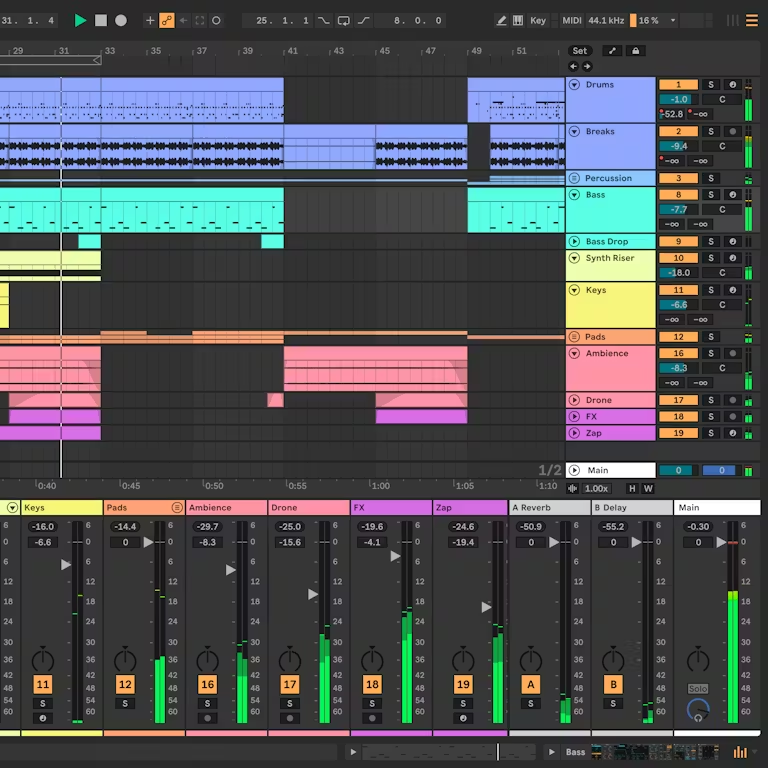
Ableton Live is a favorite among electronic musicians and live performers. Its unique session view allows for non-linear composition, making it ideal for improvisation and experimentation. Mac users benefit from its stability and compatibility with third-party plugins.
The DAW’s real-time performance capabilities make it stand out in live settings. Understanding what VST plugins are and how to use them on Mac can further expand Ableton’s creative potential, giving producers access to countless sounds and effects.
5. Pro Tools

Pro Tools remains the industry standard for recording studios worldwide. It excels in audio editing, mixing, and handling large projects. Mac users working in professional environments often rely on Pro Tools for its precision and compatibility with external hardware.
While it has a steeper learning curve, its advanced capabilities make it indispensable for serious audio engineers. Pro Tools is particularly strong in collaborative workflows, allowing multiple users to work on the same project seamlessly.
FAQ
GarageBand is the most beginner-friendly option, offering simplicity and free access.
Yes, most DAWs support VST plugins, enhancing creative possibilities.
Logic Pro offers more advanced tools and scalability, while GarageBand is ideal for entry-level users.
Yes, many studios rely on Logic Pro and Pro Tools for professional production.
Best DAW Choices for Mac Musicians
Mac users have access to a wide range of DAWs, each catering to different needs. Logic Pro and Pro Tools dominate professional environments, while GarageBand and FL Studio appeal to beginners and beat-makers. Ableton Live bridges creativity and performance. Exploring these options ensures the right fit for your workflow, and resources like the FL Studio Mac review can help guide your decision.


Discussion