

Mac users need the right software. Good task management is key. It helps you control busy schedules and complex projects. The macOS ecosystem offers many powerful applications. They integrate seamlessly with Apple devices. These tools help you plan, prioritize, and execute tasks. Manage personal errands or coordinate a large team. A dedicated Mac task manager will streamline your workflow. It helps you stay focused.
Table of contents
Essential Applications for Organizing Your Mac Productivity
1. OmniFocus: The Power User’s Choice for Deep Task Organization

OmniFocus is the gold standard for serious Mac power users. This robust application uses the Getting Things Done (GTD) methodology. It handles large, intricate projects easily. Features include custom perspectives and sequential actions. Integration with the Apple ecosystem is very deep. Powerful filtering and tagging are also included. Users quickly surface the most relevant tasks. This is great for detailed control over your life and work. For more options, see a complete list of software for Mac.
2. Things 3: Elegant Design Meets Intuitive Task Management

People celebrate Things 3 for its elegant interface. The user experience is very intuitive. It balances powerful features with a minimalist design. Task capture and management become enjoyable. Seamless synchronization works across Mac, iPad, and iPhone. Your priorities are always up to date. This provides a calm and focused work environment. Things is a clear favorite. Alternatively, the comprehensive 2Do Task Manager for Mac offers feature-rich planning. Consider these options if you seek alternatives.
Don’t miss the best of The Mac Observer
Set us as a preferred source and our Apple reporting ranks higher in your Google Search results and Discover feed — one tap, no account changes.
3. Todoist: Cross-Platform Collaboration and Simple Planning
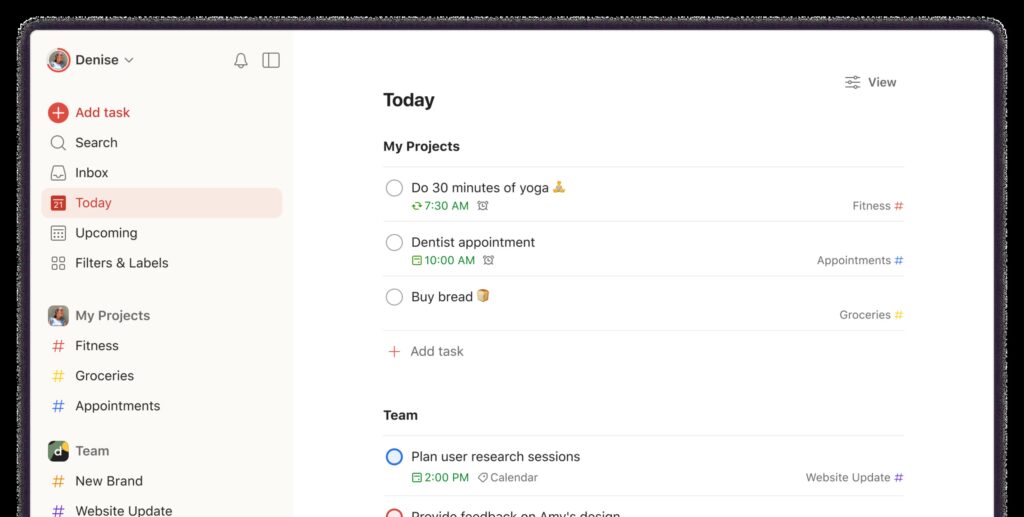
Todoist is popular across multiple platforms. It brings simplicity and collaborative power to the Mac. It features natural language input for fast task creation. You simply type “meeting with John tomorrow at 2pm.” The task schedules automatically. Furthermore, Todoist is strong for teamwork. It offers shared projects, comments, and task assignments. Its Karma points motivate consistent productivity. This system is effective for individuals and small teams. It works well across different operating systems.
4. TickTick: An All-in-One Solution for To-Dos and Habits

TickTick provides a comprehensive all-in-one solution. It combines task management, a calendar, and habit tracking. This versatility is ideal for many users. They manage their schedule and goals in one application. The Mac desktop application is highly responsive. It offers powerful search filters. It also includes a Pomodoro timer for focused work sessions. Furthermore, robust checklist functionality is included. It switches easily between list and Kanban views. This caters to different project management styles. Users gain greater control over their view.
5. Asana: Advanced Team Workflows and Project Organization

Asana manages complex tasks and workflows. Mac-based teams use it widely. Teams break down major projects into tasks. They assign ownership and set deadlines. Users then track progress visually. Client communication is critical for professionals. Managing related details is therefore crucial. Consequently, pair your best Mac task manager with dedicated contact management software for Mac. This keeps professional relationships alongside your to-dos.
Frequently Asked Questions
Task management software focuses on actions and deadlines. It uses prioritization and project structures. Note-taking apps capture information and ideas. They lack core organizational features like reminders. Task managers are for action. Note-takers are for information capture.
Most Mac apps offer free versions or trials. These cover basic to-do lists and reminders. However, the most powerful features need a paid subscription. Examples include advanced filtering and team collaboration. Deep calendar integration is another premium feature.
Choosing the Ideal Mac Task Manager for Your Needs
Your ideal task manager depends on a few factors. Consider your complexity needs and preferred methodology. Your budget is also important. The macOS platform provides a high-quality selection. You can find the right tool for diverse needs. For example, consider OmniFocus’s automation. Or maybe you prefer Todoist’s team-friendly simplicity. Choose an app with great features. Prioritize iCloud sync and native performance. A pleasant user interface is also helpful. This ensures your chosen application becomes a valuable asset. For larger responsibilities, explore the best project management software for Mac. This is necessary to find more advanced tools.


Discussion