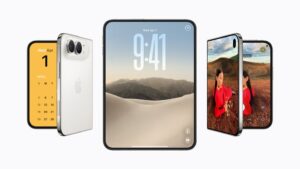
iPhone Duo is eSIM-only in every country where it is sold, Apple says in the FAQ on its iPhone Duo product page. The foldable starts at $1,999 in the U.S., opened for pre-orders on October 16 and is available starting October 23, and Apple’s specs say it is “not compatible with physical SIM cards.”

That is a bigger change outside the U.S. In the UK, for example, Apple lists iPhone 18 Pro with “Dual SIM (nano-SIM and eSIM),” while iPhone Duo on the same UK site has no SIM card option at all.
What Apple says
The answer sits in the FAQ on Apple’s iPhone Duo product page: “iPhone Duo is eSIM-only worldwide. eSIM lets you activate service quickly, store more than one plan, and switch between plans easily.”
Don’t miss the best of The Mac Observer
Set us as a preferred source and our Apple reporting ranks higher in your Google Search results and Discover feed — one tap, no account changes.
The U.S. and UK tech specs pages both list the SIM as “Dual eSIM (two active eSIMs; stores eight or more eSIMs).” A footnote on the UK specs page adds: “iPhone Duo is activated with an eSIM and does not support a physical SIM.” Apple’s Canadian and Australian stores say iPhone Duo “doesn’t have a physical SIM tray and activates only using eSIM.”
Apple links the design to battery life. The product page says “an iPhone-first dual-battery system, along with an internal space-saving eSIM design,” maximizes physical space for battery capacity.
iPhone Duo vs iPhone 18 Pro SIM support
| Model | U.S. | UK |
|---|---|---|
| iPhone Duo | Dual eSIM (two active eSIMs; stores eight or more eSIMs) | Dual eSIM (two active eSIMs; stores eight or more eSIMs) |
| iPhone 18 Pro and 18 Pro Max | Dual eSIM (two active eSIMs; stores eight or more eSIMs) | Dual SIM (nano-SIM and eSIM) |
For U.S. buyers, little changes. Apple’s U.S. specs say iPhone 18 Pro models “are activated with an eSIM and do not support a physical SIM,” and a footnote on the iPhone Duo page notes that iPhone 14 models and later are activated the same way in the U.S.
What dual eSIM gets you
Two eSIMs can be active at once, so you can keep a personal and a work number, or a home plan and a local data plan, on one phone. iPhone Duo can store eight or more eSIMs in total.
Apple’s U.S. store FAQ says you can “store multiple eSIMs on the same device and use two phone numbers at the same time.” It also makes a security point: “someone can’t remove the physical SIM card if your iPhone is lost or stolen.”
Using iPhone Duo abroad
According to Apple’s U.S. store, an iPhone Duo bought in the U.S. or Puerto Rico “doesn’t have a physical SIM tray and activates only using eSIM.” You can activate it outside the country if your carrier supports eSIM, and if your iPhone is unlocked, you can use a travel eSIM at your destination.
Apple says an iPhone bought from Apple is unlocked in most cases. The exception is financing through the AT&T Installment Plan, T-Mobile Equipment Installment Plan or Verizon Device Payment Program, where the iPhone stays locked to the carrier until paid in full.
How to move your number from a SIM card
Apple’s Set up eSIM on iPhone support page covers the options. If your carrier supports eSIM Quick Transfer, you can move the SIM from your previous iPhone without contacting the carrier, and Apple says that during setup you can transfer “your physical SIM or eSIM using the onscreen prompts.” With iOS 26 or later, you can transfer more than one number.
Before you start, Apple says:
- Sign in to both devices with the same Apple Account.
- Unlock your previous iPhone with its passcode.
- Keep both devices nearby with Bluetooth turned on.
- Make sure both devices are on iOS 18.4 or later.
Apple’s U.S. store says you need Wi-Fi to activate with eSIM during setup, though the support page notes that in some countries and regions, eSIM-only iPhone models can activate without a Wi-Fi network.
If you skip the prompt during setup, Apple lists these steps:
- Open the Settings app on your new iPhone and tap Cellular.
- Tap Set Up Cellular or Add eSIM.
- Choose a cellular plan to transfer from another iPhone. If you don’t see a list of numbers, tap Transfer From Nearby iPhone.
- Follow the instructions on your previous iPhone, then tap Transfer or enter the verification code your new iPhone shows.
- Wait for the plan to activate. Your previous SIM is deactivated when it does.
If a banner reading Finish Setting Up Your Carrier’s Cellular Plan appears, tap it and you will be sent to your carrier’s webpage to complete the transfer.
Other ways to activate
Apple lists other routes depending on your carrier. With eSIM Carrier Activation, which usually happens when you buy from a carrier, the carrier assigns an eSIM to your iPhone and you activate it by following the onscreen instructions during setup. A carrier can also give you a QR code, which you scan by tapping Use QR code on the Set Up Cellular screen. Some carriers use a link or their own app instead.
Coming from Android, Apple says to contact your carrier, which will transfer your number with eSIM Carrier Activation or a QR code. With iOS 26 or later, some carriers and select smartphone manufacturers support moving an eSIM from Android to iPhone directly.
Pricing and availability
Apple’s iPhone Duo press release says pre-orders began at 5 a.m. PT on October 16. The U.S. store lists iPhone Duo from $1,999 for 256GB in Night Sky and Star White, available starting October 23. Our earlier post on iPhone Duo pre-orders has the full launch details.