
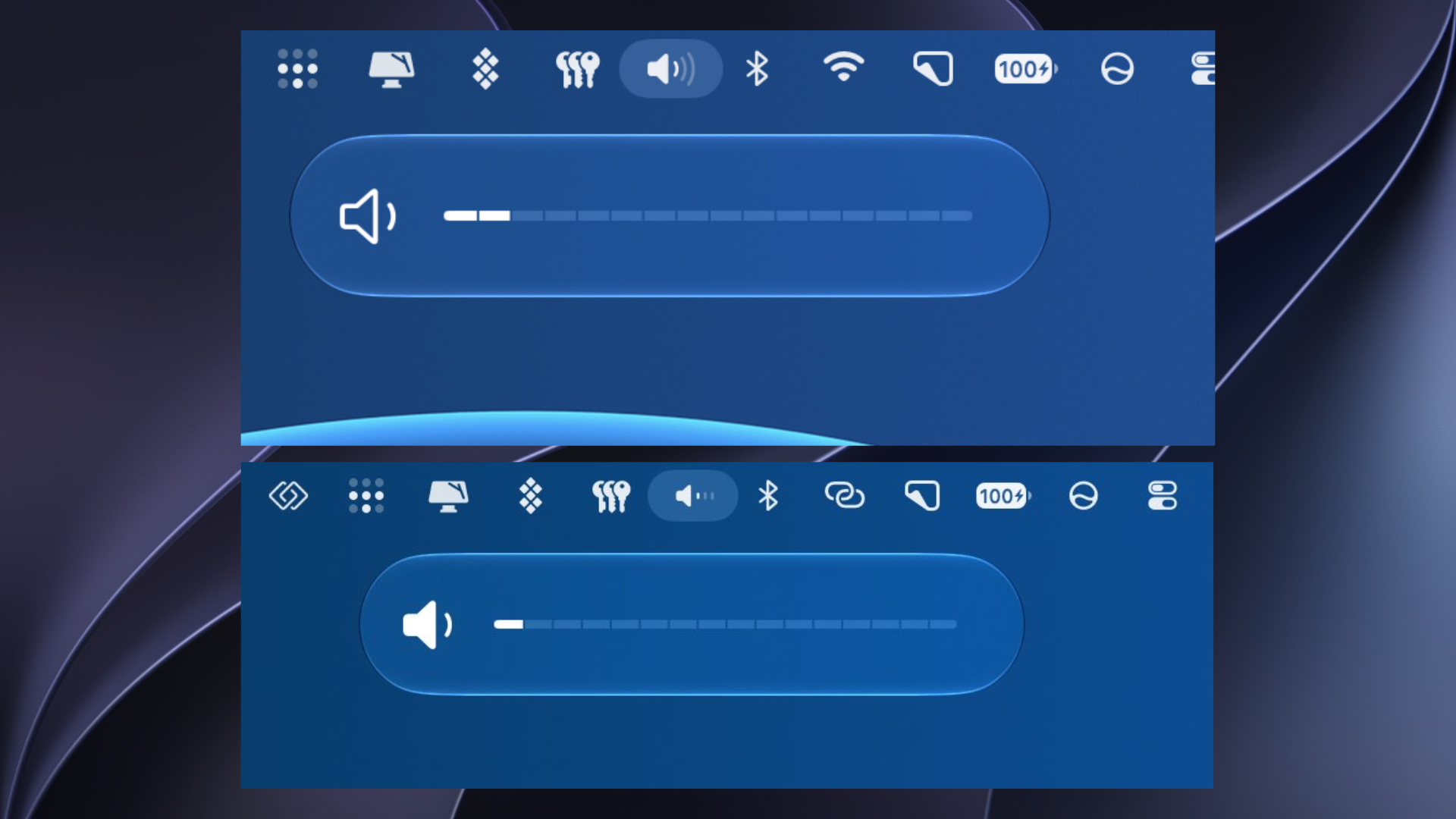
Apple has released macOS 27.2 beta 4 for developers and public beta testers, continuing to test redesigned brightness and volume controls for Mac users. The latest update arrived on October 13, 2026, with build number 26B5112a, bringing further refinements ahead of the public release.
The updated controls first appeared in macOS 27.2 beta 2, replacing the previous keyboard-triggered sliders with a segmented design that makes volume and brightness adjustments easier to track. As The Mac Observer previously reported, the changes also bring back some familiar elements from earlier macOS versions.
What’s New With the Brightness and Volume Controls?
Apple has redesigned the on-screen indicators that appear when users adjust their Mac’s brightness or volume using keyboard shortcuts.
Don’t miss the best of The Mac Observer
Set us as a preferred source and our Apple reporting ranks higher in your Google Search results and Discover feed — one tap, no account changes.
The updated interface includes several changes:
- Segmented sliders: Individual segments replace the continuous bar, making each adjustment step easier to identify.
- Larger icons: A single prominent icon appears on the left side instead of smaller icons at both ends.
- Improved positioning: The slider appears beneath its corresponding menu bar icon when that icon is available.
- Familiar design: The controls combine elements of macOS Sequoia with Apple’s newer Liquid Glass interface.
However, the redesigned indicators only appear when adjusting settings through the keyboard. The brightness and volume sliders inside Control Center remain unchanged.
macOS 27.2 Beta 4 Release Details
| Details | Information |
|---|---|
| Update | macOS 27.2 Golden Gate Beta 4 |
| Release date | October 13, 2026 |
| Build number | 26B5112a |
| Availability | Developers and public beta testers |
| New slider design | Introduced in Beta 2 |
| Public release | Expected in late October |
The update also continues testing expanded Siri AI language support, alongside system improvements and bug fixes.
How to Install macOS 27.2 Beta 4
Mac users enrolled in Apple’s beta program can install the update by following these steps:
- Open System Settings on your Mac.
- Navigate to General > Software Update.
- Click the information button beside Beta Updates.
- Select the appropriate macOS 27 beta channel.
- Return to Software Update and click Update Now when the update appears.
Make sure to back up your Mac before installing beta software, as testing builds can introduce compatibility issues and unexpected bugs.
Apple has not confirmed the final macOS 27.2 release date, although the update is expected later this month. You can also check our previous macOS 27.2 beta coverage for additional fixes and known issues.
If you’ve installed macOS 27.2 beta 4, let us know what you think of the updated controls in the comments.


Discussion