

If you’ve ever been stuck in a tiny iMessage group chat you don’t want to be in, you know the pain. Three people, endless notifications, and no polite escape hatch. You open the details menu expecting to see Leave This Conversation, and it’s just… not there. Here’s the thing: that’s not a glitch. Apple doesn’t let you leave a 3-person iMessage group. But that doesn’t mean you’re stuck. Let’s walk through what you can do and the workarounds people actually use.
Table of contents
Why You Can’t Leave a 3-Person iMessage Group

iMessage only lets you leave a group when there are four or more people, all using Apple devices with iMessage turned on.
In a 3-person chat, leaving would drop the group down to two people, which Apple considers a standard one-on-one thread. iMessage can’t convert a group back into a private chat automatically, so it disables the leave option.
Don’t miss the best of The Mac Observer
Set us as a preferred source and our Apple reporting ranks higher in your Google Search results and Discover feed — one tap, no account changes.
To be clear:
- Three-person group = you cannot leave
- One Android user in the group = you cannot leave
- Group message bubble is green = SMS/MMS chat, and you cannot leave that either
So if the button is grayed out, your phone is behaving exactly as Apple designed it.
What You Can Do Instead
Not being able to leave doesn’t mean you’re trapped. You’ve still got options that cut the noise without burning bridges.
1. Mute the conversation (the best practical option)
Muting isn’t dramatic and doesn’t alert anyone. It just stops the notifications.
Here’s how:
- Open the group chat.
- Tap the group icon at the top.
- Scroll and turn on Hide Alerts.
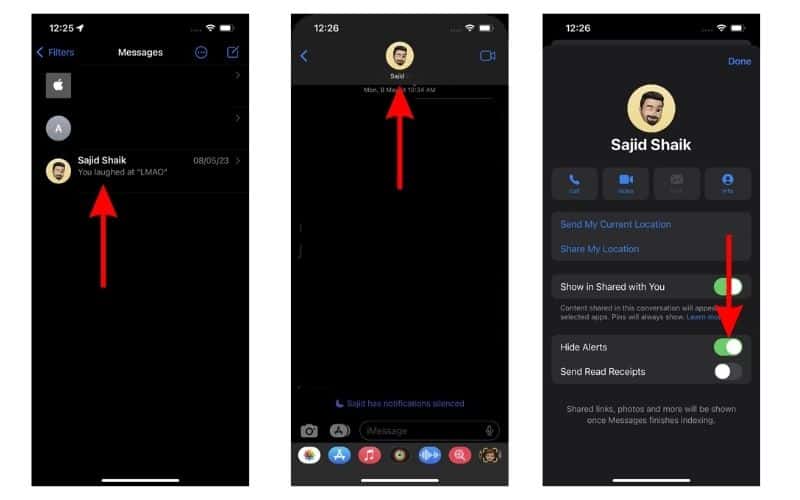

Done. The messages still come in, but your phone stays quiet. If your goal is peace, this solves the problem instantly.
You can also mute directly from the conversation list:
- Swipe left on the chat
- Tap the bell icon
Easy and invisible.
2. Ask someone to start a new group without you
If this is an active chat you genuinely don’t belong in, sometimes the cleanest move is to ask the others to create a fresh thread. Yes, it’s slightly awkward, but it’s the only way to end the original three-person chat entirely.
3. Start a separate conversation and ignore the old one
If the issue is topic-related, not personal, create a new private message with just the person you need.
Over time, the old group naturally dies off.
4. Turn on Focus modes during certain hours
If the group explodes at predictable times, you can automate the silence.
Go to:
Settings → Focus → Choose a mode → Allowed Notifications
Block Messages for that Focus, or block specific people. It’s not perfect, but it gives you control without touching the group thread.
What Not To Do
A few things sound clever in theory but don’t work:
- Deleting the conversation – it comes back as soon as someone replies.
- Blocking members – this hides messages but also blocks actual calls and texts.
- Switching off iMessage – the whole chat becomes SMS, and you’ll still get messages.
None of these solve the core problem and usually make things worse.
When You Can Leave
Just to recap: the leave button appears only if:
- The chat has at least four people, and
- Everyone is using iMessage, and
- The conversation is all blue bubbles
If those conditions are met, you’ll see:
Group info → Leave This Conversation
Otherwise, it stays gray.
Bottom Line
You can’t leave a 3-person iMessage group chat because Apple doesn’t allow it. The system needs at least four people to treat it as a true group thread. But you’re not stuck. Muting the chat is the simplest fix, and it works instantly without notifying anyone. Beyond that, you can nudge the group into starting a fresh thread or use Focus tools to keep the noise down.


Discussion