

Find My iPhone, while handy, may raise concerns about its reliability you’re not alone. This Apple feature allows you to track your device’s location, but its precision can vary. How accurate Find My iPhone is depends on a few factors, including your device’s location, internet connection, and settings. In this article, we’ll explore how reliable Find My iPhone is and how you can ensure better accuracy when tracking your device.
Table of contents
What Is Find My iPhone‘s level of precision?

According to users who tested that aspect, with good GPS signal, Find My iPhone is usually accurate up to 10-20 feet. That value, however, isn’t absolute.
Elements like poor cellular coverage, absence of other Apple devices nearby (which comprise the Find My Network), or cloudy weather, among others, may interfere with this. Because of that, Find My iPhone can be considered accurate, but only up to a level, and not under all circumstances.
Don’t miss the best of The Mac Observer
Set us as a preferred source and our Apple reporting ranks higher in your Google Search results and Discover feed — one tap, no account changes.
Improving Find My iPhone‘s Accuracy
When Your Device Is Off
If your device is turned off, Find My iPhone won’t be able to track it directly. However, Apple provides a workaround:
- Enable “Send Last Location”: Go to Settings > [your name] > iCloud > Find My iPhone, and turn on the Send Last Location feature. This will send your iPhone’s last known location when its battery runs low or it’s turned off.
- When the device is turned back on, you’ll be able to see its most recent location.
Find My iPhone Accuracy Inside Buildings
Tracking accuracy can suffer when you are inside a building, especially if there are walls or other obstructions.
- Ensure Wi-Fi is Enabled: Wi-Fi provides more accurate location tracking indoors compared to cellular signals. Make sure Wi-Fi is turned on in Settings > Wi-Fi.
- Use Bluetooth: If you’re near your device, Bluetooth can help pinpoint its location more accurately within a limited range.
- Use Apple’s “Find My” App: Apple’s Find My app often improves accuracy by utilizing both Wi-Fi and Bluetooth signals for nearby devices, offering a more precise location.
Find My iPhone Accuracy When Moving
Find My iPhone is generally more accurate when the device is stationary. When the device is moving, its location updates may be delayed, especially if it’s on the go.
- Update iOS: Ensure that your iPhone is running the latest iOS version by going to Settings > General > Software Update.
- Keep Location Services Active: Go to Settings > Privacy > Location Services, and make sure it’s turned on for Find My iPhone.
- Ensure a Stable Connection: A stable internet connection, either via Wi-Fi or cellular, will help provide faster location updates while moving.
How Accurate Is Find My iPhone for AirPods?
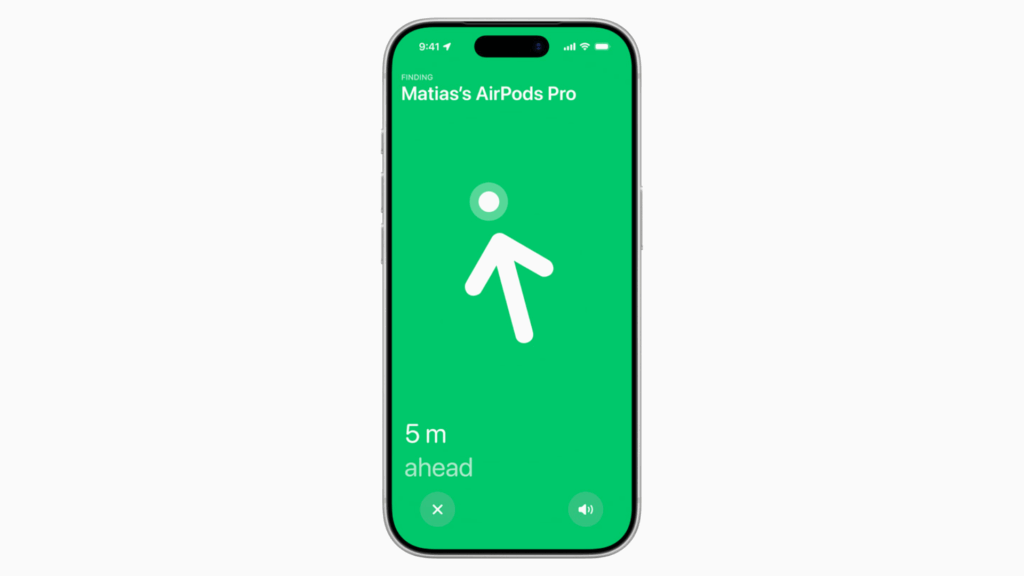
Tracking AirPods can be tricky since they don’t have GPS chips like your iPhone. The accuracy of Find My for AirPods depends on their proximity to your iPhone. Here’s what you can do to improve that:
- Ensure AirPods Are Connected to Your iPhone: If your AirPods are connected, you can see their location via the Find My app.
- Use the Play Sound Feature: If your AirPods are within range, you can play a sound through the Find My app to help you locate them.
Tips for Improving Accuracy
- Enable Bluetooth: Keeping Bluetooth on enhances the location accuracy, especially for smaller devices like AirPods.
- Use Offline Finding: Apple’s Offline Finding feature allows you to track your device even if it’s not connected to the internet, as long as other Apple devices in the vicinity detect it.
- Keep the Device Charged: Low battery levels can hinder the tracking process, as Find My iPhone requires some power to transmit the location data.
Find My iPhone Accuracy: FAQ
Yes, Find My iPhone can show the last known location of your device if it’s turned off, as long as Send Last Location is enabled.
Yes, it can, but the accuracy might be lower due to signal interference from walls. Using Wi-Fi helps improve the location accuracy indoors.
Location updates can be delayed if the device is moving, especially if the connection is weak or the device is changing locations rapidly.
You can track your AirPods if they are connected to your iPhone and within Bluetooth range. In fact, most Apple devices support tracking through Find My. Use the Play Sound feature in the Find My app to locate them.
Summary
- Find My iPhone works best with an internet connection, Wi-Fi, and Bluetooth enabled.
- Send Last Location is a useful feature when your device is off or low on battery.
- Inside buildings, Wi-Fi and Bluetooth help with better location accuracy.
- The feature is less precise when the device is moving, but a stable connection improves updates.
- AirPods can be tracked when connected to your iPhone and within range.
While Find My iPhone is generally accurate, its precision can be affected by many factors. Aspects like location, connection strength, and whether the device is turned on may influence that. By enabling features like Send Last Location, using Wi-Fi, and ensuring a stable connection, you can enhance the accuracy.


Discussion