

Keynote is Apple’s powerful presentation software, native to macOS and iOS. When a Keynote file (typically a .key extension) is shared with a user running Windows, opening it can seem impossible. Fortunately, you don’t need to buy a Mac to view these presentations. Several simple and effective methods exist that allow Windows users to easily access and even edit Keynote files directly on their PC without installing third-party applications.
Table of contents
Seamlessly Accessing Keynote Presentations on a Windows Compute
1. Use Keynote for iCloud
Apple provides a web-based version of its iWork suite (Pages, Numbers, and Keynote) accessible through any web browser, including those on a Windows PC. This is the most direct and recommended way to open and interact with a .key file without needing any local software or worrying about formatting errors.
- Navigate to iCloud.com in your browser.
- Sign in with your Apple ID. If you do not have one, you can create one for free.
- Click the Quick Access icon in the top-right corner and select Keynote.
- Click Browse in the left-side menu.
- Upload the
.keyfile from your PC by clicking the Upload icon (a cloud with an upward arrow) or by dragging the file directly into the browser window.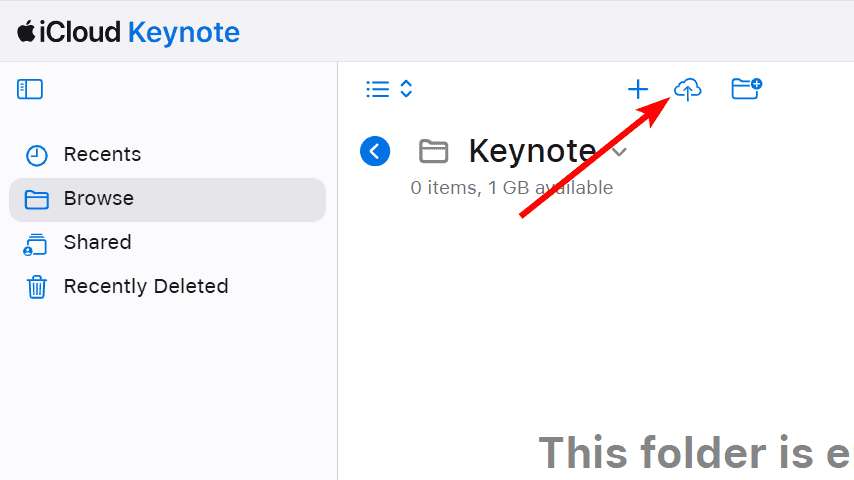
- Once uploaded, the presentation will open for viewing and editing. This is the official and most seamless way to use Apple’s Keynote on Windows.

2. Convert the File Before Sharing
The easiest solution involves the sender exporting the presentation into a PC-compatible format before they send it to you. Keynote for Mac and Keynote for iCloud both offer this export capability, making the file instantly viewable on a Windows machine with common software.
Don’t miss the best of The Mac Observer
Set us as a preferred source and our Apple reporting ranks higher in your Google Search results and Discover feed — one tap, no account changes.
Ask the sender to follow these steps in Keynote:
- Navigate to iCloud.com in your browser.
- Sign in with your Apple ID. If you do not have one, you can create one for free.
- Click the Quick Access icon in the top-right corner and select Keynote.
- Click Browse in the left-side menu.
- Click the three-dot icon next to the presentation and click Download a Copy.
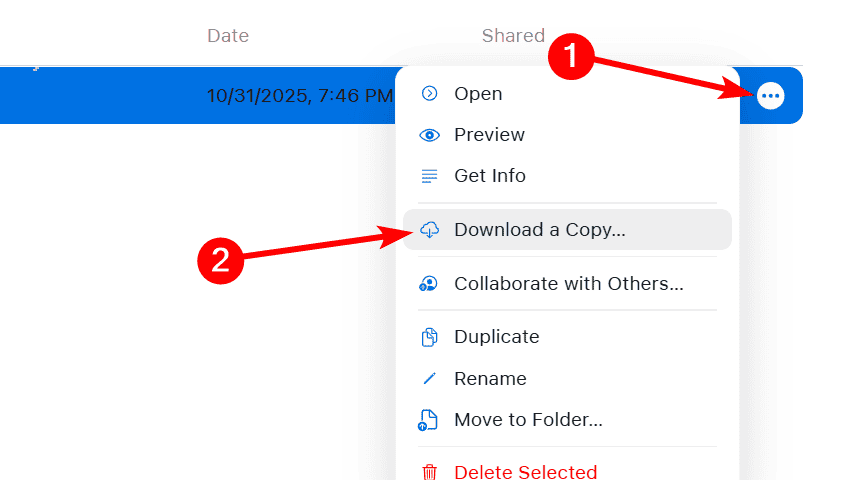
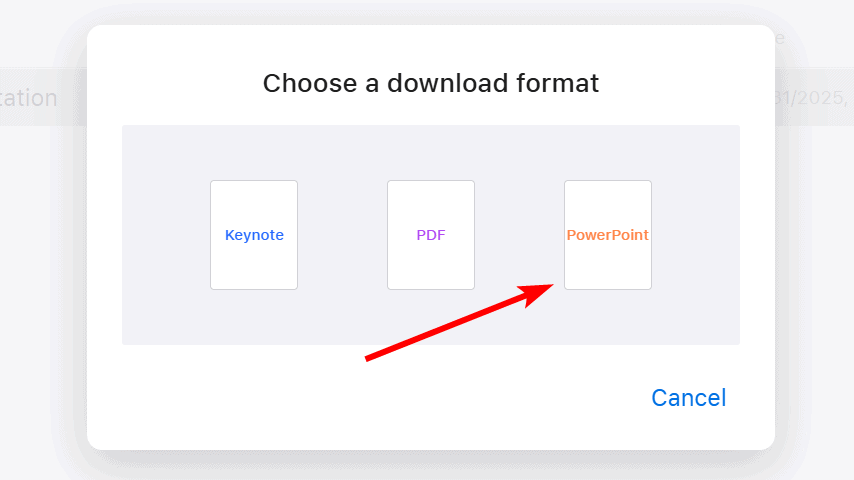
- In the pop-up, select PowerPoint or PDF to download a viewable version of it on your Windows PC.


3. Open the File with Third-Party Converter Tools
If you have already received the Keynote file and the original sender is unavailable to re-export it, you can use online file conversion services. While these tools should be used with caution due to file security, many reputable options exist that can convert a Keynote file into a PowerPoint (.pptx) or PDF format directly on your PC.

Before using any third-party service, you should:
- Search for a reputable, well-reviewed online file converter that specifically handles Keynote (
.key) to PowerPoint (.pptx) conversions. - Upload the Keynote file to the converter’s website.
- Select the PowerPoint output format.
- Download the newly converted
.pptxfile to your PC. This converted file is now fully compatible with programs like Microsoft PowerPoint or comparable free office software for Mac that are also available for Windows.
FAQ
No, PowerPoint cannot natively open a .key file. You must first convert the file to a .pptx format using Keynote for Mac, Keynote for iCloud, or a third-party conversion tool before PowerPoint can read it.
Yes, Keynote for iCloud is entirely free. You only need a valid Apple ID and an internet connection to use the web-based app to view, edit, and convert your Keynote presentations.
Using Keynote for iCloud is the best way to view the file with all of its original animations and transitions intact, as you are running Apple’s official software within your browser.
Maintaining Presentation Fidelity Across Operating Systems
For any Windows user who frequently receives presentations from macOS users, knowing how to handle the .key file format is essential for productivity. The availability of robust, no-cost tools allows anyone to quickly open and interact with a Keynote file. Consulting valuable guides like Apple’s Keynote app tips often points back to the seamless online tools Apple provides. Whether you rely on the powerful cloud version or prefer a local conversion, opening a Keynote file on a PC is a straightforward process that no longer presents a major hurdle to collaboration.


Discussion