

Apple has made it much easier to find specific moments in your HomeKit camera recordings with iOS 27. Thanks to new Apple Intelligence features in the Home app, you can now search HomeKit Secure Video footage using simple descriptions instead of manually scrolling through hours of recordings.
If you want to find a package delivery, a person walking into the driveway, or a car parked outside your home, you can simply describe what happened and let the Home app locate the relevant clips for you.
This update is one of the biggest improvements to HomeKit Secure Video in years. Apple Intelligence can analyze camera footage, generate descriptions of recorded events, and help users find clips through natural language search. The feature works directly inside the Home app and helps save a significant amount of time when reviewing security footage.
Don’t miss the best of The Mac Observer
Set us as a preferred source and our Apple reporting ranks higher in your Google Search results and Discover feed — one tap, no account changes.
Before you begin, make sure your iPhone is running iOS 27, your cameras support HomeKit Secure Video, and you have an active iCloud+ subscription.
Table of contents
Search HomeKit Camera Footage Using Natural Language
This is the easiest and fastest method introduced in iOS 27.
Apple Intelligence can understand everyday phrases and match them with events detected in your camera recordings. Instead of checking footage manually, you can search exactly what you are looking for.
- Open the Home app on your iPhone.
- Select the HomeKit camera you want to review.
- Open the camera’s recording history.
- Tap the Search field.
- Type a description of the event you want to find.
- Examples include:
- Package delivered at front door
- Person entering driveway
- Dog running in backyard
- Car parked outside house
- Lawn mowing activity
- Wait for Apple Intelligence to analyze matching recordings.
- Tap a result to open the corresponding video clip.
The Home app will automatically display clips that match your description, making it much faster to locate important events.
Find Package Deliveries and Visitor Events
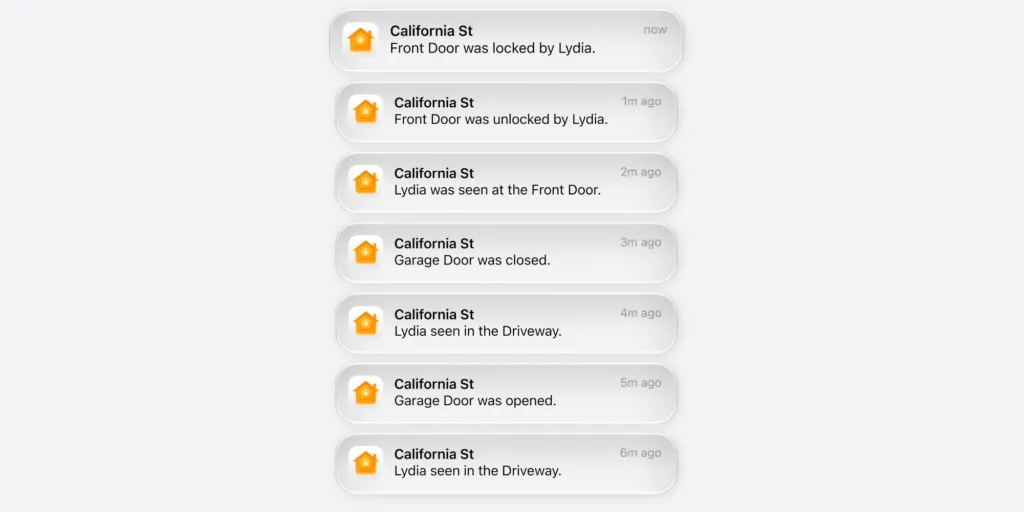
One of the most useful applications of the new search system is locating deliveries and visitor activity.
Apple Intelligence can identify events and create descriptive summaries, allowing you to search for specific actions without remembering the exact time they occurred.
- Launch the Home app.
- Open your front door camera feed.
- Access recorded footage.
- Enter search phrases such as:
- Package delivered
- Delivery person at door
- Visitor at front entrance
- Someone rang the doorbell
- Review the matching clips shown by the Home app.
- Play the video to verify the event.
This method is especially useful when you need to confirm delivery times or check who visited your property.
Search Across Multiple HomeKit Cameras

iOS 27 can connect related footage from multiple cameras, helping you follow an event as it moves through different areas of your home.
For example, if someone walks from your driveway to your front door, Apple Intelligence can surface clips from multiple cameras that captured the same event.
- Open the Home app.
- Navigate to your Home view.
- Use the search field.
- Enter a description of the activity.
- Review results from all compatible HomeKit cameras.
- Open the generated clips to see the event from different angles.
This feature is particularly useful for tracking visitors, vehicles, deliveries, and movement around your property.
Use AI-Generated Video Descriptions
Apple Intelligence automatically creates descriptions of recorded clips, making them easier to browse later. Instead of viewing generic timestamps, users can see summaries that explain what happened in each recording.
- Open the Home app.
- Select a HomeKit Secure Video camera.
- Browse recent recordings.
- Look for AI-generated event descriptions.
- Tap any description that matches what you want to review.
- Play the associated clip.
This approach works well when you are not sure exactly what search phrase to use.
Review Noteworthy Clips Suggested by Apple Intelligence
iOS 27 can automatically highlight important moments captured by your cameras. Apple Intelligence identifies potentially significant events and surfaces them inside the Home app.
- Open the Home app.
- Navigate to your camera recordings.
- Locate the section containing highlighted or noteworthy clips.
- Browse the suggested events.
- Open any clip for detailed playback.
This feature helps users quickly review important activities without performing manual searches.
FAQs
Yes. iOS 27 allows natural language search, which means you can type phrases such as “package delivered,” “person at front door,” or “car in driveway” to locate matching footage.
Yes. The new search experience relies on Apple Intelligence to analyze recordings, generate descriptions, and match searches with events in your footage.
The feature is designed for cameras using HomeKit Secure Video. Some advanced capabilities may depend on camera compatibility and software support.
Yes. Apple Intelligence can connect related recordings across multiple HomeKit cameras and present them together when relevant.
Yes. HomeKit Secure Video features require an active iCloud+ subscription.
Summary
- iOS 27 introduces natural language search for HomeKit camera recordings.
- Apple Intelligence can understand descriptions such as package deliveries, visitors, pets, and vehicles.
- Users can search directly inside the Home app.
- AI-generated video descriptions make browsing recordings easier.
- The Home app can connect related footage from multiple cameras.
- Noteworthy Clips help surface important events automatically.
- An iCloud+ subscription and HomeKit Secure Video camera are required.
Conclusion
Searching HomeKit camera footage by description in iOS 27 removes one of the biggest frustrations of reviewing security recordings. Instead of manually checking timelines and timestamps, you can simply describe what happened and let Apple Intelligence find the relevant clips.
Combined with AI-generated video descriptions, cross-camera event tracking, and highlighted noteworthy moments, the Home app becomes a much smarter tool for managing home security footage. For anyone using HomeKit Secure Video, this is one of the most useful additions arriving with iOS 27.


Discussion