

The Apple Watch is widely praised for its ability to track fitness metrics, including calories burned. However, users often wonder how accurate its calorie count is. Is the data provided by the watch reliable, or should you take it with a grain of salt? Check below how the Apple Watch counts calories, its actual accuracy, and what you can do to get the most precise results.
Table of Contents
How the Apple Watch Tracks Calories
The Apple Watch uses a combination of sensors, including the heart rate monitor, accelerometer, and gyroscope, to track your activity. It estimates the number of calories burned based on your age, weight, gender, and activity level, information. This data is then used to calculate your Total Daily Energy Expenditure (TDEE), which is the total number of calories your body burns in a day.
The watch uses algorithms to differentiate between active and resting calories. Active calories are those burned through exercise and movement, while resting calories are those burned while at rest.
Don’t miss the best of The Mac Observer
Set us as a preferred source and our Apple reporting ranks higher in your Google Search results and Discover feed — one tap, no account changes.
Factors That Influence Accuracy
Several factors can affect the accuracy of the calorie count on your Apple Watch:
1. Personal Information
The more accurate your personal information is (such as height, weight, age, and gender), the more accurate the calorie count will be. This data is asked when you’re setting up your Apple Watch for the first time, but some information may become obsolete as time goes on. Be sure to enter up-to-date information in the Health app to improve the accuracy of the tracking. Here’s how to do that:
Time needed: 5 minutes
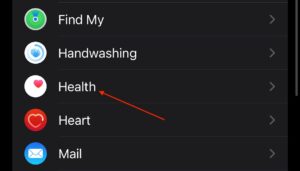
- Go to Settings > Apps > Health.
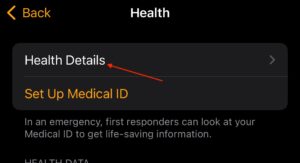
- Select Health Details.
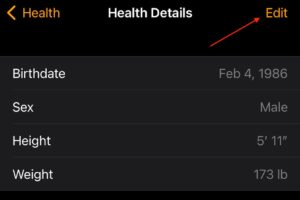
- Tap Edit, then enter the correct information.


2. Type of Activity
The Apple Watch is more accurate for certain activities than others. It tends to perform best with cardio exercises like running or cycling, where heart rate data can be closely monitored. For less intense activities or those that don’t involve significant movement, such as yoga or strength training, the calorie count might not be as precise.
3. Sensor Calibration
Regularly calibrating your Apple Watch helps improve the accuracy of its calorie count. Calibration adjusts the watch’s sensors to ensure they are measuring activity correctly. You can do this by walking or running outside with your iPhone for a set amount of time to allow the watch to learn your stride and adjust its calculations.
4. Heart Rate Monitoring
The accuracy of the heart rate monitor significantly influences the calorie count. If the heart rate sensor isn’t in proper contact with your wrist or if the watch is too loose, it may not measure your heart rate accurately, which can lead to incorrect calorie estimates.
Improving Apple Watch Calorie Accuracy
Here are some ways to improve the accuracy of your Apple Watch’s calorie tracking:
1. Regular Calibration
Ensure your Apple Watch is calibrated regularly. To calibrate your watch, open the Workout app, select Outdoor Run or Outdoor Walk, and complete a workout outdoors with your iPhone. This helps the watch learn your stride length and movement patterns.
2. Wear the Watch Correctly
Wear your Apple Watch snugly on your wrist, just above the wrist bone. The watch should stay in place during movement to ensure the heart rate sensor works effectively.
3. Update Your Personal Information
Update your weight, height, age, and gender in the Health app to ensure that your calorie count is based on the most accurate data.
4. Use Proper Workout Modes
Make sure to select the appropriate workout type in the Workout app to ensure that the calorie count reflects the specific activity you are performing.
Apple Watch Calorie Count: Tips for Better Tracking

- Always wear the Apple Watch on your non-dominant wrist for more consistent heart rate readings.
- If possible, use a chest strap heart rate monitor for more accurate calorie tracking during intense workouts.
- Avoid wearing the watch too loose on your wrist, as it can affect the heart rate sensor.
FAQ
Several factors, including incorrect personal information, improper wear, and incorrect workout modes, can lead to inaccurate calorie tracking.
In some cases, the Apple Watch can slightly overestimate the calories burned during less intense activities. However, it tends to be fairly accurate for high-intensity workouts like running.
Yes, Apple Watch allows you to select different types of workouts (e.g., indoor cycling, HIIT, swimming) in the Workout app to ensure the calorie count is more accurate based on the type of exercise you’re doing.
Summary
- The Apple Watch tracks calories using heart rate and motion sensors.
- Accuracy depends on personal data, activity type, and sensor calibration.
- You can improve accuracy by calibrating the watch, wearing it correctly, and ensuring your personal information is up to date.
- Regular workouts and proper use of workout modes will provide the most accurate calorie counts.
In general, the calorie count on your Apple Watch is fairly accurate, especially when the device is properly calibrated and worn correctly. For the most precise data, be sure to regularly update your personal information, wear the watch snugly, and select the correct workout modes. While it may not always be 100% accurate, the Apple Watch provides a great way to track your fitness progress over time.




Discussion