

Did you know users are able to backup an iPhone without using iCloud? While iCloud can be great for storing a variety of things, some users may not be thrilled with the 5GB of storage that Apple provides for free. For some users, it can be incredibly easy to fill this storage rather quickly. If your iCloud storage is full, or you’re looking to avoid using iCloud when backing up your iPhone, continue reading for some tips and tricks.
Apple provides its own cloud-based storage solutions in thanks to iCloud. Offering the ability to manage and navigate your data from any device, Apple does provide 5GB of iCloud storage free to users with an Apple ID. You can also purchase additional storage and incur a monthly fee. However, the free storage can fill rather quickly, especially if you take a lot of photos and video. Using this guide, here’s some tips on backing up your iPhone without using iCloud.
Determine the Size of Your iCloud Backup
If you are unsure of the size of your backup, but think it may be able to squeeze into your iCloud storage, there’s ways to check this. If you are unable to backup your iPhone due to storage issues on your iCloud, then determining the size of your backup can be particularly useful.
To see how much space your iCloud backup will take up, simply go to Settings > [Your Name]. Then go to iCloud > Manage Account Storage > Backups.

This is also a great time to check any older backups you may have sitting on your iCloud account. This may give you enough space to continue backing up your iPhone to your iCloud. While you definitely should keep your most recent backup, there may be some older ones taking up space.
Clicking on one of your backups will then produce the relevant information. From the top of the screen, you will see when you made your last backup, the backup size of your current one, and what the size of your next backup will be. You can also delete your Backups from this screen.
Using this data, you can determine if you are able to delete enough information from your iCloud to create a new backup.
Clean Your iCloud Account
If you are unable to create a backup due to your iCloud storage being full, there is a method to easily clean your iCloud account. While 5GB of space with a free account may seem like enough, it likely may not be. Be sure to follow this guide that I have created to ensure you are able to properly clean your iCloud data.
For those that do want to use iCloud but are running incredibly low on space, usually it is photos and videos that get in the way. Using my guide, I can show you how to remove the clutter from your iCloud account to continue using it for backup purposes.
Back up your iPhone Using a Mac
Without using iCloud, one of the safest ways to backup your iPhone is by doing it from either a Mac or Windows machine. Taking a look at Mac first, I will show you how to backup your iPhone using Finder. Keep in mind that with going this route, your backups are only on your computer, which makes them less secure than iCloud.
To backup a device on your Mac, follow these steps. Note that this guide is using macOS Ventura, and that the steps may be a bit different for previous iterations of macOS.
Time needed: 2 minutes
Back up your iPhone using a Mac
- Ensure that your iPhone is properly connected to your Mac. Be sure you have given permissions if necessary.
- Open a Finder window from your Dock.
- In the Finder window, select your iPhone under Locations.
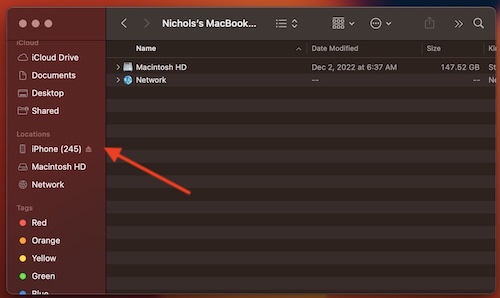
- Scroll down to Backups.
- Select Back up all of the data on your iPhone to this Mac.
- Then, click Back Up Now.


This may take several minutes depending on how much data is on your iPhone.
Backup Your iPhone Using Windows
If you are using a Windows machine, there is also an option to backup your iPhone without using iCloud. For Windows users, the long-time Apple friend iTunes will be your go-to for creating backups. Ensure that you have the latest version of iTunes before continuing.
To use a Windows device to backup your iPhone, follow these steps.
- Plug your iPhone into your Windows machine, and make sure that you have the correct permissions set.
- Go to iTunes and select the iPhone icon in the top left corner.
- Scroll to the Backup section under General, and under Automatically Backup, select This Computer.
Windows should then begin backing up your device. - You are able to check the location of this backup by going to the iTunes menu, selecting Preferences, and then going to the Devices tab.
You will be able to see the list of backups you have made through iTunes. - Alternatively, you can also go to your iPhone, go to General, scroll down, and backup your device manually.
Simply ensure that “Back up all of the data on your iPhone to this Mac” is selected, and then select Back Up Now.
When you are using a computer to backup your information, remember that the backup is only as current as the last one you created. If you are not using iCloud, you will need to backup your iPhone regularly. It is also important to remember that your backups are only as safe as your computer.
Finder, iTunes and iCloud Alternatives
If you’re looking for an alternative to backing up your iPhone, there are also some rather powerful third-party solutions. For example, one program that I recommend would be iMazing. While it does have a one-time purchase fee or a yearly-contract for unlimited devices, iMazing offers plenty of features to keep users interested. Of course, the free option does offer plenty of backup options as well.
One of the better things about iMazing is that it does not override your iPhone and iPad backups. Additionally, it also doesn’t require access to cloud storage. The program is even capable of offering automatic and wireless backup solutions. Even better, they also provide run-downs on how to operate the program.
Another good option may also be EaseUS MobiMover Pro. Just like iMazing, this program offers tools that can help users mange, transfer and backup their iPhone, iPad or iPod. One advantage MobiMover Pro has is that it can help you save space on your device while also preserving access to your photos and videos, which can often be the fastest way to fill your iCloud storage. Note that MobiMover Pro does cost money, so users will need to make a decision concerning what works best for them.
Additionally, users can also look into other Cloud-based storage alternatives to store their data. Programs such as Google Drive or DropBox can be a great alternative to iCloud. However, this is really only an alternative for photos and videos, and you would need to migrate them over manually. This can be a rather involved process, so determine for yourself what you would like to use.
Conclusion: Back up Your iPhone without iCloud
When it comes to backing up your iPhone without using iCloud, there are some options available for users. While the 5GB of free storage Apple offers with iCloud may not be enough for some users, backing up your data to a Mac or Windows machine is also a great alternative.
If you’ve run out of iCloud storage, or simply refuse to use iCloud, there are still options for backing up your device. It is important to remember to backup your device as often as possible. If you are not going to use iCloud, try and remember to backup your device nightly. At the very least, users should unsure that they’re backing up their devices at least on a weekly basis. Following this guide, users do have options outside of iCloud.


