

Few things are more annoying than getting calls from “No Caller ID” on your iPhone. It usually means the caller is hiding their number, which can make it hard to know if it’s spam, telemarketing, or something important. While Apple doesn’t reveal hidden numbers directly, there are reliable ways to identify, block, and manage these calls.
Table of contents
Before you start
- Understand “No Caller ID”: It means the caller deliberately blocked their number from showing.
- Carrier limitations: Your iPhone itself cannot unmask a hidden caller ID. Only your carrier or a third-party service can.
- Stay cautious: Don’t answer calls you don’t recognize—many spam calls want you to engage.
- Check Apple’s built-in tools: Features like Silence Unknown Callers or Block Contact may help.
1) Use “Silence Unknown Callers”
If you don’t need to answer unknown numbers:
- Go to Settings ▸ Phone.
- Tap Silence Unknown Callers.
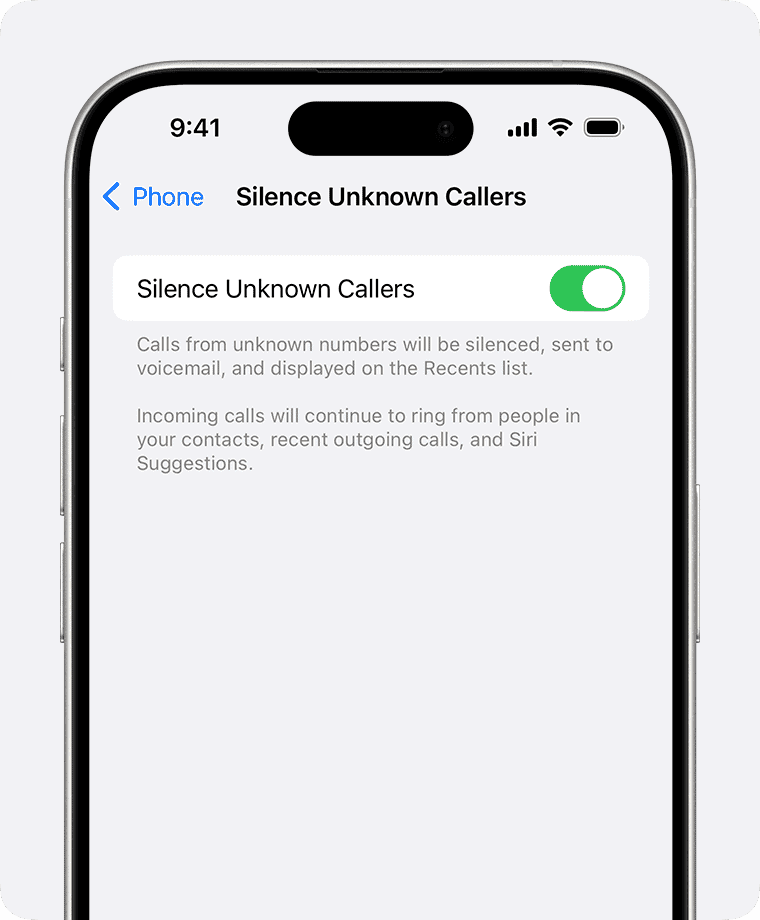
- Turn it on.

This sends calls from numbers not in your contacts, Mail, or Messages straight to voicemail. You’ll still see them in Recents.
Don’t miss the best of The Mac Observer
Set us as a preferred source and our Apple reporting ranks higher in your Google Search results and Discover feed — one tap, no account changes.
2) Check your carrier options
Some carriers let you reveal or block hidden calls:
- AT&T: Call Protect app can show suspected spam.
- Verizon: Call Filter labels spam and unknown numbers.
- T-Mobile: Scam Shield offers caller ID for unknowns.
Contact your carrier or check their app to see if revealing hidden numbers is supported.
3) Use third-party caller ID apps
Apps like Hiya, Truecaller, or RoboKiller can cross-reference calls against huge spam databases. They won’t always reveal “No Caller ID” callers, but can block or flag them.
⚠️ Note: Third-party apps require permission to access your call logs, so always use trusted developers.
4) Ask your carrier for a call trace
In some regions, dialing special codes after receiving a harassing call can trigger a call trace request with your carrier. For example, *57 (in the U.S.) may work with certain carriers. This won’t reveal the number to you directly but can be used for legal reports.
5) Block persistent “No Caller ID” calls
If the same “No Caller ID” caller keeps bothering you:
- Open Settings ▸ Do Not Disturb / Focus.
- Customize it to allow calls only from contacts or favorites.
- Alternatively, use Settings ▸ Phone ▸ Blocked Contacts ▸ Add New to block known spam numbers.
Tips
- If it’s important, the caller will usually leave a voicemail.
- Be skeptical of callers who refuse to identify themselves.
- Don’t give personal info to anyone from a hidden number.
- Use Focus filters (iOS 16+) to block all but important calls during work/sleep.
FAQs
No. Apple doesn’t allow you to reveal a hidden number by default. Only your carrier or apps can help.
No Caller ID = the caller blocked their number. Unknown Caller = the number wasn’t recognized or couldn’t be identified.
Not always—doctors’ offices, businesses, or private numbers sometimes use it.
Yes. Turning on Silence Unknown Callers or using carrier apps can effectively stop them.
Summary (ordered steps)
- Enable Silence Unknown Callers to send unknown numbers to voicemail.
- Check your carrier for apps or services that reveal or block hidden callers.
- Use third-party caller ID apps like Hiya or Truecaller for spam detection.
- Request a call trace from your carrier if harassment continues.
- Block persistent numbers and filter calls through Focus settings.
Conclusion
While your iPhone can’t directly reveal who’s behind “No Caller ID” calls, you still have control. By using Silence Unknown Callers, leaning on your carrier’s tools, and trying reputable caller ID apps, you can avoid spam and focus only on calls that matter. If harassment becomes serious, your carrier can escalate with call traces.


Discussion