
Looking for the best free VPN for iPhone? A reliable VPN can keep your browsing private, protect your data on public Wi-Fi, and even help you access content that may be restricted in your region, all without costing you a penny.
While paid VPNs usually offer the most features, free options can still be a great choice for casual users who want basic protection and occasional streaming access.
In this guide, we share the top free VPNs for iPhone, explain how we tested them, and cover what you should know before choosing one.
Don’t miss the best of The Mac Observer
Set us as a preferred source and our Apple reporting ranks higher in your Google Search results and Discover feed — one tap, no account changes.
How we tested the VPNs on iPhone
We tested and ranked each VPN through a structured evaluation process, focusing on the factors that matter most for iPhone users:
- Privacy and security: We carefully checked whether the provider follows a strict no-logs policy, what kind of encryption it uses, and whether its claims have been independently audited. This ensured that user data remains private and secure.
- Data allowance and speeds: We measured download and upload speeds under different conditions and compared them with the free data limits. Our goal was to determine if the VPN is fast enough for daily tasks like browsing, video calls, or streaming within the data cap.
- Streaming and unblocking: We tested whether the VPN could reliably access services like Netflix, BBC iPlayer, and other region-locked platforms. Free VPNs often struggle here, so performance in this area weighed heavily in the rankings.
- Ease of use on iOS: We assessed the iPhone app design, setup process, and day-to-day reliability. An intuitive app with stable connections scored higher.
- Customer support and transparency: Even for free plans, we checked whether users have access to help resources, such as guides, FAQs, or live chat, and whether the provider is transparent about its limitations.
- Independent testing cross-checks: To ensure fairness, we compared our results with findings from respected sources.
Things to consider before you start
Not all free VPNs are created equal. Before downloading, keep these important points in mind:
- Data limits: Most free plans restrict usage to a set allowance, like 5 or 10 GB per month. This can be enough for browsing or messaging, but may fall short for streaming or gaming.
- Server selection: Some providers allow free users to pick from multiple server regions, while others automatically assign a server. Limited choice can affect both speeds and your ability to access certain content.
- Privacy trade-offs: Stick with trusted providers that have a strong track record. Lesser-known free VPNs sometimes make money by logging and selling user data, which undermines the purpose of using a VPN.
- Speeds under load: Free servers are often crowded, which leads to slower speeds during peak times. Consider whether the VPN performs consistently, even when many users are connected.
- Compatibility with streaming services: Many free VPNs cannot bypass geo-restrictions on platforms like Netflix or Disney+. If streaming is your priority, test whether the VPN actually works for the service you need.
- Upgrade path: Free versions often serve as an entry point to paid plans. While this is not inherently negative, understand the upgrade options and limitations so you know when you might outgrow the free plan.
1. ProtonVPN – Best free VPN for unlimited data
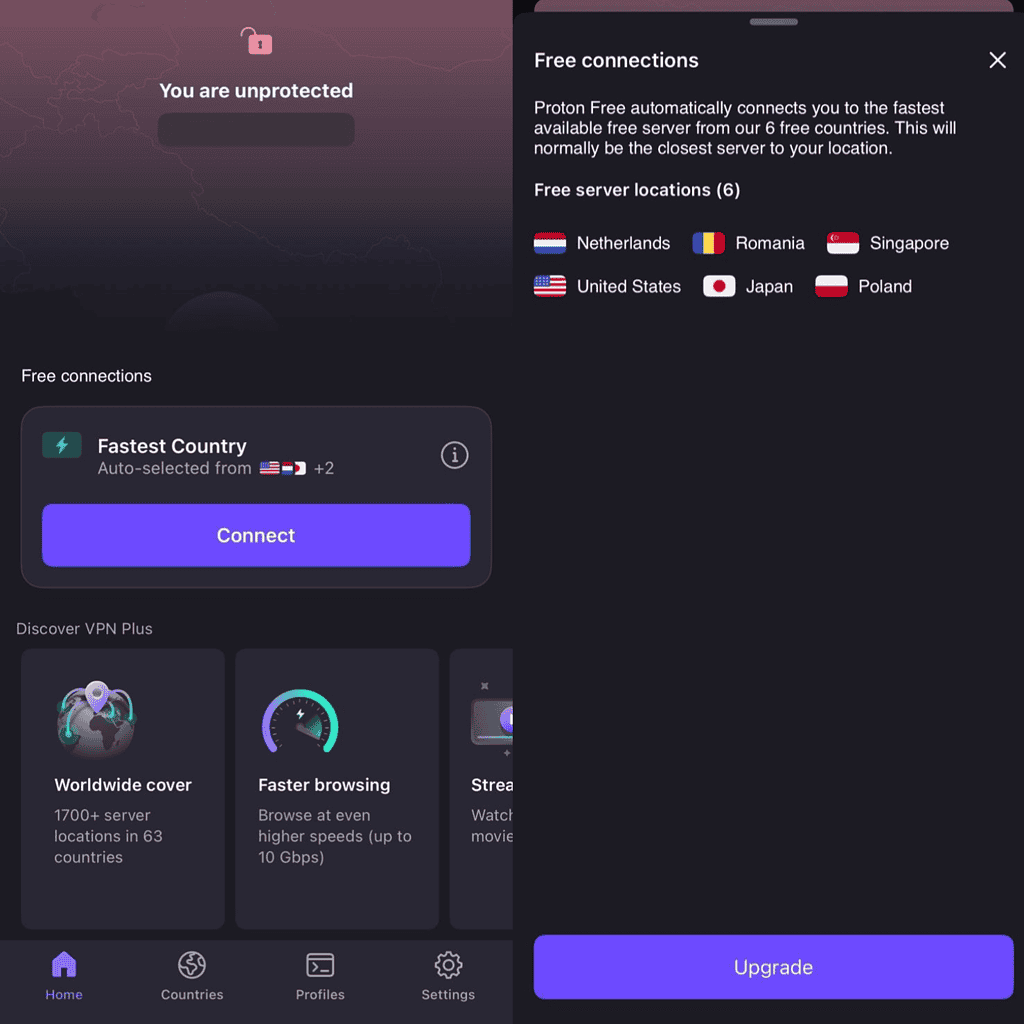
ProtonVPN stands out among free VPNs because it is one of the very few that offer unlimited data without forcing you to upgrade after a certain bandwidth cap.
Built by the team behind ProtonMail, it’s designed with privacy and security as the top priority. The free plan currently allows you to connect to servers in six countries: the US, Japan, Poland, Romania, Singapore, and the Netherlands.
While speed can be inconsistent during peak hours, ProtonVPN is excellent for casual browsing, social media, and even light streaming.
Our testing results
During our tests on iPhone, ProtonVPN performed solidly for day-to-day use. Browsing was smooth, with average speeds dropping by around 35% compared to baseline Wi-Fi. That’s slower than premium services but still very usable for video calls and streaming in standard definition. YouTube and Netflix worked, but buffering occurred occasionally at peak hours.
On the security front, ProtonVPN impressed us. DNS leak tests came back clean, and the app uses AES-256 encryption with a strict no-logs policy.
The iOS app interface is polished, and battery drain was minimal compared to heavier VPNs. However, free users may notice server congestion, which impacts speeds for gaming or torrenting.
Overall, ProtonVPN is the best free option if you want privacy-focused unlimited usage without worrying about data caps.
Pros and cons of ProtonVPN (free version)
| Pros | Cons |
|---|---|
| Unlimited free data (rare for free VPNs) | Limited to 3 server locations |
| Strong security with AES-256 encryption | Speeds slow down during peak hours |
| Clean, user-friendly iOS app | Not suitable for gaming or torrenting |
| Backed by a trusted Swiss-based company | Free plan limited to one device |
2. Windscribe Free – Best free VPN for customization and generous data
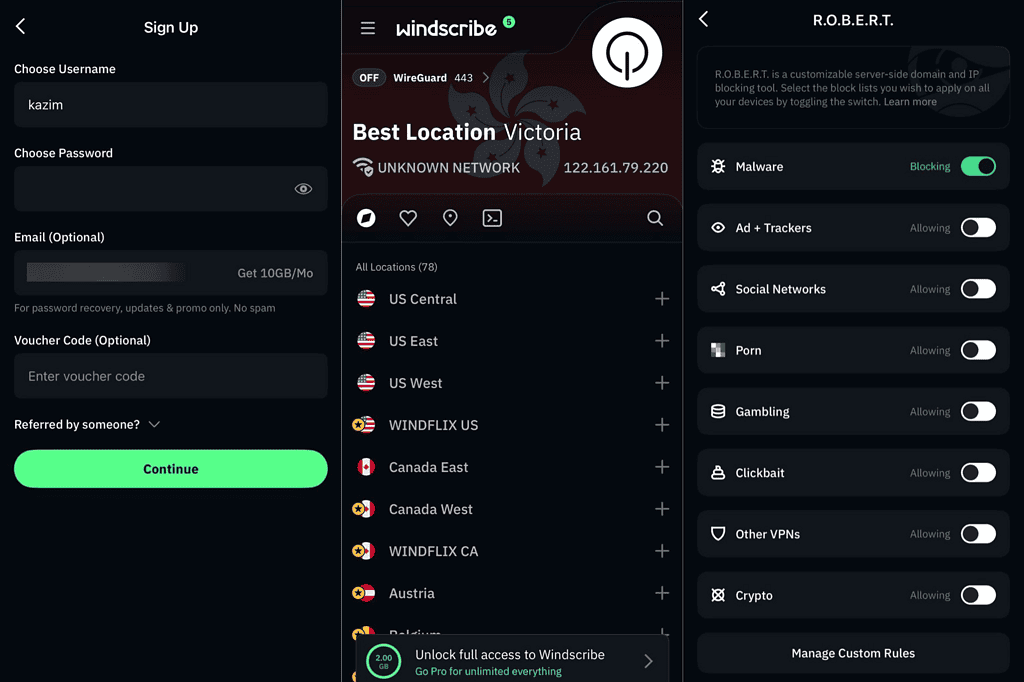
Windscribe Free is a favorite among iPhone users because of its generous monthly data allowance and customizable features. The free plan includes 10 GB of data per month after confirming your email, and you can get even more through referrals.
With access to servers in 10 different countries, including the US, UK, Canada, and select locations in Europe and Asia, it offers more variety than most other free VPNs.
What makes Windscribe stand out is its unique features: the “R.O.B.E.R.T.” domain blocker (great for ads and malware) and a flexible firewall (kill switch) that adds an extra layer of safety. This makes it especially appealing to users who want fine-grained control over their VPN settings.
With Windscribe, you can also access TikTok in unsupported regions!
Our testing results
During our tests on iPhone, Windscribe delivered stable and consistent speeds. The average speed drop was around 30–35% compared to our baseline Wi-Fi, making it slightly slower than PrivadoVPN but still strong enough for streaming and browsing.
Netflix US access was hit-and-miss, but YouTube and Disney+ streamed in HD without buffering. Torrenting isn’t supported on all free servers, but the ones that do allow it performed fairly well.
On the security side, Windscribe passed all DNS leak and IP leak tests. The encryption was reliable, and the kill switch worked flawlessly, even when we force-quit the app to test it.
The iPhone app was smooth and responsive, though server connection sometimes took a few seconds longer compared to ProtonVPN. Battery usage was moderate, close to PrivadoVPN.
The main limitation is the data cap. Even at 10 GB, heavy users (like streamers or gamers) might run out quickly. However, for casual browsing, secure messaging, or occasional streaming, Windscribe Free is one of the most customizable and feature-rich free VPNs we tested.
Pros and cons of Windscribe free
| Pros | Cons |
|---|---|
| 10 GB free data (up to 15 GB with email confirmation) | Data cap may be restrictive for heavy streaming |
| Extra privacy tools like R.O.B.E.R.T. ad/malware blocker | Netflix US access not always reliable |
| Strong security with kill switch and no leaks detected | Slightly slower connection times than ProtonVPN |
| Multiple server options across 10 countries | Torrenting support limited to certain servers |
3. PrivadoVPN Free – Best free VPN for streaming on iPhone
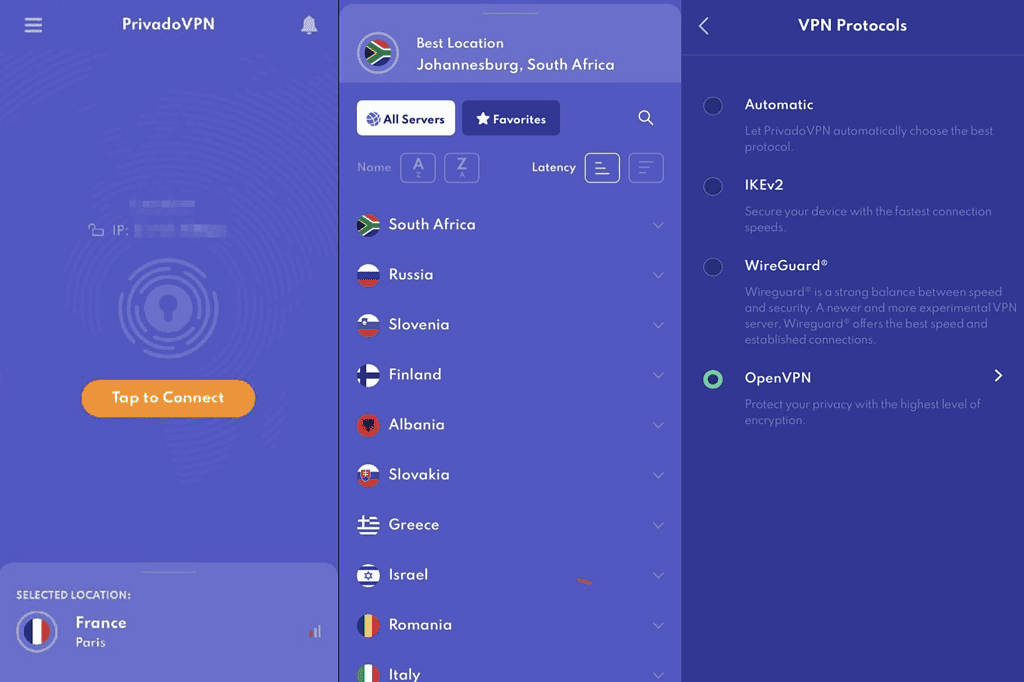
PrivadoVPN Free is one of the strongest contenders for iPhone users who want a streaming-friendly VPN without paying.
The free plan includes 10 GB of data per month, which is more generous than most competitors. Once that limit is reached, you can still continue using it, but at a slower speed.
It provides access to servers in over 12 cities, including the US, UK, and several European countries, making it a solid choice for accessing geo-restricted content..
Our testing results
When we tested PrivadoVPN on iPhone, we were pleasantly surprised by its streaming performance. Both Netflix US and BBC iPlayer worked without issues on the free plan, which isn’t always the case with free VPNs.
Speed tests showed an average 25–30% drop compared to our baseline Wi-Fi, which is quite efficient and better than many other free providers. HD streaming was smooth, and YouTube loaded instantly without buffering.
On security, PrivadoVPN did well in our DNS leak and IP masking tests. It uses 256-bit encryption and a no-log policy, providing a strong level of privacy.
The app is intuitive, and connecting to servers was quick, though we noticed occasional delays during server switching. Battery usage was moderate, slightly higher than ProtonVPN in our test runs.
Where PrivadoVPN falls short is the data cap. For heavy streamers or gamers, the 10 GB monthly limit is restrictive. But for casual streaming, browsing, and travel use, it’s one of the most reliable free options we tested.
Pros and cons of PrivadoVPN Free
| Pros | Cons |
|---|---|
| Excellent for Netflix, BBC iPlayer, and YouTube | 10 GB monthly cap may be limiting |
| Fast speeds with only ~25–30% drop | Speeds throttled after data limit is reached |
| 12+ global server locations | Moderate battery usage on iPhone |
| Strong encryption and no-log policy | Free plan limited to one device |
4. TunnelBear Free – Best free VPN for beginners
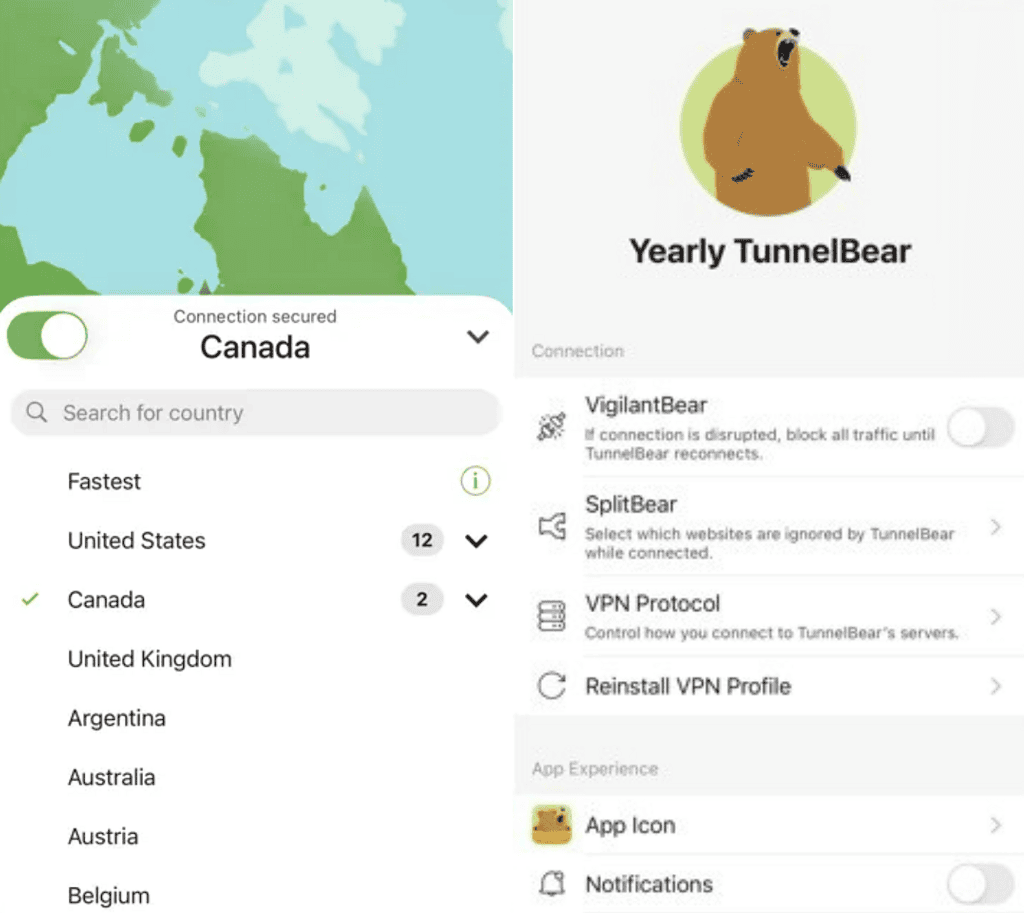
TunnelBear Free is one of the most user-friendly VPNs available, making it a great choice for beginners who want security without complicated settings. The app has a playful design with animated bears digging tunnels whenever you connect, but behind the lighthearted visuals lies solid privacy protection.
TunnelBear Free is best for casual browsing and occasional use, especially for those who value simplicity and a fun interface.
However, the biggest limitation is the 2 GB monthly data cap, which is far too low for streaming or gaming.
Our testing results
During testing, TunnelBear Free performed smoothly on iPhone for basic browsing, social media, and email. Connection speeds were decent, with only about a 30–35% drop compared to our baseline, slower than ProtonVPN. Pages loaded quickly, and the VPN didn’t cut off mid-session.
Security-wise, TunnelBear excelled. It passed all DNS and IP leak tests with strong AES-256 encryption, and the “VigilantBear” kill switch functioned correctly when we forced a connection drop.
The iOS app also includes the “GhostBear” mode, which obfuscates VPN traffic to bypass restrictions. This worked well in tests for accessing restricted sites, though it didn’t consistently fool Netflix.
For streaming, TunnelBear Free isn’t practical due to the small data cap. We tested YouTube and were able to stream at 720p without buffering, but the allowance ran out quickly. Netflix, Disney+, and Hulu all detected the VPN, blocking playback. For torrenting, the provider allows P2P traffic, but the 2 GB limit makes it effectively useless for large files.
Battery consumption was modest, and the app ran quietly in the background without draining resources. Overall, TunnelBear Free is best for beginners who just want an easy, trustworthy VPN for light use.
Pros and cons of TunnelBear Free
| Pros | Cons |
|---|---|
| Extremely beginner-friendly interface | Very small 2 GB monthly data cap |
| Fun design with animations | Netflix and other streaming services blocked |
| Passed all leak and security tests | Torrenting impractical with such a low cap |
| Includes kill switch (VigilantBear) and obfuscation (GhostBear) | No unlimited data option |
5. Hotspot Shield Free – Best free VPN for fast speeds

Hotspot Shield Free is one of the most speed-focused VPNs for iPhone users, powered by its proprietary Hydra protocol. This makes it a solid choice for users who prioritize quick connections and smooth browsing.
However, its limitations, especially a daily data cap of 500 MB and ads in the free version, hold it back from being a true replacement for paid VPNs.
Hotspot Shield Free is best for streaming short videos, secure browsing, and light app usage, but not ideal for heavy use like torrenting or binge-watching.
Our testing results
In our tests, Hotspot Shield Free impressed us with fast connection speeds. On iPhone, we saw only a 15–20% drop compared to our baseline, making it the fastest free VPN we reviewed.
Web pages loaded instantly, and HD YouTube videos played smoothly without buffering, though streaming for long periods hit the 500 MB daily cap quickly.
Security was solid but not flawless. The VPN uses AES-256 encryption and passed our IP leak tests, but unlike ProtonVPN or TunnelBear, Hotspot Shield Free displayed ads within the app, which can feel intrusive.
For streaming, Netflix did not work during testing, and the VPN was immediately blocked. Hulu and Disney+ also denied access, but YouTube worked perfectly. Torrenting is allowed but heavily restricted by the daily cap, making it impractical for downloads larger than a few hundred MB.
Battery usage was light, and the iOS app was stable throughout testing. However, the constant push toward upgrading to premium and the ads inside the app may frustrate some users. Still, if you want fast speeds for short browsing sessions, Hotspot Shield Free is hard to beat.
Pros and cons of Hotspot Shield Free
| Pros | Cons |
|---|---|
| Very fast speeds with minimal slowdown | 500 MB daily cap (about 15 GB/month) |
| Strong encryption with Hydra protocol | Free version offers limited servers |
| Passed IP leak tests | Netflix, Disney+, Hulu blocked |
| Easy-to-use iOS app | Includes ads and upgrade prompts |
#6 Planet VPN– Best Free iPhone VPN with No Registration and No Data Limits
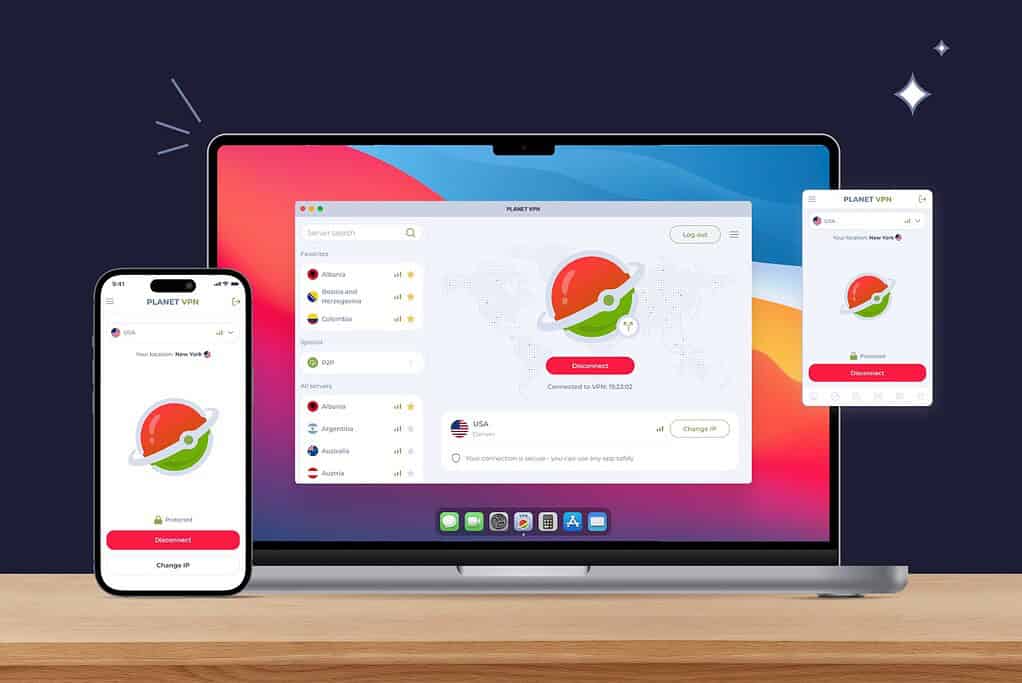
Why It Stands Out: Planet VPN is one of the rare free VPNs that imposes zero restrictions on traffic, bandwidth, or session time – and unlike most competitors, it requires no registration or email address whatsoever. That’s a meaningful privacy advantage: you simply download the app, tap connect, and you’re protected. No account, no data trail.
The free plan gives iPhone users access to 12 server locations – more than Proton VPN’s 5 free locations and significantly more than Hotspot Shield’s single free server – with no monthly data cap to worry about. The iOS app is clean and straightforward, making it a strong choice for users who want protection without a learning curve.
Security: Planet VPN uses AES-256 encryption across all connections, including the free tier. It supports multiple protocols – OpenVPN, IKEv2, and its proprietary PlanetX and StarGuard protocols – giving iPhone users flexibility depending on their network environment. A built-in Kill Switch cuts the connection instantly if the VPN drops, preventing accidental data exposure. DNS and WebRTC leak protection are included at no cost, which many competitors reserve for paid plans only.
Privacy: The service operates under Romanian jurisdiction (outside EU data-sharing agreements and the 14 Eyes intelligence alliance) and maintains a strict no-logs policy: no browsing history, no connection timestamps, no personal data collected. Notably, the no-registration model means there’s no account data to hand over even if requested – a genuinely stronger privacy position than services that require an email to sign up.
Performance: With 1,260+ servers across 60+ countries available to premium users, the infrastructure is substantial. Free users connect to 12 optimized locations with the same server-grade encryption as premium subscribers – Planet VPN does not throttle free connections to push upgrades, which sets it apart from Hide.me (capped at 1 Mbps on free) and PrivadoVPN (speed drops after 10 GB).
The Drawbacks: Ads are present on the free plan, and features like streaming-optimized servers, Double VPN, split tunneling, and P2P support require a premium subscription. Free users are also limited to 12 server locations compared to 60+ on the paid tier. If streaming Netflix or torrenting is your priority, the premium plan unlocks those capabilities.
The Bottom Line: For iPhone users who want a genuinely unlimited free VPN – no data caps, no registration, no email required – Planet VPN is one of the most permissive options available. Its combination of AES-256 encryption, a Kill Switch, Romanian jurisdiction, and zero-log architecture delivers a serious privacy baseline at no cost. Users who need streaming or a larger server selection can upgrade, but the free plan holds up well for everyday private browsing on iPhone.
| Pros | Cons |
|---|---|
| No data cap, bandwidth limit, or session time limit on the free plan | Ads shown on the free plan |
| No registration or email required — zero account data created | Streaming-optimized servers, Double VPN, split tunneling, and P2P require premium |
| 12 free server locations (more than most free competitors) | Free tier limited to 12 server locations (premium unlocks 1,260+ servers in 60+ countries) |
| Easy-to-use iOS app | No independent third-party audit published (unlike Proton VPN or TunnelBear) |
| AES-256 encryption, Kill Switch, and DNS/WebRTC leak protection on the free tier | |
| Romanian jurisdiction — outside the 14 Eyes and EU data-sharing frameworks | |
| Multiple protocols: OpenVPN, IKEv2, plus proprietary PlanetX and StarGuard | |
| Available across all major platforms: iOS, Android, Windows, macOS, Linux, and browser extensions | |
| 15M+ users; rated 4.7/5 on the App Store (545,000+ reviews) |
Tips for using a free VPN on iPhone
- Watch your data usage: Most free VPNs limit you to 2 GB to 15 GB per month. Only Proton VPN offers unlimited data, so be mindful of streaming or downloads on the others.
- Choose wisely for streaming: Some free VPNs work better with Netflix or YouTube, while others struggle. If streaming is your priority, test servers until you find the most reliable one.
- Switch servers to improve performance: Free servers can get crowded. If your provider allows location choice, try different regions for faster speeds.
- Secure public Wi-Fi: Always switch on the VPN when using coffee shop, airport, or hotel Wi-Fi to protect your personal data.
- Balance speed and security: Stronger encryption may slow down speeds slightly. If you only need quick browsing, some VPNs allow lighter protocols for faster connections.
Frequently Asked Questions
Yes, if you choose a trusted provider like Proton VPN, Windscribe, or TunnelBear. Avoid unknown free apps that may log or sell your data.
Some free VPNs unblock Netflix occasionally, but consistency is an issue. Paid plans are more reliable for streaming across multiple platforms.
Yes, there may be some speed drop, especially on busy servers. Windscribe and Proton VPN are better for maintaining usable speeds.
They can, but latency may be too high for competitive games. Stick to casual mobile gaming and avoid expecting zero lag.
Windscribe offers multiple free server options across countries, giving more flexibility compared to others that auto-assign servers.
Summary
After testing and reviewing the top providers, here is how they stack up:
- Proton VPN Free – Best overall with unlimited data and strong privacy.
- Windscribe Free – Flexible server choice and generous data.
- PrivadoVPN Free – Good mix of speed and usability.
- TunnelBear Free – User-friendly but capped at 2 GB per month.
- Hotspot Shield Free – Decent speeds but limited data.
- Planet VPN – Best free option for no data limits and no registration, good network choices.
Each has strengths and trade-offs, so the right choice depends on whether you value unlimited data, speed, streaming, or ease of use.
Conclusion
Finding the best free VPN for iPhone comes down to balancing privacy, speed, and usability within the limits of a free plan. Proton VPN is the top pick for unlimited data and solid security, while Windscribe is excellent if you want server flexibility.
For occasional use, TunnelBear and Hotspot Shield offer reliable, quick protection, even with lower data limits.
Free VPNs are not a full replacement for premium services, but when used wisely, they can provide a safe and practical solution for everyday browsing, securing public Wi-Fi, and protecting your privacy on iPhone.
Also, you might consider learning how to set up a VPN on iPhone!

Discussion