
For a novel or essay, choose a reflowable EPUB so the reader can change text size and the lines can wrap to fit the screen. For a picture book where the words point to parts of an illustration, a fixed-layout EPUB keeps them in position. In Pages on Mac, the kind of source document you started with determines whether you have both options.
Check the source before changing the export settings
A word-processing document supports fixed or reflowable EPUB. A page layout document supports fixed layout only. Apple’s portrait book templates use word processing; its landscape book templates use page layout. If Reflowable is missing, changing how you hold the reading device or choosing a different cover image won’t make that option appear.
For a text-heavy book built entirely from positioned text boxes, consider creating a separate word-processing document and placing the manuscript into flowing body text. Converting the document type alone leaves existing boxes as objects. Start with a representative chapter before spending time rebuilding the whole book.
Export and proof two pages that behave differently
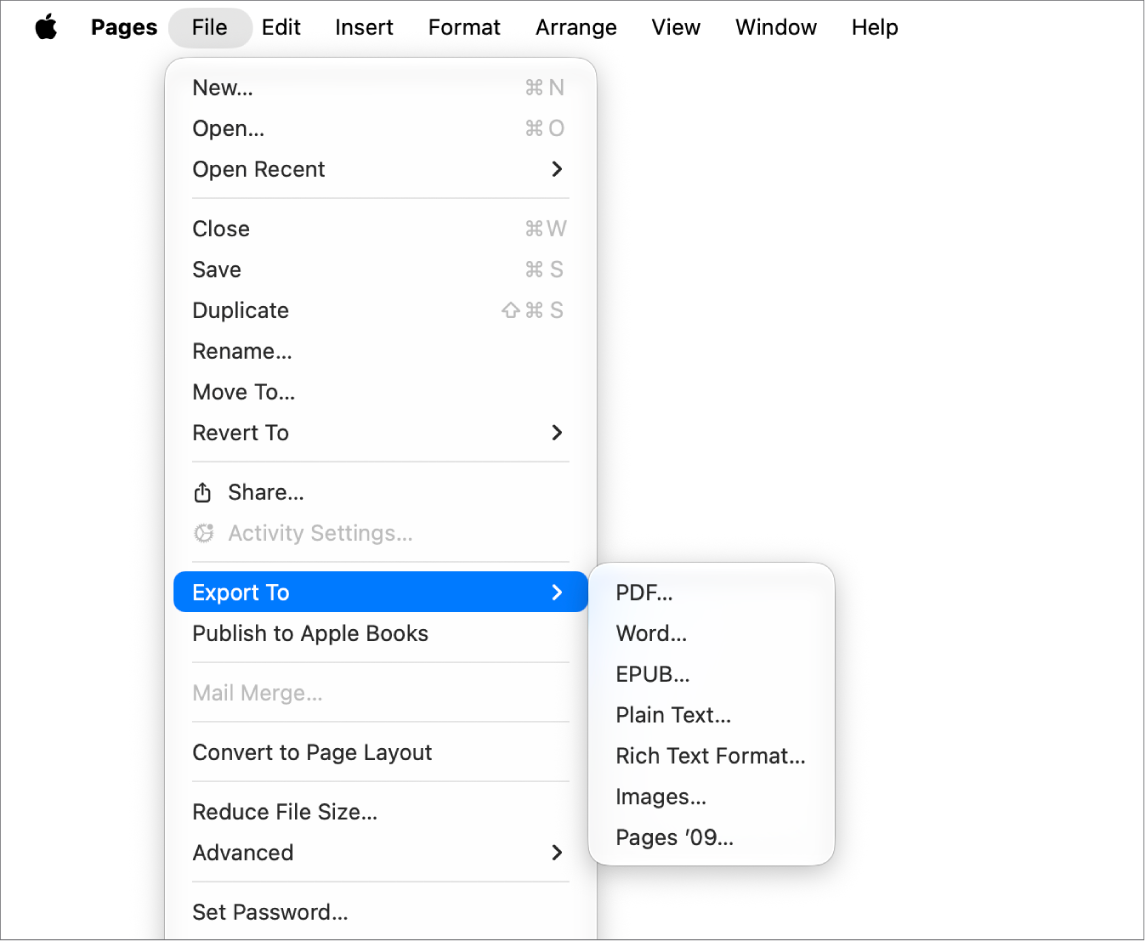
- In Pages, choose File → Export To → EPUB. Enter the title and author. Set the cover to use the first page, a supplied image or PDF, or no cover, according to how you want the book listed.
- Choose Reflowable or Fixed layout where available. For a fixed layout, check the advanced choice between a single page and a two-page spread if the design depends on facing pages.
- Save the .epub and open that file in Apple Books. For a reflowable book, increase the text size and find a chapter heading followed by an image. You should still be able to tell which text the image belongs with. For a fixed layout, look at a spread on a narrow screen and judge whether small lettering remains legible when zoomed.
Proof a note reference as well. In a reflowable EPUB, Pages converts footnotes to endnotes. Fixed-layout EPUB does not preserve footnotes, so move essential notes into the page content before exporting that format. Keep the Pages source for revisions and distribute the proofed EPUB.
Apple’s EPUB design and conversion details · Export to EPUB in Pages
Don’t miss the best of The Mac Observer
Set us as a preferred source and our Apple reporting ranks higher in your Google Search results and Discover feed — one tap, no account changes.
Discussion