
If you want the cover blank and the first page of text labeled 1, give the text its own section. Hiding the footer on the first page of a single section only hides a number; the next page normally remains page 2. These steps apply to a word-processing document in Pages on Mac.
Start a section at the first page of text
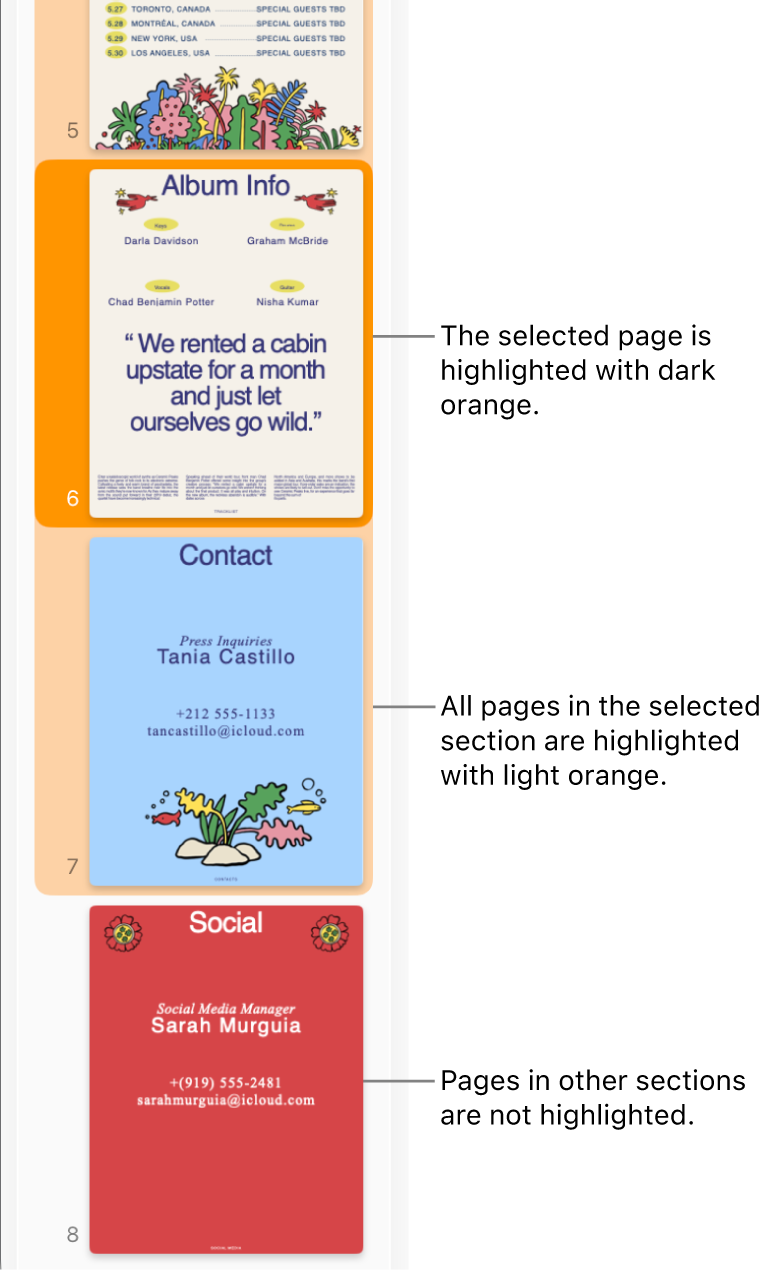
- Show page thumbnails so you can recognize the cover and the first chapter. If the cover and text are already on separate pages, select the first text page and use the Document sidebar’s section controls to create a section Starting with this page. This avoids adding an extra blank page at an existing boundary.
- If the text still follows immediately after the cover material, put the insertion point at that boundary and use Insert → Section Break. The text after the break moves to the new section. Pick the method that matches the document’s existing structure.
- Select the body section. In Document → Section, clear Match previous section if the headers and footers are linked. Under Page Numbering, choose Start at and enter 1. Leave Hide on first page of section off here if page 1 should be visible.
Put the number in the footer
Move the pointer to the bottom of the first text page and click the left, middle or right footer field. Select Insert Page Number and choose the style you want. If no footer fields appear, enable the footer on the Document tab. Keep the cover section’s footer empty or hide its first-page header and footer as appropriate.
Read the printed numbers, rather than the page counters in the viewer. The second physical page of the PDF can correctly carry the printed number 1. Check the page after it as well. If both pages display 1, make sure you inserted a page-number field instead of typing the digit. If the first text page displays 2, recheck the section boundary and the Start at value for that section.
Create and format sections · Insert and set page numbers
Don’t miss the best of The Mac Observer
Set us as a preferred source and our Apple reporting ranks higher in your Google Search results and Discover feed — one tap, no account changes.
Discussion