
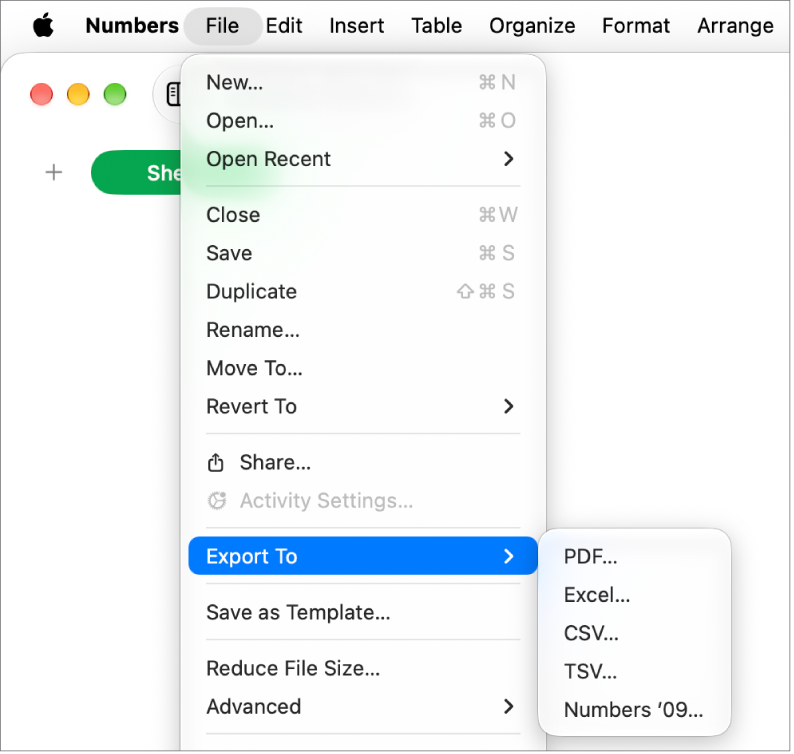
Choose File → Export To → Excel in Numbers on your Mac. Before saving, decide what one tab in the recipient’s Excel workbook should contain. A Numbers sheet can hold several independent tables. Numbers lets you export a worksheet for each whole sheet or a separate worksheet for each table.
Choose a structure the recipient can use
Imagine one Numbers sheet called Conference with three tables: Budget, Attendees and Venues. If someone needs to review the three as one planning sheet, choose a worksheet per sheet. If someone will import the attendees into another system or send the budget to a different editor, a worksheet per table is easier to navigate. It still includes all three tables. It does not restrict who can see each one.
- Give the source sheets and tables meaningful names. Check whether any of them contains figures you would leave out of a handoff. If necessary, prepare an edited copy for export.
- Open File → Export To → Excel and select the worksheet option that fits. When you choose one worksheet per table, you can also include a summary worksheet with links to the tables. That can help with a long workbook.
- Review the password option. Apple says the source password carries over to an Excel export unless you change or remove it. Save the exported workbook with a name the recipient will recognize.
Check the workbook, not just the Numbers original
Open the exported .xlsx in Excel if available. Count the expected worksheets, read the headers and compare a calculated total with the original. Check one formula if the recipient is expected to edit its inputs. A file that opens and looks familiar can still organize the data differently than the person receiving it expects.
If the job is simply to supply rows to a database, ask for the expected input format. Numbers’ CSV export can produce a file per table or combine tables, and exports cell contents as values. For a colleague who needs tabs and an editable workbook, send the .xlsx and keep the .numbers file as your working original.
Apple’s Numbers export options
Don’t miss the best of The Mac Observer
Set us as a preferred source and our Apple reporting ranks higher in your Google Search results and Discover feed — one tap, no account changes.

Discussion