

Apple has returned Slide Over to iPad with iPadOS 26.1 beta 2, just in time to placate frustrated users who felt the feature’s removal was a step backward. You get a floating, resizable pane that sits over your primary app, so you can glance at messages, notes, or mail without abandoning what you are doing. It slots into Apple’s new windowing model rather than replacing it.
How it works now
Open any app window, tap the green traffic light control, and choose Enter Slide Over. The system shrinks that window to the familiar compact strip, keeps your main app active underneath, and lets you swipe the pane to the edge to hide or pull it back when you need it. You can resize the panel more freely than before, which helps if you prefer a taller reading pane or a narrower utility view.
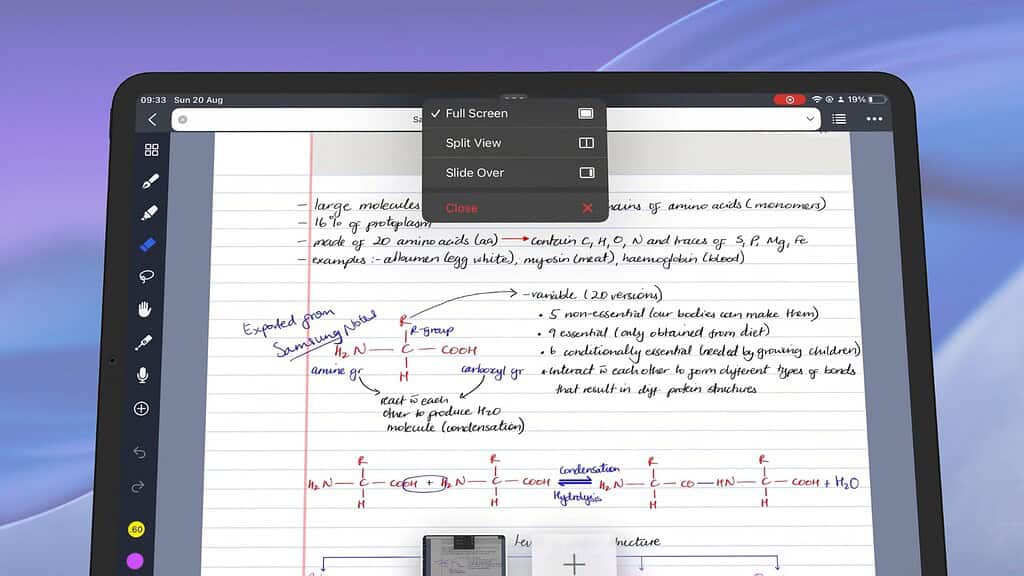
Apple added the Enter Slide Over option directly inside the window controls, making the feature feel native to the Split View introduced with iPadOS 26.
Don’t miss the best of The Mac Observer
Set us as a preferred source and our Apple reporting ranks higher in your Google Search results and Discover feed — one tap, no account changes.
What you can do
- Keep a single Slide Over app visible while you work in the background app.
- Hide or reveal that pane with an edge swipe.
- Resize the Slide Over window to suit your task.
What you cannot do yet
- Stack multiple Slide Over apps and flick between them, like in earlier iPadOS versions.
- Maintain more than one Slide Over instance at the same time.
We previously documented how iPadOS 26 removed both Split View and Slide Over when Apple rolled out its new windowing system at WWDC. That change sparked complaints from users who relied on Slide Over for quick reference and triage. Today’s beta brings part of that behavior back without abandoning the broader shift to windowed multitasking.
Reddit threads over the summer captured the frustration. Users said they lost a fast way to peek at an app without rearranging windows. Early posts today welcome the return in 26.1 beta 2, while noting Apple currently limits you to one Slide Over at a time. If you missed that light, flexible layer, you will feel at home again, even if power users still want stacks.
You often need a quick look rather than a full context switch. Slide Over fills that gap inside the new system, so you do not juggle tiles just to check a DM or copy an address. It is a small change that restores a habit many of you built over years of iPad use.
Quick start
- Update to iPadOS 26.1 beta 2 on a developer profile.
- Open your main app.
- Tap the green traffic light.
- Select Enter Slide Over.
- Resize and swipe to park it at the edge when you are done.
Features of Slide Over in 26.1 Beta 2
To sum up, here are the must-know features Apple has restored in this build:
- Enter Slide Over from the green window control
- Single active Slide Over app while you continue working underneath
- Hide and reveal the pane via edge swipe
- Resizable overlay – you choose height/width
- Seamless coexistence with the new windowing system
- No stacking yet – only one Slide Over app at a time
You get more fluid multitasking today. If Apple reintroduces stacked Slide Over in later betas, you’ll gain speed and depth. For now, this update brings back Slide Over to frustrated iPad users who felt left behind under the new windowing model.




Discussion