

Apple has released iPadOS 26.3 to the public, and it closes the 26.3 beta cycle. The Release Candidate landed a few days earlier, and now the final build is rolling out to everyone.
The public release is iPadOS 26.3 (build 23D127) dated February 11, 2026. The Release Candidate was iPadOS 26.3 RC (build 23D125) dated February 4, 2026.
Next up: the iPadOS 26.4 beta cycle, which should start after this point release settles in.
Don’t miss the best of The Mac Observer
Set us as a preferred source and our Apple reporting ranks higher in your Google Search results and Discover feed — one tap, no account changes.
How to update iPadOS 26.3
- Open Settings
- Tap General
- Tap Software Update
- Tap Download and Install
- Enter your passcode if asked, then accept the terms
Before you start, it helps to:
- Keep at least 50% battery, or plug your iPad in
- Connect to Wi-Fi (especially on larger updates)
- Make sure you have enough free storage for the download and install steps
Changes in iPadOS 26.3
Most of iPadOS 26.3 focuses on bug fixes and security updates. Still, there are a few user-facing changes worth knowing about.
Wallpaper gallery updates
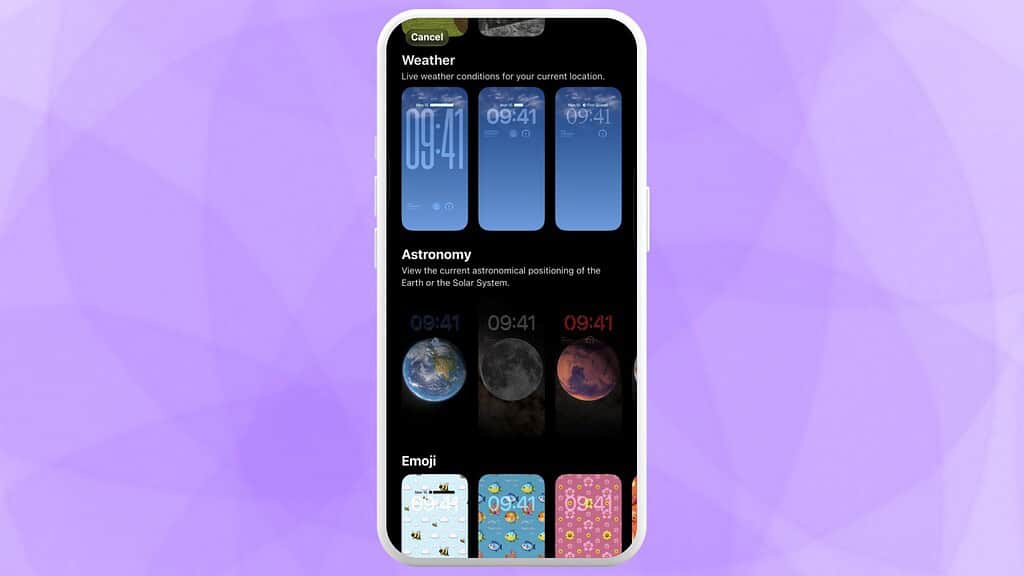
iPadOS 26.3 reorganizes the wallpaper picker by splitting the old Weather & Astronomy section into two separate rows: Weather and Astronomy.
The Weather row also adds a couple of new wallpaper options, with different widget and font treatments while keeping the same live-conditions idea.
Limit Precise Location for cellular networks
There’s a new privacy toggle called Limit Precise Location. It is currently limited to M5 iPad Pro models with cellular, because it depends on an Apple-designed modem.
The point of the setting is simple: it reduces the precision of location information exposed to cellular networks, without changing signal quality or the day-to-day experience.
Transfer to Android
iPadOS 26.3 adds a built-in option that helps you move data from an Apple device to an Android device, including the ability to start transfers during setup.
The supported transfer set includes items like:
- Photos
- Messages
- Notes
- Apps (where possible)
- Passwords
- Phone numbers
If you installed iPadOS 26.3 already, tell me what build you see in Settings > General > About, and whether you noticed the wallpaper changes right away. Let us know in the comments.

Discussion