

You probably use pinch to zoom in Apple Maps without thinking. But when you only have one hand free, Apple also gives you a one-finger option: double-tap and hold, then drag up to zoom in or drag down to zoom out.
That setup works. Still, the direction can feel backward once you start thinking about what “up” and “down” mean on a phone screen.
Current direction feels “right” to some people
When you drag up after a double-tap-and-hold, the map zooms in. Apple documents it that way, and it matches what many iPhone users already learned years ago.
Don’t miss the best of The Mac Observer
Set us as a preferred source and our Apple reporting ranks higher in your Google Search results and Discover feed — one tap, no account changes.
I also think muscle memory matters more than people admit. Once your brain links “drag up” with “zoom in” for Apple Maps, changing it would feel like the app broke, even if the new direction made sense on paper.
Reversing it also makes sense
Now for the part that keeps bugging me. If you picture the top of your screen as “sky” and the bottom as “ground,” dragging toward the sky can feel like pulling away from the map. In plain terms, you expect to zoom out. Dragging toward the ground feels like you are pushing in closer, so you expect to zoom in.
That mental model is simple, and it feels natural. It also matches how some people think about altitude and distance in the real world.
The real problem: you also need to move the map
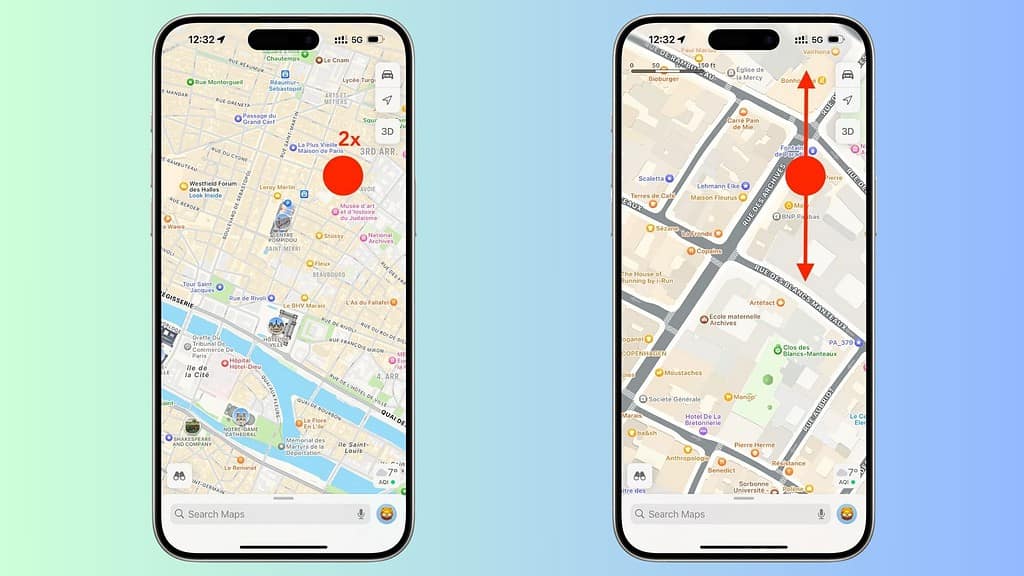
Here’s where it gets tricky. In Apple Maps, you already drag to pan around. So Apple needs a zoom gesture that stays predictable and avoids accidental panning. The double-tap-and-hold gesture solves that by putting you in a “zoom mode,” then mapping up and down to the zoom level.
If Apple Maps reversed the direction, nothing would break mechanically. But it would split user expectations, and support forums would fill up with “my Maps zoom is inverted” posts overnight.
What should Apple do next?
I land on a simple answer: keep the default, add an option. A toggle in Maps settings like “Reverse one-finger zoom direction” would respect both habits without forcing a change on everyone.
You would set it once, then never think about it again. That’s the whole point.



Discussion