

Is battery life fading on your Apple Watch? Apple will test the battery and replace it when it no longer holds enough charge, free under AppleCare+ if it’s below Apple’s health threshold, or for a fee if you’re out of coverage. Here’s the practical playbook: how to check your battery health, when replacement makes sense, what it costs, how to book service, and a few pro tips to stretch the time before you ever need a swap.
Table of contents
First, check if you actually need a new battery
On your watch: Go to Settings → Battery → Battery Health. You’ll see Maximum Capacity and any service alerts. Apple flags you when capacity is “significantly reduced.” For more details, check out our separate article on how to check your Apple Watch battery health.

AppleCare+ rule of thumb: If diagnostics show <80% of original capacity, AppleCare+ covers battery service at no charge. Out of warranty or without AppleCare+, there’s a fee. (Pricing varies by model/region, you can use Apple’s estimator to find out.)
Don’t miss the best of The Mac Observer
Set us as a preferred source and our Apple reporting ranks higher in your Google Search results and Discover feed — one tap, no account changes.

Can I replace the battery myself?
Short answer: no, not realistically. Apple Watch isn’t part of Apple’s Self Service Repair catalog (that program covers iPhone, iPad, Mac, select displays, and Beats). If you DIY a watch, Apple may decline future service. Use Apple or an authorized provider.
How to book a battery replacement (the smooth way)
- Back up your iPhone (your Watch piggybacks on it).
- Open the Apple Support app (or visit Apple’s repair site) and choose Get Service.
- Select Battery performance then schedule a drop off.
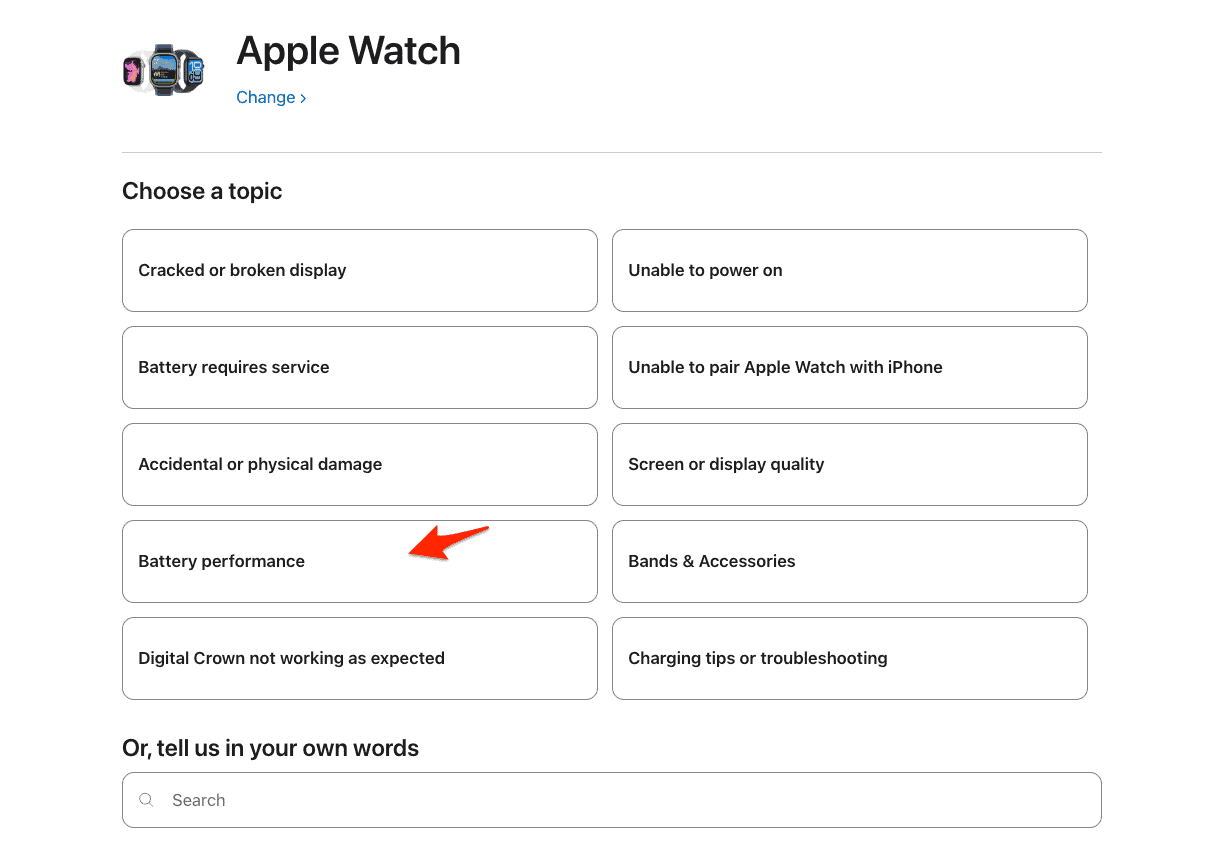
- If you have AppleCare+ and diagnostics confirm <80%, the battery service fee is waived. Otherwise, Apple shows the out-of-warranty price via Get an estimate.

Heads-up: Replacement units or parts may include new or previously used genuine parts that pass Apple’s functional tests.
When should you replace vs. wait?
- Replace now if health is <80% (covered on AppleCare+), or you can’t comfortably finish a day even after basic optimizations.
- Wait if you’re near 80% and the watch still lasts a normal day, try the battery-saving tips below first.
- Consider an upgrade if your watch is vintage/obsolete (Apple may no longer stock parts) or you’re eyeing new watchOS features.
Battery-saving tips to delay a replacement
These are quick wins that don’t ruin the experience. For more tips, take a look at how to increase your Apple Watch battery life:
- Use Low Power Mode during long days or travel (Control Center → Battery).
- Turn off Always-On display (if supported) or reduce Wake Screen time.
- Trim Background App Refresh and aggressive heart rate/blood oxygen polling during idle hours.
- Prune push notifications you don’t act on.
- Prefer Bluetooth when the paired iPhone is nearby; standalone cellular drains faster.
- Keep watchOS updated. Point releases often include power fixes. If you’re following the new cycle, see our quick takes on what’s new and when.
Tip: After a major update, expect 24–48 hours of extra drain while indexing and sync settle, don’t judge battery health on day one.
Safety note (swelling and recalls)
Apple previously settled a lawsuit over early-model swelling risks; while Apple didn’t admit fault, it’s a reminder to stop using any device that shows swelling, screen lift, or overheating and seek service immediately. Also be mindful of third-party chargers; recalled accessories do happen.
FAQ
Either can happen. Apple may replace the battery or provide a service replacement unit that meets spec; both are covered by Apple’s repair guarantee.
AppleCare+ coverage is triggered when diagnostics show below 80%. If you’re close, try the tips above; re-test later. Out-of-warranty replacements are still available for a fee.
Authorized service reseals and tests devices to spec. DIY or unauthorized repair can compromise sealing—another reason to stick with Apple or an authorized provider.
If you depend on it daily, ask about Express Replacement Service with AppleCare+. Availability varies by region.
Summary
- Check Battery Health on the watch first. If diagnostics show <80% and you have AppleCare+, Apple replaces the battery at no charge.
- Book service via the Apple Support app for mail-in or in-store options. Apple guarantees the repair.
- Use Low Power Mode and a few smart tweaks to stretch runtime before you need a swap.
Bottom line
A tired Apple Watch battery is fixable, and often free under AppleCare+. Confirm your health number on the watch, book official service, and you’ll be back to all-day battery. While you wait for your appointment, a little tuning (Low Power Mode, fewer background tasks) can buy you meaningful hours.


What is New no longer covered on warranty how do I get the battery replaced and what will it cost if I go through Apple versus possibly a third-party vendor who uses an apple battery? If you could answer any of these questions it would be helpful. I know the watch is older, but it’s still serviceable until the battery apparently died. The only thing I do now is if you press one or both buttons on the side of the watch for about 10 seconds the Apple logo appears and then after a few seconds it disappears then nothing else happens. I’ve had your own Apple charger so they can’t say it was on Apple charger because the issue.
Can’t even get into low power mode. The only sign of life is by pressing one of the side buttons for about 10 seconds then the apple logo appears for about 4 sec. What does the procedure. This watch is no longer eligible for Apple+ or Apple care how do I get the battery replaced watch was never waterproof or warter resistant.