

iOS 13 introduced Sign in With Apple, a feature that lets you create accounts with apps and websites using your Apple ID. Here’s where to find Sign in With Apple logins.
Note: You have to have created an account using Sign in With Apple for the setting to appear.
Sign in With Apple
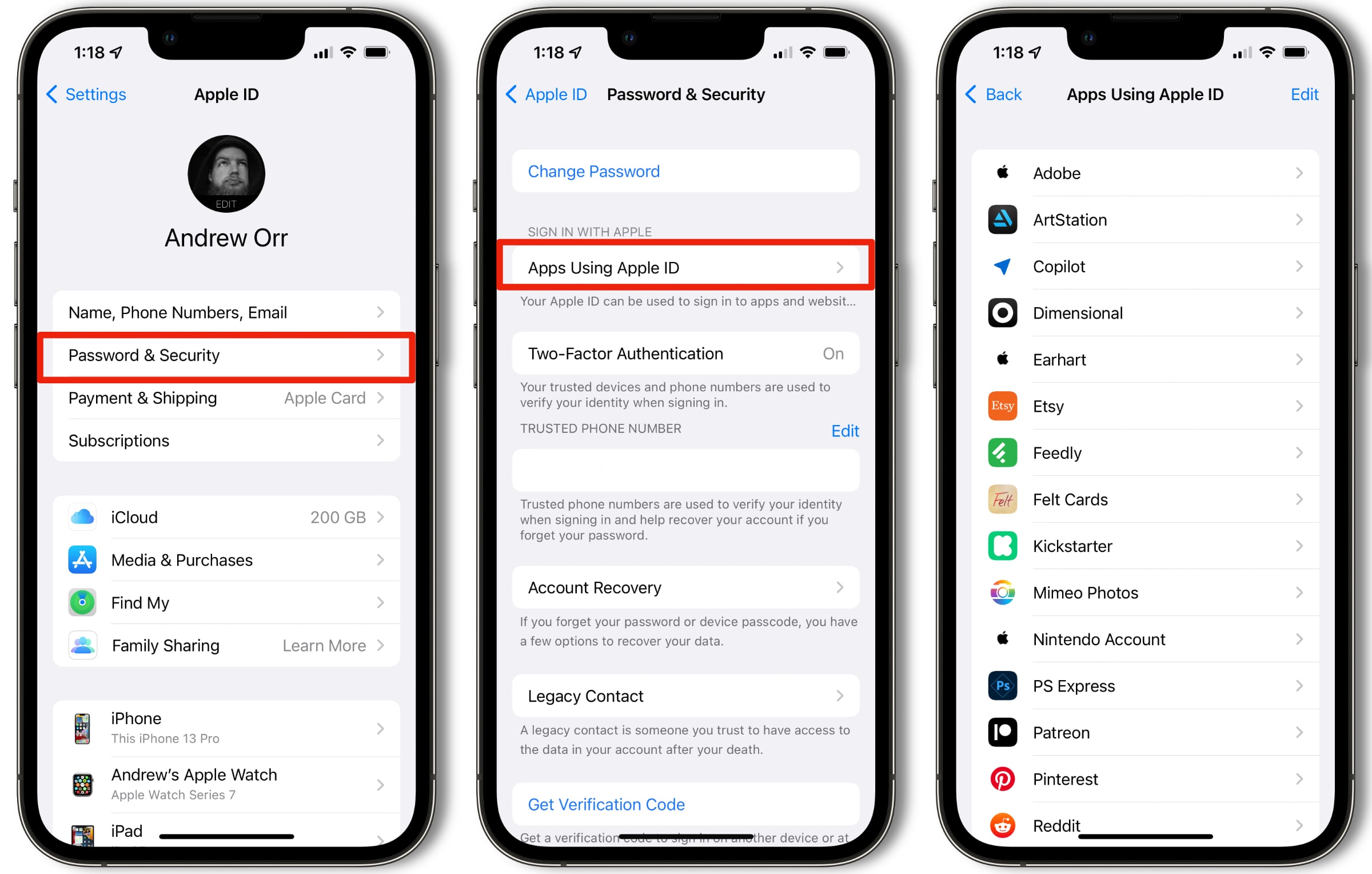
- Open Settings.
- At the very top, tap on your name, then tap Password & Security.
- Next, tap Apps Using Your Apple ID. You’ll see a list of all the apps using your ID.
- You can tap on each app and view its privacy policy, or tap Stop Using Apple ID if you no longer want to use that app. Or, you can achieve the same thing by tapping the Edit button on the upper right.
Alternatively, if you don’t want to use this feature you can use Hide My Email with Apple’s iCloud+ subscription.
Don’t miss the best of The Mac Observer
Set us as a preferred source and our Apple reporting ranks higher in your Google Search results and Discover feed — one tap, no account changes.




FYI, I’m using the latest IOS update.
I just found it under privacy and security. I have one (new) app using my Apple ID. I just got an iPhone 11. Hope this helps.
Just an FYI – checked some friends iPhones – 7Plus, 8Plus, X, 11, 11Pro Max, all running iOS 13. No one has that. Maybe you’ve got a preview by accident ?
I just updated the article to note that you have to actually have a Sign In with Apple account for it to appear.
Not sure where you are – but my iPhone 11 Max doesn’t correspond to this article.
Hmm, this is on an iPhone 7 Plus. Does it show up for you under Settings > Your Name > Name, Phone Numbers, Email?
Nope, not there either.
My iPhone Xs Max doesn’t show that either.