

Mac users looking to dive into 3D modeling have more options than ever. Whether you’re designing for architecture, animation, product prototyping, or game development, macOS supports a wide range of powerful 3D software. This guide highlights the best tools available in 2025, with a focus on usability, versatility, and compatibility with Apple Silicon.
Table of contents
Choosing the Right 3D Software for macOS
Blender
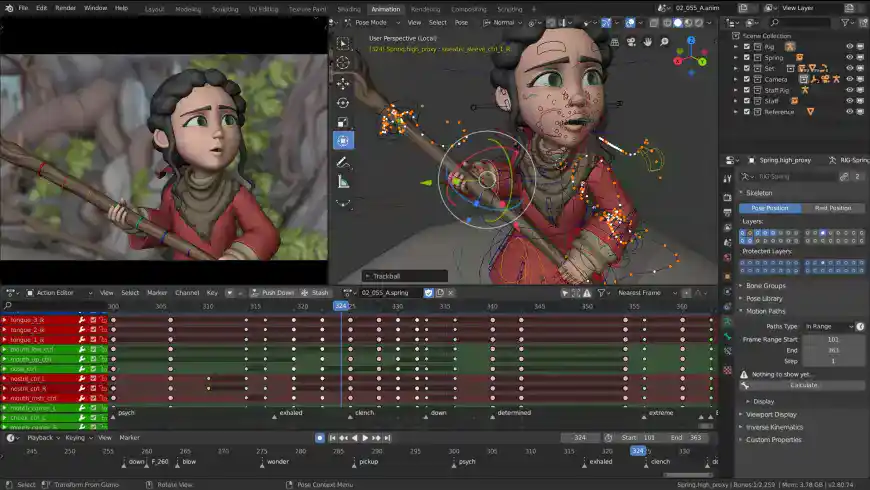
Blender is one of the most popular free 3D modeling tools available for Mac. It supports modeling, sculpting, animation, rendering, and even video editing. Its open-source nature and active community make it ideal for creators who want full control over their pipeline. Blender is compatible with macOS Ventura and optimized for Apple Silicon, making it a reliable choice for high-performance tasks.
The software also includes a built-in compositor and simulation tools for physics, smoke, and fluid dynamics. Whether you’re building game assets or animated shorts, Blender offers a complete suite of features without licensing fees. For AI-assisted workflows, you can complement Blender with the best AI software for Mac to streamline rendering and asset generation.
Don’t miss the best of The Mac Observer
Set us as a preferred source and our Apple reporting ranks higher in your Google Search results and Discover feed — one tap, no account changes.
Fusion 360
Fusion 360 by Autodesk is a cloud-based CAD and CAM tool that excels in industrial and mechanical design. It offers parametric modeling, simulation, and generative design features. Fusion 360 is free for personal use and integrates well with macOS, making it a top pick for engineers and product designers.
Its collaborative features allow teams to work on the same model in real time, which is especially useful for remote workflows. Fusion 360 also supports exporting to various formats for 3D printing and manufacturing. If you’re working with sensitive files, pairing it with the best data recovery software on Mac ensures peace of mind in case of accidental loss.
SketchUp

SketchUp is widely used in architecture and interior design. Its intuitive interface and vast library of extensions make it ideal for quick conceptual modeling. The Mac version supports real-time rendering and integrates with layout tools for presentation-ready visuals. SketchUp is especially useful for landscape designers and urban planners.
The software also offers cloud-based storage and mobile viewing options, making it easy to share models with clients and collaborators. With support for third-party rendering engines, SketchUp can produce photorealistic visuals for pitches and proposals. For post-production, many professionals pair it with the best video editing software on Mac to create compelling walkthroughs and visualizations.
ZBrush
ZBrush is a digital sculpting tool favored by character artists and illustrators. It allows for high-resolution modeling with millions of polygons, making it perfect for detailed organic shapes. While resource-intensive, ZBrush runs smoothly on newer Macs and is often used in tandem with other creative software.
Its dynamic brush system and customizable interface make it a favorite among professionals in film and gaming. ZBrush also supports integration with other 3D platforms, allowing for seamless asset transfer. For users working across multiple media types, combining ZBrush with the best AI software for Mac can accelerate concept development and texture generation.
FreeCAD

FreeCAD is a free, open-source parametric modeler suitable for mechanical engineering and product design. It supports 2D drafting and 3D modeling, with a modular architecture that allows customization. FreeCAD is ideal for users who prefer transparency and control over proprietary software.
Its active development community ensures regular updates and plugin support. FreeCAD also includes simulation tools and scripting capabilities for advanced users. While it may not have the polish of commercial software, its flexibility and cost-effectiveness make it a strong contender for Mac-based design workflows.
FAQ
Yes, most programs like Blender and FreeCAD support both Intel and Apple Silicon architectures. Performance may vary depending on RAM and GPU, but many tools offer scalable settings to accommodate older hardware.
3D Slash and FreeCAD are excellent entry-level options. For added protection while downloading software, consider using the best free antivirus software for Mac. These tools help safeguard your system from malware and corrupted installers.
Some platforms now offer AI-assisted modeling and rendering. Explore the best AI software for Mac to enhance your creative workflow. These integrations can speed up repetitive tasks and improve design accuracy.
Best 3D Software for Mac in 2025: Final Picks
Mac users have access to a rich ecosystem of 3D tools, from beginner-friendly apps to professional-grade platforms. Whether you’re sculpting characters, designing mechanical parts, or visualizing architectural spaces, there’s a solution tailored to your needs.
For a complete creative setup, pair your modeling software with the best video editing software on Mac to bring your projects to life. This combination ensures a seamless workflow from concept to final render, making your Mac a powerhouse for 3D design.



We need M5 Ultra iPad Studio to tackle these high end Applications at the iPad and iPadOS at the ‘Touch’ level And thus enabling porting and running the Mac software on the ‘Mx Ultra iPad Sudio.’