

If you just dropped your new iPhone, the first step is to inspect it carefully and back up your data. Focus on checking damage, protecting your data, and reviewing repair or coverage options.
Table of Contents
What To Do if You Just Dropped a Brand-New iPhone
Inspect the iPhone for Visible and Hidden Damage
Start with a physical inspection before turning to repairs. Look for cracks, dents, display issues, or camera problems.
Time needed: 15 minutes
- Examine the screen under bright light for cracks or lifted edges.
- Check the back glass and camera lenses.
- Press the Side Button and Volume Buttons to confirm they respond properly.
- Open Camera and test photo and video focus in all lenses.
- Play audio to verify speakers work correctly.
If your brand new iPhone appears broken, avoid charging it until you confirm there is no structural damage.
Don’t miss the best of The Mac Observer
Set us as a preferred source and our Apple reporting ranks higher in your Google Search results and Discover feed — one tap, no account changes.
Back Up Your Data Immediately
Even if the device seems fine, internal damage can appear later. Protect your information before troubleshooting further.
- Go to Settings > [Your Name] > iCloud.

- Tap iCloud Backup.
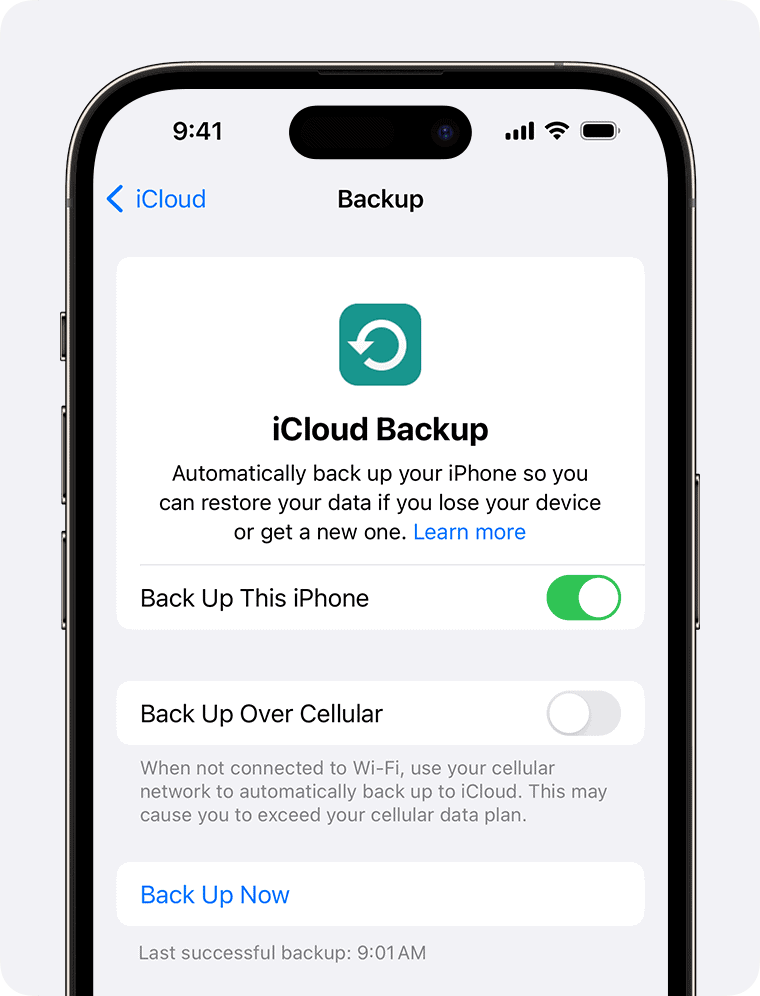
- Select Back Up Now.


You can also connect to a Mac and back up using Finder.
Check AppleCare+ and Warranty Coverage
AppleCare+ covers accidental damage with a service fee. Standard warranty does not cover accidental drops.
- Open Settings > General > About.

- Tap Coverage to review AppleCare+ status.

- Visit Apple Support to check service options.


If you plan to return a new dropped iPhone, review the retailers return policy first. Accidental damage usually disqualifies standard returns.
Schedule an Official Repair or Evaluate Third-Party Options
If you need to fix a broken new iPhone, Apple or an authorized service provider is the safest option. They use genuine parts and maintain warranty coverage.
- Open the Apple Support website or app.
- Select iPhone > Repairs & Physical Damage.
- Choose in-store or mail-in service.
Independent repair shops may cost less, but they can affect warranty eligibility.
Dropped a New iPhone? Check These Tips
- Use a protective case and screen protector immediately.
- Avoid further drops before inspection.
- Test Face ID, Wi-Fi, Bluetooth, and cellular signal.
- Do not attempt to open the device yourself.
FAQ
Can I return a broken new iPhone?
Retailers generally reject returns with accidental damage unless covered by AppleCare+ or protection plans.
Only manufacturing defects qualify under standard warranty, not accidental drops.
Costs vary by model, and AppleCare+ reduces the service fee significantly.
Summary of What To Do if You Just Dropped a New iPhone
- Inspect your iPhone carefully for damage.
- Back up your data immediately.
- Review AppleCare+ and warranty coverage.
- Schedule a certified repair if necessary.
When dealing with dropped iPhone scenarios, quick inspection and backup protect your data, while certified repair ensures long-term reliability.


Discussion