
If your camera saves a RAW file and a JPEG for the same exposure, Photos on Mac can show the pair as one library item. Photos initially uses the JPEG as the original. When you want to develop the camera’s RAW data yourself, switch the source inside the editor. There’s no need to take a second picture or import the JPEG again.
Start with the camera pair
- In Photos, open the shot you imported from a camera set to save RAW + JPEG. If you copied files from an SD card, verify that both the camera’s RAW file and the matching JPEG were present.
- Double-click the photo, then click Edit. Open the Image menu in the Mac menu bar and choose Use RAW as Original. The command applies to the photo you are editing.
- Look at the image before moving any sliders. The camera’s JPEG may already have applied a stronger contrast curve or a different color treatment. A different-looking starting image is expected.
- Make your adjustments and click Done. For example, try recovering detail in bright clouds before adjusting contrast across the entire photograph.
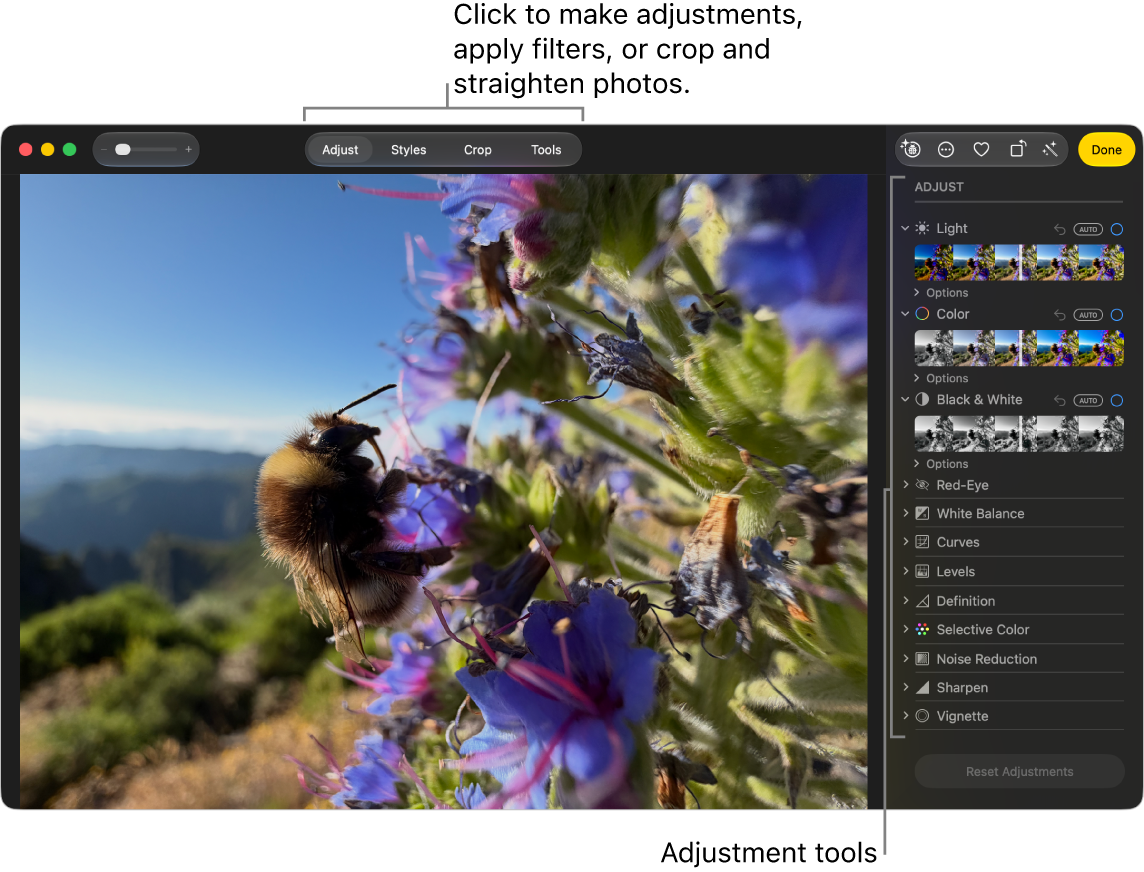
If the command isn’t available
Make sure you’re in Edit mode for one photograph. A JPEG downloaded from an email or selected on its own is just a JPEG, even if the camera originally recorded both formats. Changing the extension or using a RAW export preset cannot restore sensor data that was never included. A camera file imported on its own as RAW already has a RAW source to edit.
If you want to compare two finished renditions, duplicate the photo before working on the second version. Photos documents Image → Duplicate 1 Photo and the M key for temporarily comparing an edit with its original. The M key compares the current edit with its source, so it serves a different purpose from keeping two finished copies. Apple’s RAW source instructions and Photos editing controls.
Don’t miss the best of The Mac Observer
Set us as a preferred source and our Apple reporting ranks higher in your Google Search results and Discover feed — one tap, no account changes.
Discussion