

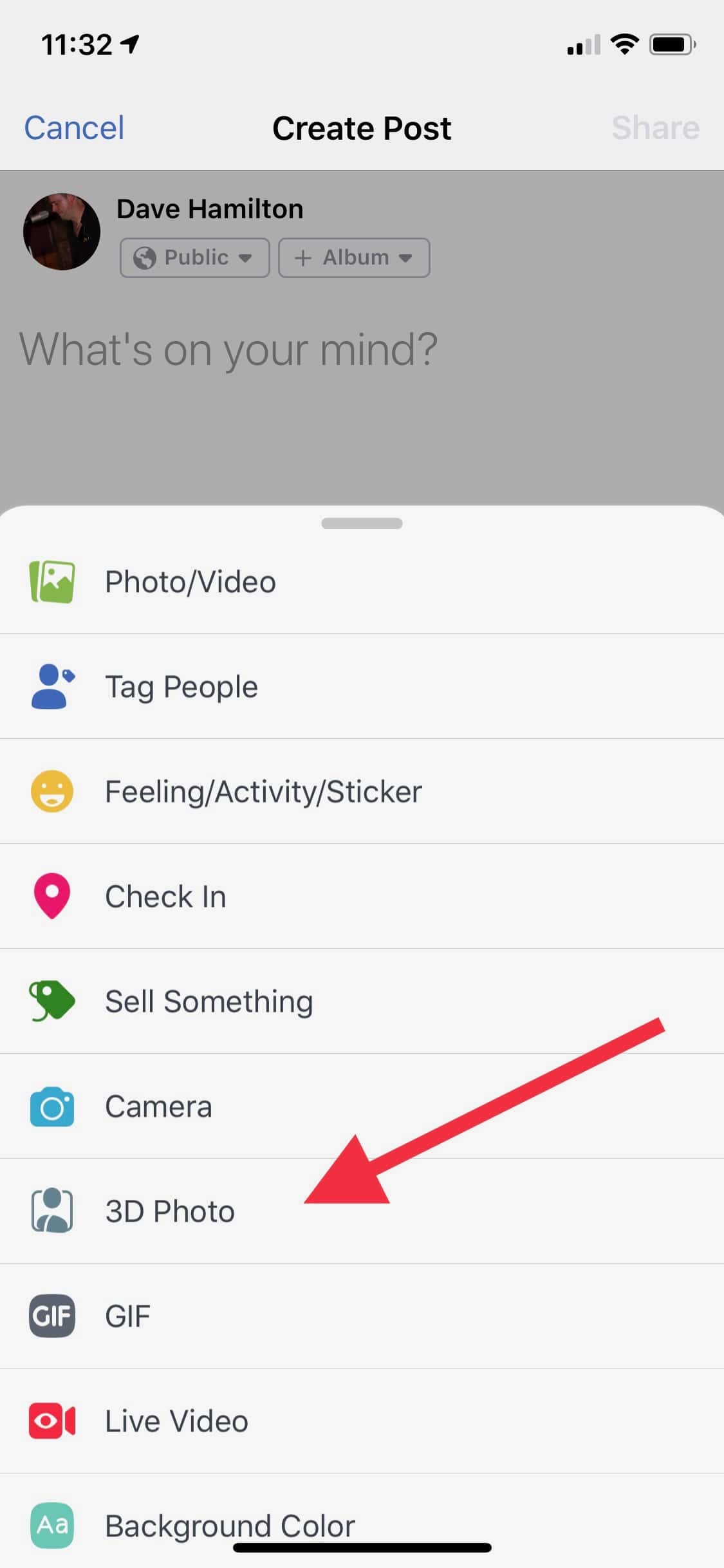
Facebook recently started rolling out 3D Photos for iPhone users. Problem is, not everyone has it yet and you want it. Thankfully, Apple-industry legend, Sam Levin, found a path and posted the instructions for us all.
To add 3D Photos to Facebook on your iPhone
- Launch the Facebook App
- “Like” the Facebook 360 Page on Facebook (this is the trick!).
- Force Quit the Facebook app on your iPhone.
- Relaunch Facebook and create a new post. You’ll see the “3D Photo” option in the list of things you can add to your post.
Facebook will only use Portrait Mode photos for its 3D Photos option. Portrait Mode is currently supported by the Camera app on iPhone 7 Plus, iPhone 8 Plus, iPhone X, iPhone XS, and iPhone XS Max.
Thanks, Sam! And if you want to see an example of this, check out the photo I added to my own feed this morning.
Edit, December 3, 2018: The iPhone XR can take Portrait Mode photos but, as of December 3, 2018, Facebook has not yet updated their app to include this model in their lists. For that matter, the iPad can view and contain Portrait Mode photos in its library, and yet Facebook’s app also won’t let that device post Portrait Mode photos. Go figure.
Don’t miss the best of The Mac Observer
Set us as a preferred source and our Apple reporting ranks higher in your Google Search results and Discover feed — one tap, no account changes.


It was never stated that you could make use of XR to take 3D photographs, they said in the reverse direction. even though it has the portrait mode, it is still not possible to utilize it on Facebook I am frustrated that it isn’t possible to use it on any mobile device or other computer. I am also sharing your displeasure. This post is in response to a person who asked the user to remove XR from the tutorial because you cannot use it to take 3D photographs on Facebook however, I explained that’s precisely what the tutorial says that you’re not able to do with XR.
I follow the steps and it worked, thanks for the details and screenshot.
Great. thanks for your sharing
Well gonna try this later. Hope it works
Amazing, but can I also convert 2D image into 3D from Facebook?
Thanks for sharing the step by step guide for this method.
Thanks for sharing this guide.
They never said that you can use XR for 3D photos they were saying then opposite they were saying despite it having a portrait mode you are still unable to use it on Facebook i two find it frustrating that you can’t do it on any phone or any computer I share your frustration. This is a response to someone who asked them to take xr off the tutorial as you can’t take 3D photos on Facebook but I was explaining that that’s exactly what the tutorial mentions that you are not able to use XR.
Force Quit the Facebook app on your iPhone. Relaunch Facebook and create a new post. You’ll see the “3D Photo” option in the list of things you can add to your post.
Can you remove the XR from your site about 3D photos as it can’t be done users on facebooks 360page day you need a duel camera to do this on Facebook
Good point. Edit made!
I tried this too but it didn’t work. Will it just not work with the XR?
I think @davehamilton did a quick poll elsewhere about the XR and this feature and found it wasn’t available. The assumption at that stage was that Facebook hasn’t added the XR to an internal list of devices that can use the 3D feature.
Indeed, that seems to be the case. Hopefully a future nondescript Facebook update will address this for us all!
I followed step by step. It didn’t work. I have an iPhone X. Any ideas??
Thanks Dave! I just sent you a friend request