
Apple Pay lets you store debit and credit card information and use your iPhone, Mac, and Apple Watch as a wallet. Here’s how to manage your Apple Pay billing and shipping address.
[Here’s How to Add Money to Apple Pay Cash or Change Linked Bank Card]
Apple Pay Billing & Shipping
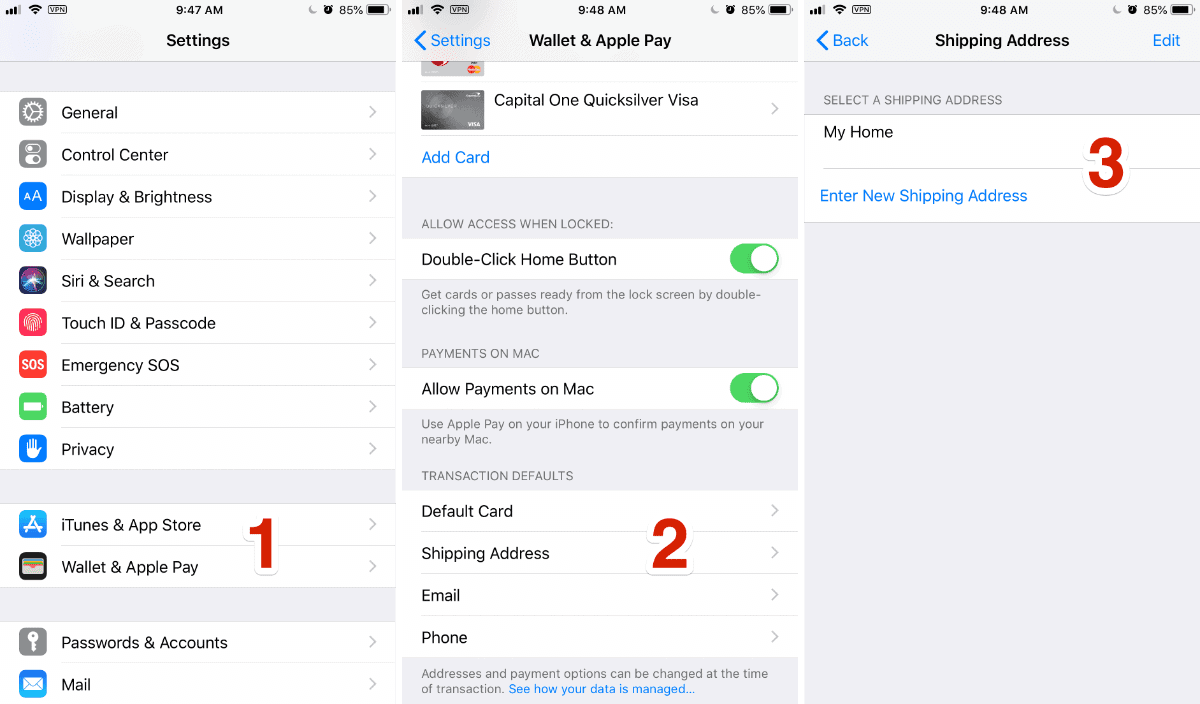
- Open Settings.
- Scroll down until you see Wallet & Apple Pay, and tap on it.
- At the bottom, you’ll see a section called Transaction Defaults.
- This is where you can change your default card, shipping address, email, and phone number.
- Tap on Shipping Address, then tap Enter New Shipping Address. You can either search for a contact with that address, or enter it manually.

[Belgium Apple Pay Coming in the Next Few Weeks]
Don’t miss the best of The Mac Observer
Set us as a preferred source and our Apple reporting ranks higher in your Google Search results and Discover feed — one tap, no account changes.


Discussion