
Apple says an iMac with pro features is coming later this year, but didn’t elaborate on exactly what that entails. Jeff Butts and Dave Hamilton join Jeff Gamet to talk about what they’d like to see in the new model. Spoiler: they were able to distill that down to two words.

Apple Settles Unwired Planet's Patent Infringement Case Hours Before Trial
Unwired Planet’s patent infringement lawsuit against Apple is finally over because the two companies reached an undisclosed settlement just a day before they were scheduled to go to trial. The agreement most likely includes Apple writing a big check, and the patent holding company agreeing to leave the iPhone and Mac maker alone.

Bloomberg Backs Up iPhone 8 Big Screen Design Reports
Another report is out saying the iPhone 8 will sport an almost bezel-free display, and this time it’s from Bloomberg. This one backs up what we’ve already heard: A bigger display in an iPhone 7-size body, curved glass edges, OLED, and no physical Home button.

Logitech POP Smart Button Gets HomeKit Support
Logitech’s POP Smart Button is getting HomeKit support, and its POP Smart Button Kit will be available in Apple’s retail stores. The button supports a wide range of devices, so you can use it to control non-HomeKit gear, too.
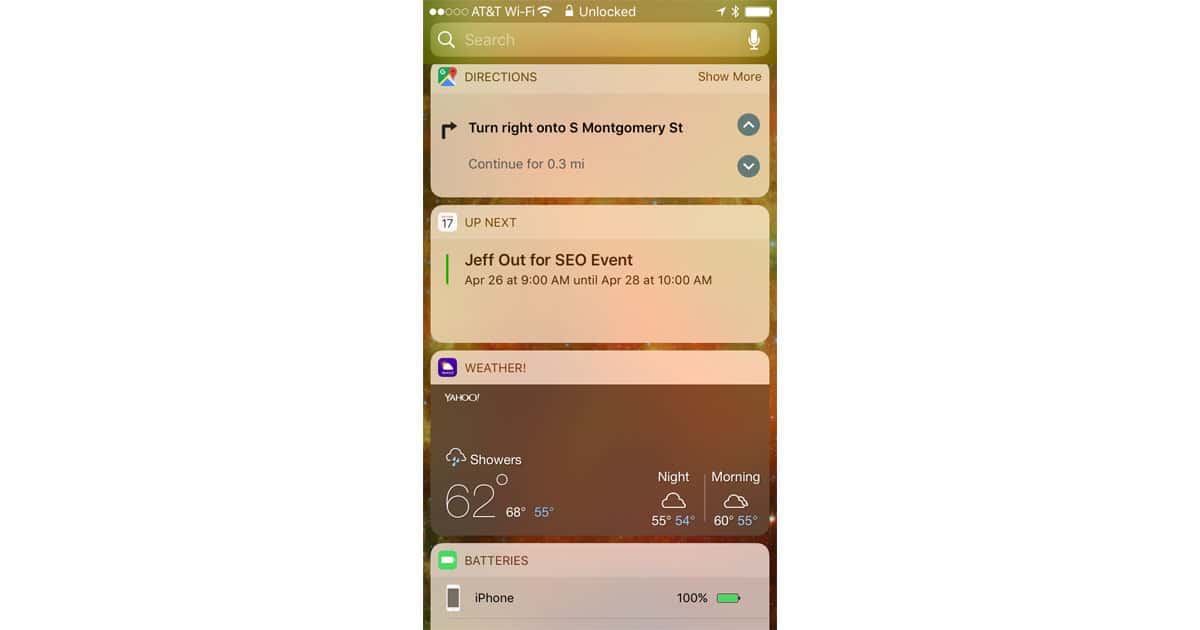
Google Maps for iOS Adds Turn-by-Turn Directions to Lock Screen Widget
Google updated its Google Maps app for iOS Monday. Version 4.30’s chief new feature is turn-by-turn directions on the lock screen courtesy of a Directions widget. With that widget, users can arrow through each direction in any active route from the lock screen or the Today view (swipe left on the Home Screen). Users can also send their location via Google Maps through iMessage. Both features give Google Maps a dramatically more integrated experience in iOS, erasing some of the pain points of not being the built-in Maps service for Apple’s mobile operating system. The Directions widget will need to be added to your lock screen, while the location feature is available through iMessage. The update is free, meaning you remain the product.

A Full Screen 'iPhone X' Leak I Can Get Behind
KK Sneak Leaks has posted a leak of what’s supposed to be Apple’s full-screen iPhone, the so-called iPhone X. I don’t know if it’s real, but it’s a leak I can get behind. And for what it’s worth, KK gave it a 99% reliability. Bryan Chaffin takes us on a tour.
A Video Tribute to Carrie Fisher
The collective heartbreak when Carrie Fisher died in December was felt around the world. The Star Wars channel on YouTube has posted a wonderful “Tribute to Carrie Fisher” that is beyond delightful and amazing. It spans the decades of her involvement with Star Wars, including some outtakes, interviews, and scenes from the movies. Enjoy, and remember, if anyone asks: you were chopping onions.

Technical Evolution Can Leave Companies Behind That Caused it
Companies have to be careful about grand projects that don’t serve as a foundation, change rapidly, and sometimes incur legal difficulties. This week’s Particle Debris looks at how Google Book Search foundered from a lack of commitment and legal troubles, VRML morphed into purer VR, the strained evolution of tvOS, cute robots putting laborers out of work, the rapid evolution of self-driving cars, and how Amazon CEO Jeff Bezos plans to keep his company from a slow, painful demise. These are examples of how technical evolution can double back on the very companies that spawn it.

CoBattery iPhone Charging Case Comes with 2 Swappable Batteries: $59
We have a deal for you on CoBattery, an iPhone charging case that comes with two swappable batteries. It’s designed to let you never have to plug your iPhone in again. Instead, your iPhone charges from the battery case while the second battery recharges. It’s $59 through us, with models for iPhone 6/6s/7 and iPhone 6/6s/7 Plus.

TMO Background Mode Interview with Computerworld Apple Holic Jonny Evans
Jonny Evans is a self-admitted Apple Holic who lives in the UK and writes terrific analysis of Apple for Computerworld. He has a lot to say, and so he also has his own blog called Apple Must. Jonny is one of the most insightful technical journalists to cover Apple. His articles are always compelling and well researched. Amazingly, Jonny started off as road crew for rock & rolls bands. Pretty soon he was organizing and promoting events. The leaflets got more and more sophisticated, and that led him to realize his passion for writing. One day, a writing job opening at Macworld UK appeared, and he landed the gig. In the second segment we covered everything Apple, and Jonny’s informed perspectives really came out. You’ll want to hear what he has to say.