
You can now download iPhone 12 and iPhone 12 Pro device frames from Apple’s design resources website.
Developers

James Thomson of PCalc – TMO Daily Observations 2020-10-26
Today, James Thomson of PCalc sits down with host Kelly Guimont to chat about developing apps for Macs through (several) processor changes.

App Store Connect 1.5 Update Brings New Icon, TestFlight
The App Store Connect 1.5 update brings a new icon that uses design language from macOS Big Sur. It also lets developers set up internal TestFlight beta testing and more. Release Notes: Add up to 100 members of your team to test beta builds of your app; edit test details for beta builds, view build activity and status, and expire builds; answer required export compliance questions; remove internal testers.

This Developer Made Over $100k Selling Custom App Icons
Developer “Traf” wrote a blog post saying he made over US$100,000 in six days selling custom app icons that can be used on iOS 14.
As soon as I noticed the hype, I put together some icons in my own style, downloaded some widgets, and tried it all out. I thought it looked cool, so I shared a screenshot of it on Twitter. Right away, people started asking about the icons in the screenshot. So I quickly packaged them, uploaded them to Gumroad, and embedded them on a Notion site using Super. All of this took about two hours.
It’s cool to see all of the customization people are doing on iOS 14, but I wonder if this developer could get into legal trouble by making money off of companies’ icons.

Apple Shares New Marketing Tools for Developers Like App QR Codes
Apple has shared new App Store marketing tools for developers to promote their apps in various ways, like generating a custom QR code.
App Store Objections and Coalitions – TMO Daily Observations 2020-09-24
Dave Hamilton and Bryan Chaffin join host Kelly Guimont to discuss the Coalition for App Store Fairness and new avenues for App Store disputes.
Apple Announces New CryptoKit APIs and Other Updates
Apple shared an update to its developer page to announce updates to CryptoKit, like new APIs and support for PEM and DER formats.

Apple Shares Details to Address iOS 14 App Privacy Questions
Apple shared an update on Thursday giving developers more information to address iOS 14 app privacy questions when it’s released.
Apple Opens App Review Process for Developers to Suggest Changes
Apple announced Monday that it has updated the app review process as announced at WWDC 2020, with a new way to suggest changes.

Apple Releases iOS 14 Developer Beta 6
Today Apple released iOS 14 developer beta 6 for iPhones, seeding only a week after iOS beta 5, reflecting the OS stability.

Some Developers Use TestFlight as an Unofficial App Store
Writing for Protocol, David Pierce shares stories from developers who use TestFlight as an unofficial App Store.
TestFlight is not an alternative to the App Store, it’s a staging ground on the way there. Developers told me Apple doesn’t review TestFlight apps very intensively, other than to make sure they’re not fundamentally broken or obviously malicious. And if Apple’s already reviewed, say, version 1.0 of your app, they say it won’t even look at 1.0.1. It doesn’t think of TestFlight as a long-term home for apps.
A cool, clever workaround to the App Store’s strict rules.

Apple Seeds Developer Beta 5 for iOS 14, watchOS 7
Apple seeded developer beta 5 for iOS 14, iPadOS 14, and watchOS 7 on Tuesday, two weeks after developer beta 4 was released.

Tidbits Managing Editor Josh Centers (#7) - BGM Interview
Josh Centers is the managing editor of TidBITS, as well as the author of many Take Control Books: Notes, Home Automation, Apple TV, co-author of Take Control of Preview. He also published Take Control of iOS 13 and iPadOS 13. And he’s recently joined The Prepared as an editor.
In his seventh appearance on the show, Josh explored the new faetures of iOS 14 and what he likes most—as he prepares for his forthcoming Take Control book. The App Libraries feature was at the top of his list. In segment two, Josh and I discussed a major, impressive research article he recently wrote about the often contentious relationship between developers and Apple and its handling of the App Store. We finished with thoughts on a next gen Apple TV 4K.

Apple Boosts App Store Security With New App Attest API
Apple is introducing a new security measure for the App Store called the App Attest API and it will be used in iOS 14 and later.

Apple Security Research Device Program Launches Today
The Apple Security Research Device program launched today, and it aims to provide special iPhones to researchers with shell access.
Apple Extends App Store Connect API Capabilities
Apple is extending the capabilities of the App Store Connect API for developers, following its redesign of the Connect website in June.

PSA: The Deadline to Add ‘Sign In with Apple’ is Tuesday, June 30
The deadline for developers to add Sign In with Apple into their apps is coming up tomorrow, June 30. Andrew has several guides available for readers.
WWDC Interview: Patrick McCarron – TMO Daily Observations 2020-06-18
Kelly Guimont is joined by Patrick McCarron, a full-time iOS Developer. They discuss WWDC 2020 and how it compares to a “regular” dubdub.
Apple Redesigns App Store Connect Website
Along with redesigning the Apple Developer app on macOS, Apple has also redesigned the App Store connect website.

Apple Developer Mac App Updated With New UI
Today Apple released a developer app on macOS called Apple Developer, which matches the iOS app of the same name. In fact, this could very well be the Catalyst version of the iOS app. The reason I think so is because I noticed my “Get App Icon” gave me the iOS icon, even though I used the Mac link. Or, that could mean nothing. The app is meant to be your one-stop guide to developer news, and also a great place to watch WWDC 2020. Stay up to date on the latest technical and community information; browse news, features, developer stories, and informative videos; catch up on videos from past Apple events and download them to watch offline. There’s also an in-app purchase to sign up for the Apple Developer Program.

How to File Great Bug Reports According to Apple
Apple shared post to its developer page to give advice on how to file great bug reports. It’s also good advice for people who like to beta test Apple software, so bookmark the page once iOS 14 and macOS 10.16 Redwood have been announced (I’m taking this opportunity to make my macOS name prediction).
You should always file feedback for any bugs you find while developing on Apple’s platforms; after all, we can’t fix problems that we don’t know about. But how can you be sure that the information you provide is helpful for triaging the issue, rather than a bug-solving dead end? Here are some of our top tips for making sure your bug report is clear, actionable, and — most importantly — fixable.
GitHub Codespaces Lets You Code Visual Studio on an iPad
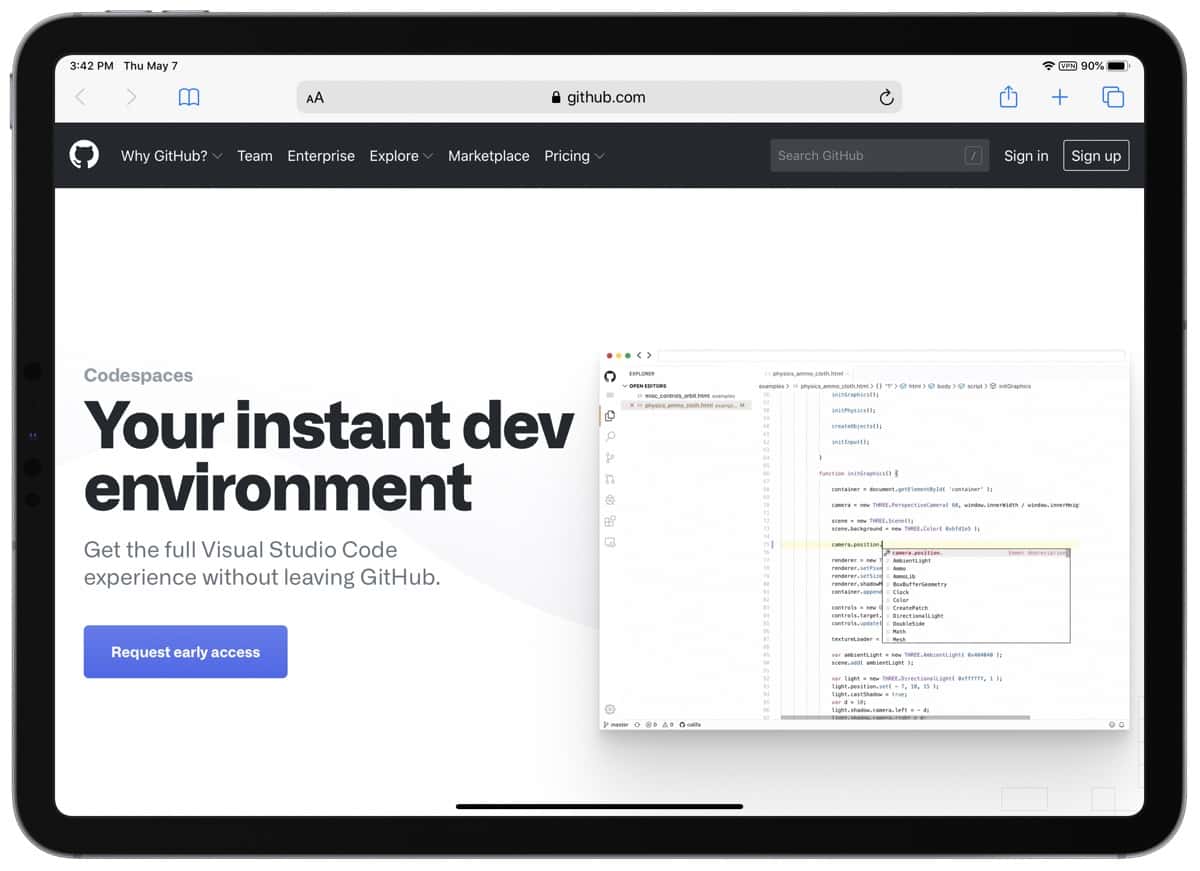
GitHub has a new tool it’s working on called Codespaces. It gives you a full Visual Studio coding experience in a browser. This means it can work on an iPad, Mac, and PC.
Codespaces sets up a cloud-hosted, containerized, and customizable VS Code environment. After set up, you can connect to a codespace through the browser or through VS Code.
I think this is exciting news. I don’t having programming experience but one argument in the “iPad computer replacement” debate is that developers can’t code on it.

Over 750 Courses on AWS, Azure, Python, Linux, SQL, More: $79.99
We have a deal on the Complete Developer & IT Pro Library, a collection of more than 750 training courses covering Amazon Web Services (AWS), Python, Linux, SQL, Java, Microsoft, Cisco…and a lot more. The deal is for lifetime access to these courses for $79.99
Apple Previews Contact Tracing With iOS 13.5 Developer Beta
Apple released the iOS 13.5 developer beta today. In particular it includes initial support for the contact tracing API for government coronavirus apps.