
Sharing a list lets everyone see “pick up the keys.” Assigning that reminder makes it clear who agreed to do it. In Reminders on iPhone, the assignment control appears after the list is shared, and the person you choose must have joined it.
Put the task in the right list
- Open Reminders and open the actual list containing the task. If the list is still private, tap Share and send the invitation through Messages or Mail. Have the intended participant open it and accept.
- Go back to the shared list, tap the reminder and look at the quick toolbar above the keyboard. Tap the Assignment button, choose the participant and tap Done.
- Reopen the same item and look for the person’s name or avatar beside it. Ask that person to check their Assigned to Me list if they want to see their responsibilities across several shared lists.
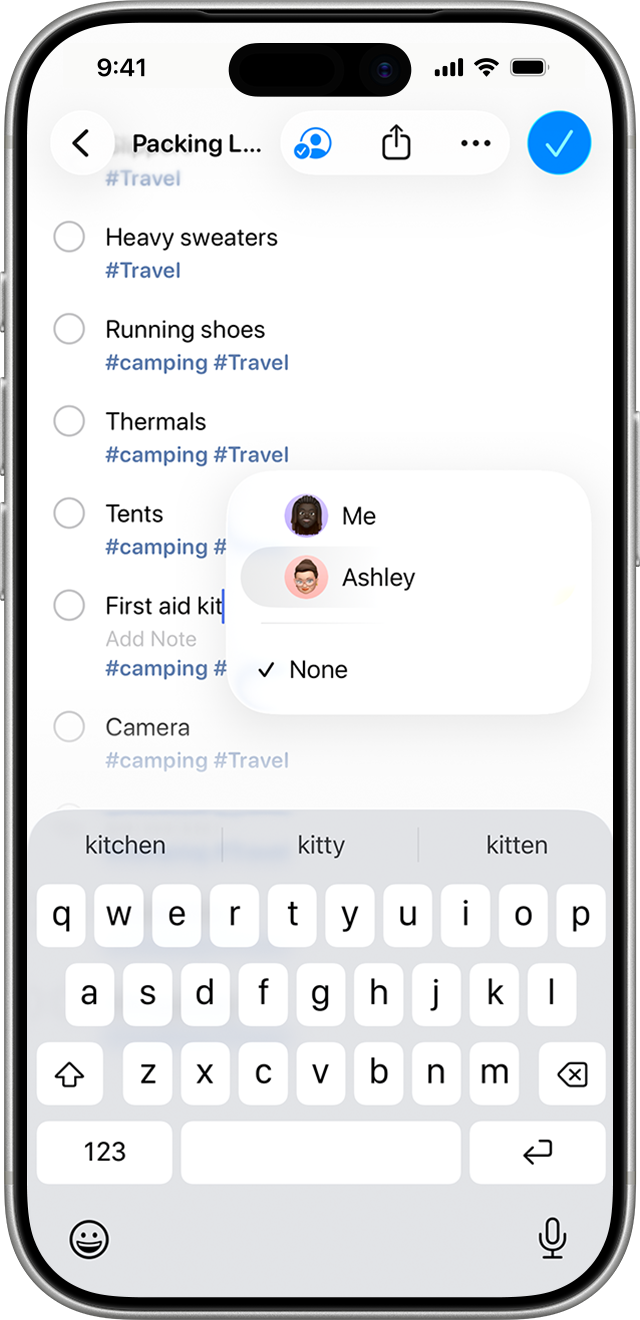
If you cannot select your partner, first check which list contains the item. A private “Errands” reminder and a shared “Household” list can sit next to each other without sharing participants. Also check whether your partner accepted the original invitation. Sending the invitation alone does not put their name in the assignment picker.
Hand a task over without making a duplicate
If someone else volunteers, tap the current assignee beside the reminder and choose Reassign. Select the new person and confirm. Use Remove Assignment to leave the task on the shared list without naming an owner. Keep the original entry so everyone sees the same completion state.
An assignment does not automatically give everyone the same personal alert. For example, you can agree who will collect the keys and have that person set their own reminder before the office closes. The options under the list’s collaboration button and Manage Shared List control notifications when people add or complete reminders. Those activity notifications serve a separate purpose from a deadline alert.
Apple’s assignment and notification guide · About Assigned to Me
Don’t miss the best of The Mac Observer
Set us as a preferred source and our Apple reporting ranks higher in your Google Search results and Discover feed — one tap, no account changes.
Discussion