

Krnl Executor has become a popular iOS tool among Roblox enthusiasts. It allows users to execute custom scripts and cheats in Roblox on their iPhones. However, using such tools comes with both advantages and risks. This article will guide you through the installation, features, and safe use of the app, along with the potential consequences of using this tool.
Table of Contents
iOS Krnl Executor: How To Install
To install Krnl Executor, follow these steps carefully:
Time needed: 15 minutes
- Go to the Krnl Executor website and navigate to the download section.
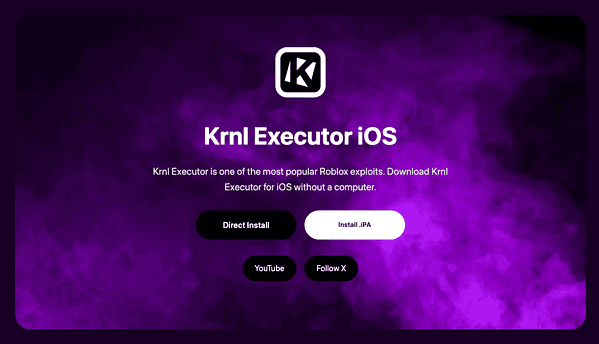
- Tap the Install .IPA button to begin downloading the app’s installation file. Alternatively, you can opt for the Direct Install method.
- After installation, go to Settings > General > VPN & Device Management
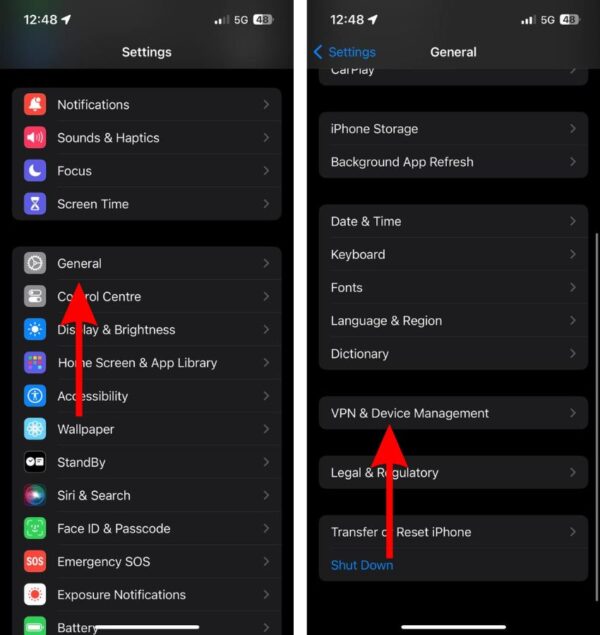
- Select the profile related to the Krnl Executor app and trust it.
- After trusting the profile, the app will be available on your home screen. Tap it to open and start using it.


 NOTE
NOTE
Main Features and Functionalities of Krnl Executor for iOS

Krnl Executor offers various features designed for Roblox users who want to explore customizations and cheats. Here are its main functionalities:
Don’t miss the best of The Mac Observer
Set us as a preferred source and our Apple reporting ranks higher in your Google Search results and Discover feed — one tap, no account changes.
- Script execution: You can run custom Lua scripts to manipulate the Roblox game environment.
- Cheats and exploits: The app allows users to apply cheats and enhance their in-game experience by bypassing certain Roblox features.
- Compatibility: The tool works on most iPhones with iOS 12 or later, allowing users to enjoy Roblox scripts on their mobile devices.
How to Safely Use the App Without Violating Terms
Using Krnl Executor can violate Roblox’s Terms of Service and the iOS user agreement. Here are steps to minimize the risk:
- Use the tool for educational purposes only: Avoid exploiting or cheating in a way that impacts other players or the game’s fairness.
- Limit your use: Using krnl executor ios occasionally and for personal projects can reduce the likelihood of getting banned.
- Keep your account safe: Never share your Roblox credentials or sensitive information when using exploits.
Tips
- Troubleshooting installation: If the app doesn’t install, ensure that you have an updated iOS version and enough storage space. You may also need to re-download the app if the installation fails.
- Stay informed: Keep an eye on updates for krnl executor ios to ensure you’re using the latest version, which may include new features or bug fixes.
- Use VPN for extra security: Some users prefer using a VPN when using exploits like this to protect their privacy and avoid detection.
Krnl Executor for iOS: FAQ
Krnl Executor is a Roblox script executor for iOS. It’s an app that lets users run custom in-game scripts and cheats on their iPhones. It allows users to manipulate the game environment using Lua scripting.
If the installation of Krnl Executor fails, check that your iOS version is supported. Additionally, make sure you have trusted the app’s profile in Settings > General > VPN & Device Management. If the issue persists, restart your device and try again.
While Krnl Executor allows you to explore Roblox cheats and scripts, using it can violate Roblox’s Terms of Service or the iOS user agreement. It may lead to your Roblox account being banned or other penalties if misused.
Summary
- Krnl Executor allows iOS users to run Roblox cheats and scripts on iPhones.
- Installation is straightforward but may require trusting the app’s profile.
- Always use the app responsibly to avoid violating Roblox’s terms.
- Use updates and VPNs for additional safety when using Krnl Executor.
In conclusion, Krnl Executor is a powerful iOS tool that enhances the Roblox gaming experience, but it comes with risks. While it’s tempting to explore new ways to play Roblox, it is crucial to stay within the boundaries of the platform’s rules. Always exercise caution and use the tool in moderation to avoid penalties. Understanding the risks and following safe usage guidelines will help you make the most of the exploit while safeguarding your Roblox account.


Good
https://github.com/krnlexecs/krnl.git