
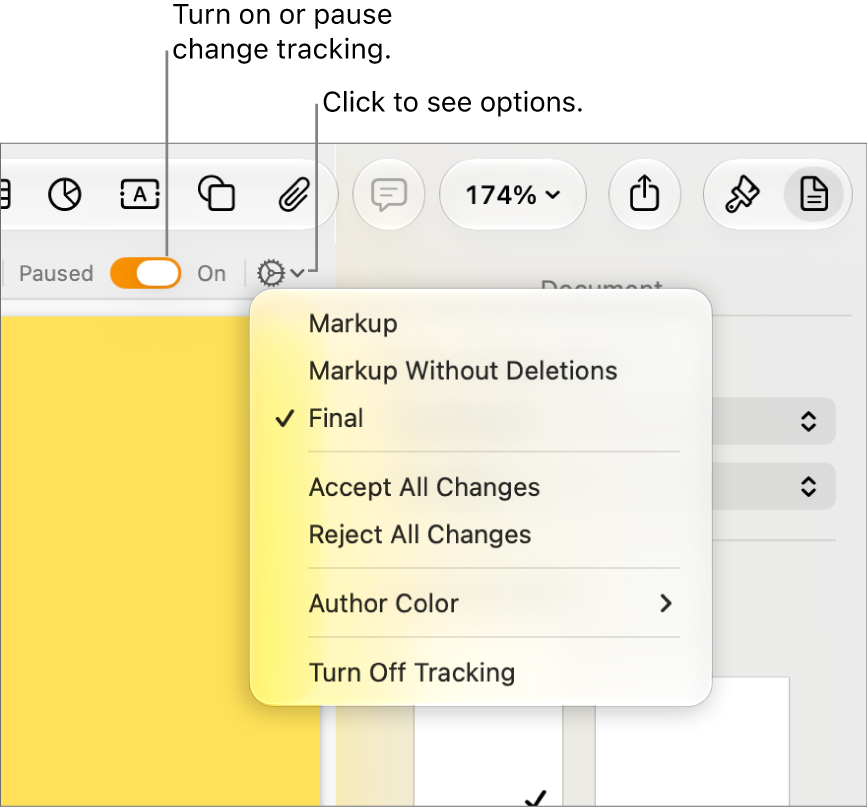
Choosing Final in Pages hides the redlining on your screen. The changes are still in the document and can reappear in another view. To give someone an editable Word file containing the agreed wording, make a separate delivery copy, resolve its tracked changes and review its comments before exporting.
Keep the original review file
Duplicate the document and name the copy for the handoff, for example Proposal – client copy. Leave the version with the editors’ discussion intact. Work in the copy even if you intend to accept every change: accepting a deletion makes the deleted words disappear from the final text.
- In the review toolbar, switch the change view to Markup. This shows removed text as well as additions. Open the Comments & Changes pane if you need to work through a long document. Check that the pane is showing all reviewers.
- Hover over a marked change and use Accept or Reject. Read the resulting sentence. For example, rejecting a proposed deletion keeps the original text, while accepting that deletion removes it. Use Accept All Changes only after you’ve approved the entire set.
- Once the changes are resolved, choose Turn Off Tracking from the review controls so final tweaks stay clean. Inspect comments separately. On the delivery copy, use Delete on any conversation the recipient should not get; deleting its top comment also removes the replies.
Inspect the file the recipient will actually open
Choose File → Export To → Word and save the .docx. Open that specific file in Word if available. Turn on its review display, open the comments pane and search for a phrase you know was deleted. Then compare a sentence containing an accepted edit with the approved Pages text.
If the recipient is supposed to review your decisions instead, retain the marked-up original for that handoff. The clean file no longer supplies the context for why one editor changed a deadline or another rejected the change.
Review and accept tracked changes · Manage comment conversations · Export a Pages document to Word
Don’t miss the best of The Mac Observer
Set us as a preferred source and our Apple reporting ranks higher in your Google Search results and Discover feed — one tap, no account changes.

Discussion