

The only legitimate ways to remove iCloud Activation Lock from a used iPhone are to contact the original owner or request removal through Apple with valid proof of purchase. Activation Lock is a security feature that ties the device to the previous owner’s Apple ID, preventing unauthorized use.
Table of contents
What Is Activation Lock?
Activation Lock is a built-in Apple security feature that automatically turns on when “Find My iPhone” is enabled. It ties the device to the owner’s Apple Account (Apple ID) and requires their credentials to activate the phone after it’s been erased or reset.
This feature was designed to deter theft and protect user data. Even if someone erases your iPhone, they cannot use or reactivate it without your Apple Account (Apple ID) and password. It’s a great tool for keeping devices secure, but it can create challenges when buying or selling second-hand iPhones if not properly removed.
Don’t miss the best of The Mac Observer
Set us as a preferred source and our Apple reporting ranks higher in your Google Search results and Discover feed — one tap, no account changes.
How to Remove iCloud Activation Lock
Step 1: Ask the Previous Owner to Remove the Device from iCloud
The easiest and most reliable way is to have the previous owner sign in to iCloud.com, go to Find My > All Devices, select the iPhone, and click Remove from Account.

Step 2: Contact Apple Support with Proof of Ownership
If you bought the iPhone legitimately but cannot reach the seller, contact Apple Support. Be prepared to provide:
- Proof of purchase (receipt or invoice showing the device’s serial number or IMEI)
- Your Apple ID (Apple Account)
- A valid explanation of how the phone was acquired
Apple may unlock the device if it’s not reported stolen and your documentation checks out.

Step 3: Selling Your Own iPhone? Disable Activation Lock First
Before selling your iPhone, go to Settings > [Your Name] > Sign Out, then erase the device via Settings > General > Transfer or Reset iPhone > Erase All Content and Settings. This ensures the new owner won’t be locked out.

All the Legitimate Ways to Remove Activation Lock
- Ask the Previous Owner (In Person or Remotely): Still the fastest, most effective solution.
- Apple Support Unlock Request: Works only if you have proof of rightful ownership and the device hasn’t been reported lost or stolen.
- Certified Reseller Assistance: Some Apple-authorized resellers can help unlock devices if you purchased from them.
- Avoid Third-Party Unlock Services: Tools or sites promising “iCloud bypass” often scam users or violate Apple’s terms. At best, they don’t work. At worst, they compromise your privacy or device.
How to Remove Activation Lock Without the Previous Owner
If you can’t reach the original owner, your only real option is Apple.
- Go to support.apple.com and start a Support Request for Activation Lock removal.
- Submit your proof of purchase, including IMEI or serial number.
- Apple will review your case. If approved, they’ll remove the lock remotely.
⚠️ Apple will NOT remove Activation Lock if:
- The device was reported stolen or marked as lost
- You don’t have legitimate proof of ownership
- The seller used a fake or mismatched invoice
Important: There is no guaranteed way to remove Activation Lock without either the original Apple ID credentials or Apple’s help.
Check for Organizational Management (Apple Business Manager / School Manager)
Some used iPhones may be enrolled in an organization’s device management program like Apple Business Manager (ABM) or Apple School Manager (ASM). These devices are remotely supervised and linked to the organization’s Apple ID and cannot be removed from Activation Lock by regular users, even after erasing or restoring the device.
To check if your iPhone is supervised or managed:
- Go to Settings > General > VPN & Device Management.
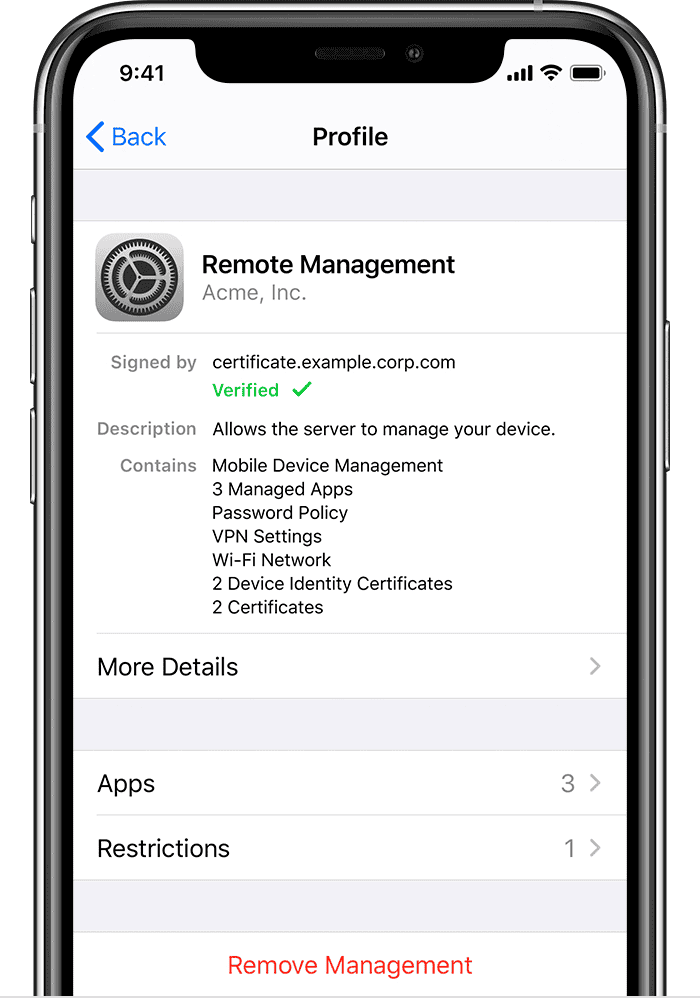
Image credit: Apple - If you see a profile listed, the iPhone may be remotely managed.
- You might also see a message during setup like: “This iPhone is supervised and managed by…”

If the iPhone is linked to an organization:
- Contact the IT department or administrator of the organization (if known) and ask them to release the device from Apple School/Business Manager.
- If this isn’t possible, Apple Support will not remove Activation Lock in most cases, even with a purchase receipt, because the device is tied to an enterprise account.
Devices enrolled in ABM or ASM are often sold by mistake or through unauthorized resellers. There is no legitimate way to bypass this form of Activation Lock without the organization’s approval.
Frequently Asked Questions
Yes, but only through the previous owner or Apple Support with proof of ownership.
Not without proper authorization. Avoid third-party services claiming to “bypass” iCloud — most are scams or illegal.
Go to Settings > Your Name > Sign Out, then erase the phone. This disconnects your Apple ID and turns off Activation Lock.
They must remove it themselves via iCloud.com or on the device. Without their credentials, you’ll need to contact Apple with documentation.
No. These tools are unreliable, risky, and often illegal. They can also damage your device or lead to a permanent lockout.
Yes, but only if you have a valid purchase receipt and the device is not flagged as stolen.
Summary
- Option 1: Contact the previous owner and ask them to remove the device from iCloud.
- Option 2: Contact Apple with proof of ownership for official Activation Lock removal.
There are no shortcuts or reliable third-party tools for bypassing Activation Lock. The process is in place to protect users, and that includes you.
Conclusion
Always ask the seller to unlock the device or provide proof of ownership. If that’s not possible, try contacting Apple Support with the proper documents.
To avoid this situation in the future, always check Activation Lock status before buying a used iPhone. You can ask the seller to erase the device and show that it’s ready for setup. Stick to certified resellers or marketplaces with buyer protection when possible.
If you purchased the iPhone in good faith, don’t give up, but don’t fall for shady “bypass” tools either.


Hey sir my iPhone locked to owner but mujhe iCloud id yade nahi
I was screwed over from day one by someone I knew for 20 years and because of her being a prostitute/drug addict (she lied trfftt m
I have a apple watch series 7 that I bought second hand. I need some support how to remove the activation lock
If you bought the Apple Watch second-hand and it’s showing Activation Lock, the cleanest way to remove it is to have the previous owner unpair/remove it from their Apple ID: they can unpair it from the paired iPhone (which automatically removes Activation Lock) or sign into iCloud.com → Find iPhone, select the watch and choose “Remove from Account.” If you can’t reach the seller, your next step is to contact Apple Support and request Activation Lock removal — Apple will ask for proof of ownership (original receipt or invoice showing the watch’s serial number/IMEI and your purchase) before they help.