

The mobile web experience is often marred by intrusive advertisements, slowing down page loads, draining battery, and compromising privacy. For iPhone users, reclaiming a fast, clean, and secure browsing environment starts with a powerful ad blocker. These apps integrate seamlessly with Safari and other browsers, providing a firewall against disruptive trackers, banners, and video ads, making your internet use significantly more enjoyable and efficient.
Table of contents
Key Features of Top-Rated iOS Content Blockers
1. AdGuard

AdGuard stands out for its robust feature set, offering ad-blocking capabilities that extend beyond the Safari browser to protect against in-app ads as well. It provides advanced tracking protection filters, speeds up page loading, and helps conserve cellular data. Users can customize filter lists to control exactly what is blocked, ensuring a personalized ad-free experience while maintaining a high level of privacy.
2. Total Adblock

Total Adblock consistently ranks high due to its near-perfect performance in tests against various ad types, including pop-ups, video, and banner ads. The app is highly effective and simple to set up, making it ideal for users who want maximum protection with minimal effort. It is an excellent solution for those looking to effectively block YouTube ads on iPhone and secure their browsing sessions instantly.
Don’t miss the best of The Mac Observer
Set us as a preferred source and our Apple reporting ranks higher in your Google Search results and Discover feed — one tap, no account changes.
3. 1Blocker

Designed specifically for the iOS ecosystem, 1Blocker offers a native content blocking experience within Safari. Its strength lies in its modular approach, allowing users to select what they want to block from ads and trackers to social media widgets and comment sections. For those who frequently encounter disruptive interruptions, 1Blocker offers granular control over which elements are hidden, including common pop-up ads on iPhone.
4. AdLock
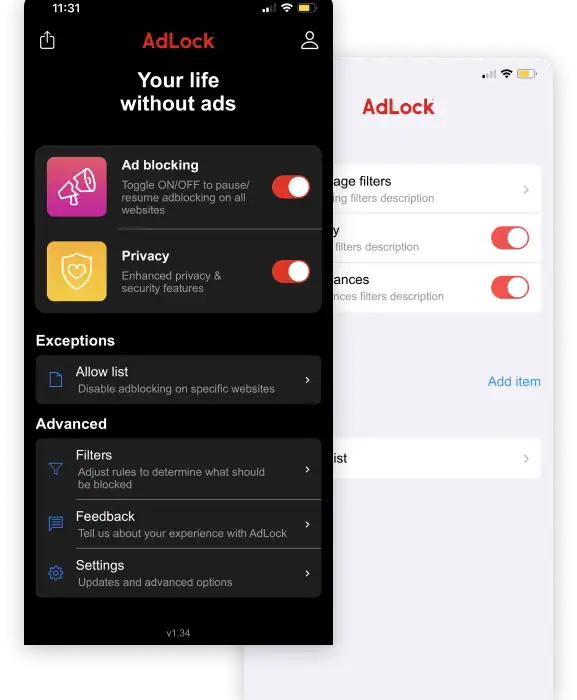
AdLock delivers a clean browsing experience by removing all forms of intrusive advertising, including video ads and banners. Its comprehensive approach often extends to apps beyond the browser, depending on the iOS settings and type of ads. Choosing a blocker like AdLock can dramatically improve mobile security and speed, allowing you to focus on content rather than constant promotional distractions, even shielding against unwanted social media promotions and X (formerly Twitter) ads on iPhone.
FAQ
Generally, no. By preventing resource-heavy ads and tracking scripts from loading, ad blockers actually reduce CPU load and data consumption, which often results in improved page loading speeds and better battery life.
Download the app from the App Store, then go to Settings > Safari > Extensions (or Content Blockers). Find the app you installed and toggle the switch to the On position to activate the filtering.
All listed options block ads in Safari. Some comprehensive blockers, like AdGuard and AdLock, offer advanced features (often paid) that use VPN or DNS filtering to block ads that appear within other non-browser apps, providing device-wide protection.
Optimizing Your Private Mobile Experience
Selecting the right ad blocker is the first critical step toward a faster, more secure mobile life. Whether you prioritize advanced configuration like 1Blocker or broad coverage like AdGuard, the shift from ad-saturated browsing is transformative. It is important to know that while effective, some apps may occasionally block content you need, requiring you to temporarily learn how to turn off the pop-up blocker on iPhone or disable the ad blocker for specific websites. Choose the app that best fits your daily browsing habits and gives you peace of mind.




Discussion