

Do you want to keep your iPhone battery healthy as long as possible? Optimized battery charging on iPhone is a built-in feature that helps reduce battery wear over time. It learns your charging habits and limits how long your battery stays fully charged.
In this blog, you’ll learn what optimized battery charging is, how to enable or disable it, and why the feature is essential for your iPhone!
Table of contents
What is optimized battery charging on iPhone?
About
Optimized battery charging is a smart feature that delays charging past 80 percent until just before you normally unplug your iPhone. It learns your daily routine and applies machine learning to reduce the time your battery stays at full charge, which helps keep the battery healthier longer.
Don’t miss the best of The Mac Observer
Set us as a preferred source and our Apple reporting ranks higher in your Google Search results and Discover feed — one tap, no account changes.
Purpose
Its main goal is to reduce the chemical aging of your lithium-ion battery. Keeping the battery at 100 percent for a long time stresses it and accelerates degradation. Optimized battery charging reduces that stress, helping extend battery lifespan.
Use case
This works best for people who charge their iPhones at night and wake up around the same time, such as daily commuters or office workers. It holds the charge at around 80 percent overnight and finishes to 100 percent just before you usually disconnect it in the morning.
How to enable or disable optimized battery charging on iPhone?
- iPhone 15 and later (iOS 18 and above): Go to Settings > Battery > Charging. Use the slider to set a charge limit (80 %, 85 %, 90 %, 95 %, or 100 %). Optimized battery charging is available when the limit is at 100 %.
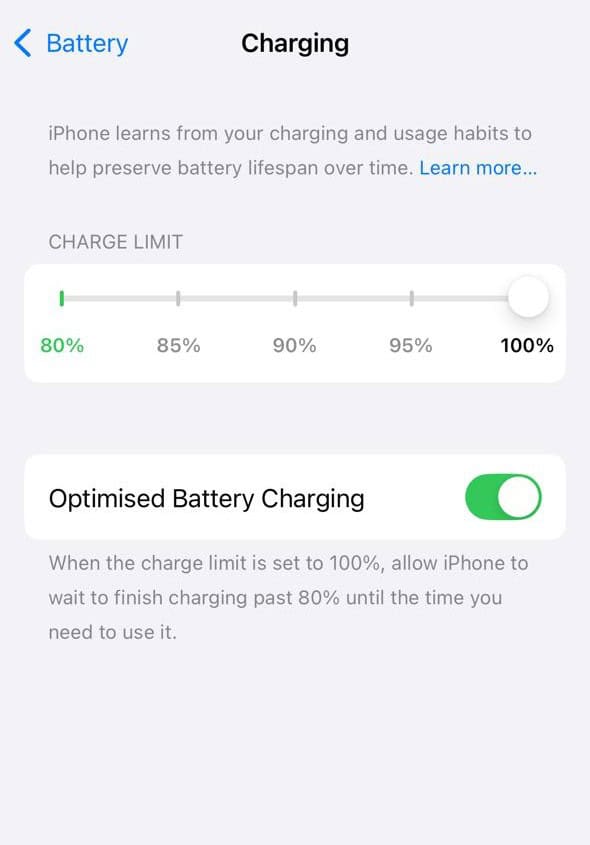
- iPhone 14 and earlier: Go to Settings > Battery > Battery Health & Charging, and turn Optimized Battery Charging on or off.


According to Apple’s official website, your iPhone needs about 14 days of regular charging patterns, with at least nine charges of five hours or more in the same location, to learn when to delay the final charging step.
Tips
Here are helpful actions you can take to protect your iPhone battery:
- Keep charge between roughly 20 % and 80 % when possible.
- Avoid charging overnight in hot places, and remove phone cases that trap heat.
- Do not use your phone while charging, since that increases heat and speeds up wear.
- Use Apple-recommended or genuine chargers and cables, not cheap fast-charge accessories.
- Keep your iPhone software up to date for battery management improvements.
- If you rarely need a full charge, use charge limit options (iPhone 15 and later) to cap at 80 % or 90 %.
Frequently Asked Questions
It usually takes about 14 days of consistent charging habits and at least nine long charging sessions in the same location.
Yes. By reducing the time your battery stays at full charge, it slows down the chemical wear and helps preserve capacity.
If you use iPhone 15 or later, the charge limit gives you direct control (like capping at 80 %), which adds more precision. If you prefer a set-and-forget option, optimized battery charging is easier and still effective.
Yes, leaving it full for hours can stress the battery. Controlling charging, such as using optimizations or limiting the charge, can reduce that stress and help prolong life.
Summary
- Optimized battery charging reduces stress by delaying full charge until needed.
- Perfect for consistent overnight charging routines.
- Set it up in Settings under Battery or Battery Health.
- Use tips like temperature awareness and proper chargers to improve longevity.
- Choose between smart learning and manual charge limits depending on your preference.
Conclusion
Taking care of an iPhone battery does not have to be hard. Optimized battery charging is built in, smart, and easy to use if you charge your phone in the same place every night.
Combine it with good habits like avoiding heat, using quality chargers, and not always charging to 100 percent, and you can keep your battery healthier longer. Over time, that means better battery performance and more value from your iPhone without extra effort.


Discussion