

A Mac is a powerful machine. However, to truly unlock its potential, you need utility software. This software is indispensable for maintaining peak performance. macOS includes basic tools like Disk Utility. Nevertheless, specialized third-party applications boost efficiency. They also automate maintenance and safeguard data much better. These tools clean deep, manage data clutter, and transform input devices. Investing in the right utilities keeps your hardware fast. It also makes your workflow efficient. Finally, it ensures your critical information is backed up securely.
Table of contents
Essential Tools for Mac System Health and Workflow
1. CleanMyMac X

CleanMyMac X is a respected utility suite. It is designed to clean, optimize, and protect your Mac. Furthermore, it excels at freeing up disk space. It intelligently locates and eliminates system junk. This includes outdated cache files and broken downloads. Log files also silently accumulate over time. Beyond just cleaning, its Smart Scan handles optimization. This involves managing login items. It also runs necessary maintenance scripts. This can dramatically improve your system speed. For users concerned with security, there’s a Protection module. This includes a powerful malware removal tool. The Moonlock engine powers this tool. It ensures threats like adware are neutralized promptly.
Moreover, the software streamlines application management. It features Uninstaller and Updater tools. Users can fully remove apps and all lingering files. Standard macOS file deletion often overlooks this capability. In addition, CleanMyMac X manages large and old files. It also visualizes storage with Space Lens. This makes it simple to declutter your digital universe quickly. It is one of the best comprehensive solutions. It repairs system issues and ensures long term Mac health. This powerful maintenance complements built in tools well. See more about finding the best Mac repair software.
Don’t miss the best of The Mac Observer
Set us as a preferred source and our Apple reporting ranks higher in your Google Search results and Discover feed — one tap, no account changes.
2. Raycast

Raycast functions as a powerful command bar. It effectively replaces the native Spotlight search. Its core strength lies in its speed. It launches applications instantly with keystrokes. It also performs calculations and searches files quickly. Crucially, this utility is built for speed. It also focuses on keyboard centric workflows. It offers a robust clipboard history manager. You also get an emoji picker. Plus, a system control interface is included. Users perform actions like putting the Mac to sleep directly.
What truly differentiates Raycast are its extensions. A vast library of community created extensions exists. In fact, these extensions turn the search bar into a productivity hub. They integrate with popular services like Jira and Slack. They also work with Spotify and 1Password. Users can create and search issues easily. They can also control music playback or translate text. All this happens without leaving the keyboard. Consequently, Raycast enables a significant speed boost. This makes it indispensable for power users.
3. BetterTouchTool
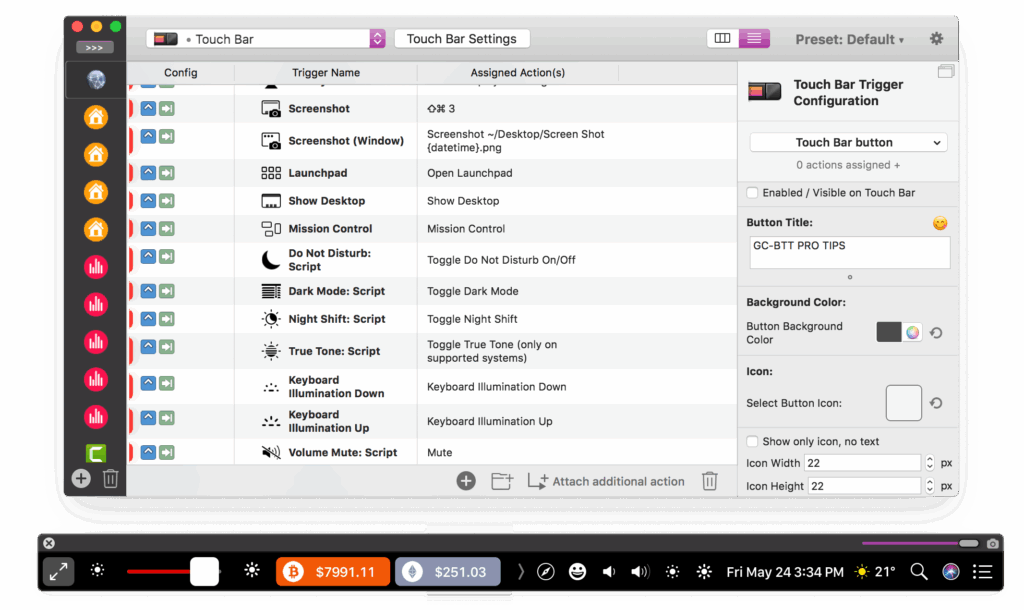
BetterTouchTool (BTT) is an exceptional automation utility. It provides deep customization over all input devices. Users assign custom actions and workflows easily. These map to trackpad gestures and Magic Mouse clicks. They also work with keyboard shortcuts and the Touch Bar. For instance, a three finger swipe can minimize a window. A specific mouse button sequence can launch a script. It can also execute a complex macro instead. This transforms tedious tasks into fluid movements.
The tool’s power extends beyond simple key mapping. It includes robust window management capabilities. This allows for effortless snapping and resizing. Users migrating from other operating systems often desire this feature. Furthermore, BTT gives complete control over the Touch Bar. Users replace default controls with custom widgets. These widgets tailor to specific applications. Developers set up app specific shortcuts, for example. Multimedia users create unique controls easily. You can even find bundles that include useful utilities like an audio software bundle.
4. Carbon Copy Cloner

Carbon Copy Cloner (CCC) is a gold standard. This holds true for data integrity and disaster recovery. This backup utility specializes in creating bootable backups. It “clones” your entire Mac drive onto an external device. Unlike file level backups, a bootable clone allows restarts. You can restart from the backup drive immediately. This happens if your primary internal drive fails. Thus, it provides crucial business continuity for you.
CCC’s sophisticated features include Smart Updates. These only copy files that have changed. Therefore, incremental tasks become exceptionally fast. It also features a SafetyNet. This archives replaced or updated files. This gives users an extra layer of protection. Finally, CCC provides precision control. Users control exactly what data is copied. You get flexible scheduling options. It also supports creating read only snapshots. These protect against ransomware. Considering external drive maintenance is important, learn what is better than Mac Disk Utility to learn about advanced storage options.
FAQ
macOS has built in security like XProtect. This technology detects and blocks common malware. However, third party anti malware tools offer deeper scans. They also provide extra protection against specific threats. Using a combination is often the safest choice.
Many free Mac utilities are quite effective. Tools like Raycast and OnyX offer powerful features. Conversely, paid software usually offers more comprehensive suites. They also include better support and regular updates. Choose based on your specific needs.
You should generally avoid running multiple deep cleaning programs. They could conflict with each other. Nevertheless, you can safely use a cleaning app and a backup app together. Ensure they target different aspects of your system.
Maintaining Your Mac’s Optimal System Performance
Utilizing Mac utility software is the most effective approach. It leads to system longevity and streamlined productivity. Specifically, combine automated cleaning and personalized controls. Add robust bootable backup strategies, too. You can maintain a responsive and efficient computer. This proactive maintenance ensures your Mac operates at its best. It minimizes downtime and maximizes hardware value. Learn how to repair your Mac disk with Disk Utility.


Discussion