

Apple Mail is the default email application for macOS and iOS. It offers a clean, simple experience. The app integrates deeply with the Apple ecosystem. However, many users seek advanced features. They want greater customization or enhanced productivity tools. Several third party email clients offer superior functionality. Consider an Apple Mail vs Gmail comparison. This can be key before choosing. The best alternatives provide a unified inbox. They offer strong privacy features and deep integrations. These apps transform email into a workflow manager.
Table of contents
Enhancing Your Email Workflow on Mac and iPhone
Choosing the right email application is crucial for efficiency. These alternatives offer superior functionality. They go beyond simple sending and receiving. The apps incorporate features like AI assistance. They also offer robust calendar management. Users who need to manage their inbox elsewhere should know how to access Apple Mail on Windows may be helpful. Keep in mind these apps are highly optimized for Apple devices.
1. Spark Mail

Spark Mail earns praise for its smart features. It helps users achieve “inbox zero.” This lets them focus on important communications. The signature Smart Inbox automatically sorts incoming emails. It uses categories like Personal, Notifications, and Newsletters. Therefore, priority emails always appear at the top. The app supports a unified inbox. It works with Gmail, Outlook, iCloud, and Exchange. It provides a clean, modern interface. This interface is consistent across Mac, iPhone, and iPad.
Don’t miss the best of The Mac Observer
Set us as a preferred source and our Apple reporting ranks higher in your Google Search results and Discover feed — one tap, no account changes.
Furthermore, Spark offers powerful productivity tools. Snooze temporarily removes an email from your inbox. It brings the email back later. Send Later lets you schedule emails for optimal delivery. Spark also features collaborative tools for teams. These include shared drafts and private comments on emails. Thus, email threads become a communication hub. Spark is an ideal choice for users. They combine personal and team email management in one app.
2. Microsoft Outlook
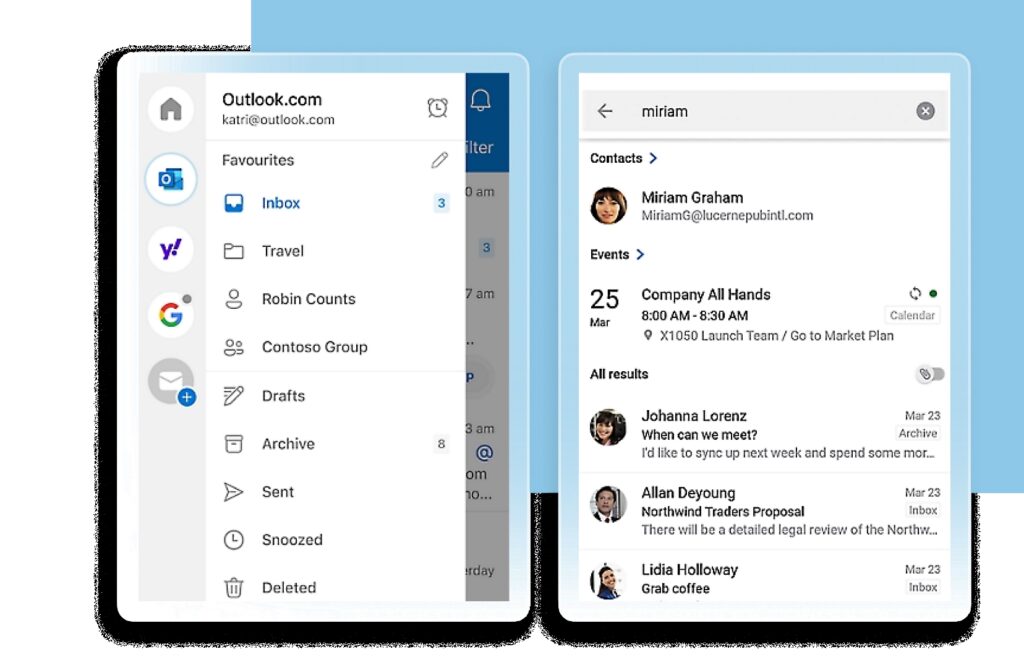
Microsoft Outlook is a long standing email client. It dominates business environments. The app has significantly evolved for the Apple platform. The modern Mac and iOS version runs fast. It offers a native experience. It integrates deeply with the Microsoft 365 suite. Its key strength is comprehensive integration. This includes email, calendar, contacts, and tasks. It is a powerful personal information manager.
Recent updates brought popular features. The Focused Inbox intelligently separates essential emails. It filters out less urgent ones. Outlook works with many account types. It provides advanced features like scheduling emails. You can also add multiple time zones to the calendar. Consequently, Outlook offers the most seamless integration. It works best for users whose work involves Exchange or Office 365.
3. Canary Mail

Canary Mail stands out for its strong emphasis on privacy and security. It offers end to end encryption for emails. This works even with recipients not using Canary Mail. This feature, plus Phishing and Impersonation Detection, is important. It makes it a preferred option for security conscious users. The app runs on macOS and iOS. It features a unified inbox. It also has a clean, user friendly design. Additionally, users who rely on the native Mail app can improve management. They can utilize Apple Mail’s advanced search features.
In addition to security, Canary Mail has productivity tools. These include an AI Copilot for writing and summarizing. Features like Read Receipts and 1-Click Unsubscribe help streamline management. Email Templates also help daily inbox handling. Canary Mail balances top tier security with modern features. It simplifies handling high volume correspondence effectively.
4. Mozilla Thunderbird

Mozilla Thunderbird is a venerable, open source email client. Users favor it for privacy and customization. They also appreciate its community driven development. Historically, it was a desktop only client. However, recent efforts focused on modernization. They also expanded its presence across platforms. It is a powerful, desktop focused application for Mac. It supports virtually every email protocol.
Thunderbird’s strength comes from its extensive configurability. It supports numerous add ons. Users can tailor the client to their exact needs. It includes built in support for calendar, tasks, and chat. This provides an integrated desktop experience. Therefore, Thunderbird remains a compelling, privacy centric choice. This is true for users who prioritize data ownership and open source. They also value a robust, multi featured desktop application.
5. Airmail

Airmail is known for its speed and extensive customization. It also offers deep integration with third party applications. It is designed for power users. It supports Gmail, Exchange, Outlook 365, and IMAP accounts. They all appear in a unified inbox. Airmail lets users customize nearly everything. This ranges from appearance with themes and layouts. It includes functionality with custom swipe gestures.
The application’s strength is its ability to integrate with external productivity services. Examples include Trello, Evernote, and Todoist. Emails convert into tasks or notes with one click. Airmail offers essential features like snooze and send later. It also offers bulk editing. All features are optimized for macOS and iOS. Airmail is a top contender. It suits users who need a fast, tailored email client. It serves as a central hub for their digital workflow.
FAQ
Yes, the native Apple Mail application is reliable. It is secure and fully functional. It works well for users who prefer simplicity. They also like tight integration with their Apple devices.
The listed clients use various security measures. Canary Mail offers end to end encryption. Others use secure server infrastructure.
Yes, all five clients support a unified inbox. You can manage multiple email accounts. These accounts can be from different providers. They all show in a single application interface.
Optimizing Your Inbox on Apple Devices
Selecting the best email client is a personal decision. It depends on your priorities. You might focus on advanced productivity or security. Extensive third party integrations might also be important. The right choice can dramatically improve how you handle correspondence. It transforms a source of stress into efficiency. Find a client that manages multiple accounts. It must provide the specific tools you need. This is the most effective way to gain control. You might also want to look into the best Apple Mail extensions to enhance the native client.


Discussion