

Apple Mail is the default email client for macOS. It offers a clean interface. Integration with the Apple ecosystem is seamless. The core features fall short for power users. Professionals dealing with high email volume need more. Complex privacy requirements also demand extra tools. Apple Mail extensions change this experience. These powerful add-ons transform the native application. They inject sophisticated features for scheduling, security, and organization. You can upgrade your email experience. This makes your digital correspondence robust and professional. It ensures your communication is secure and efficient.
Table of contents
Transforming Your Mac Inbox with Essential Mail Enhancements
The Mac App Store installs extensions. They work directly within the Mail app. This provides advanced, native-feeling functionality. The right selection of tools drastically improves your workflow.
1. Mailbutler

Mailbutler is an all-in-one productivity tool. It fills the gaps in Apple Mail. Send Later is one feature it offers. This lets you schedule emails for optimal delivery. Snooze hides an email until later. Therefore, your focus stays on immediate priorities. The tool also provides robust read receipts. Tracking is easy with this extension. Professional users manage multiple clients. They need to manage different email configurations. Consequently, setting this up effortlessly is essential. If you want to add another email account first, you can find a guide on how to add an account to Apple Mail.
Don’t miss the best of The Mac Observer
Set us as a preferred source and our Apple reporting ranks higher in your Google Search results and Discover feed — one tap, no account changes.
2. SpamSieve

Apple Mail includes native spam filtering. SpamSieve is still the most accurate option. This premium extension uses powerful Bayesian analysis. It learns from your unique email history. This effectively distinguishes legitimate correspondence from junk. It learns your definition of spam. You get a lower rate of false positives. This is critical for high-volume users. It ensures you do not miss important emails. Crucial attachments are secure and arrive. Moreover, your inbox remains clutter-free. Learn how to attach files in Apple Mail on your Mac or iPhone. This ensures your outgoing correspondence is complete.
3. GPG Suite

Users handle sensitive information. For them, GPG Suite is the security standard. This open-source extension provides full end-to-end encryption. It also offers digital signing capabilities. It uses the OpenPGP standard. It integrates directly into the Mail compose window. Thus, you easily encrypt your messages. Only the intended recipient can read it. They must have the private key. It is an indispensable privacy tool. Use it to protect your communications. Maintain your digital privacy easily. You can avoid third parties scanning your content. Sometimes, protecting privacy means knowing how to turn off Apple Mail categories on your devices. This provides a more streamlined, private experience.
4. MsgFiler
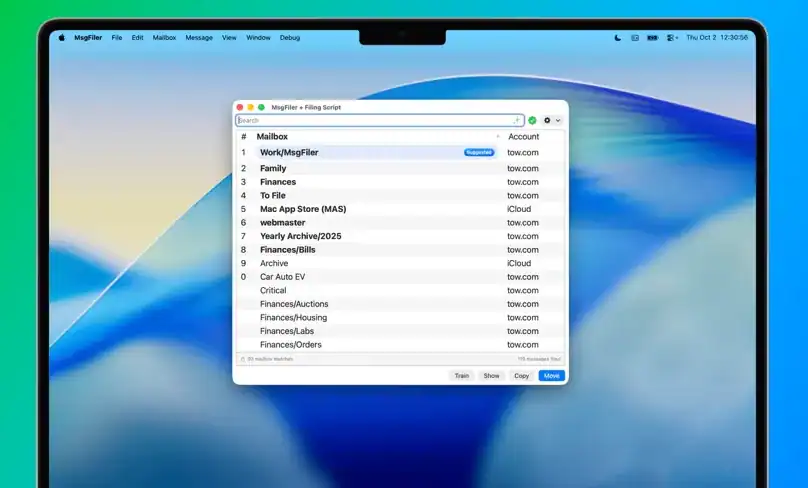
MsgFiler significantly reduces organization time. You avoid manually dragging messages into folders. Instead, this extension lets you file emails fast. It uses keyboard shortcuts and predictive search. You simply hit a key combination. Then you type the destination folder name. Consequently, the message moves instantly. Professionals process hundreds of emails weekly. This small tweak saves immense time. Maintaining a clean folder structure becomes frictionless. It ensures correct filing of crucial communication. This happens without disrupting your flow.
FAQ
Yes, Apple reviews all Mail extensions. They must be in the Mac App Store. This process ensures they meet strict security guidelines. Therefore, they are generally safe to install on your computer.
Mail extensions are currently for macOS Mail. Developers create companion apps for iOS. They sync data between devices. However, core features are restricted to Mac.
Mastering Your Inbox with Extensions
The right Apple Mail extensions transform the native application. They make it a powerful professional hub. These tools add essential features. These include scheduling and superior spam protection. Military-grade encryption is also available. Therefore, these tools ensure secure, efficient communication. Investing in these enhancements masters your inbox. Nevertheless, you might sometimes need to take a break. You can sign out of Apple Mail to maintain focus.


Discussion