

Cultured Code has released the Things 3.25 update, bringing a wide set of touch features to the touchscreen MacBook Pro. The company built this version to go well beyond basic screen taps. Instead, it turns task management on Apple hardware into something that feels much closer to using an iPhone. You can now swipe, drag, and tap your way through daily lists without reaching for a trackpad or mouse.
Swipe and drag tasks across your screen with simple gestures
Cultured Code redesigned how to-dos respond when your fingers touch the display. Moving items around or picking multiple tasks at once now happens right under your fingertips, even when your list stretches past the bottom of the screen.
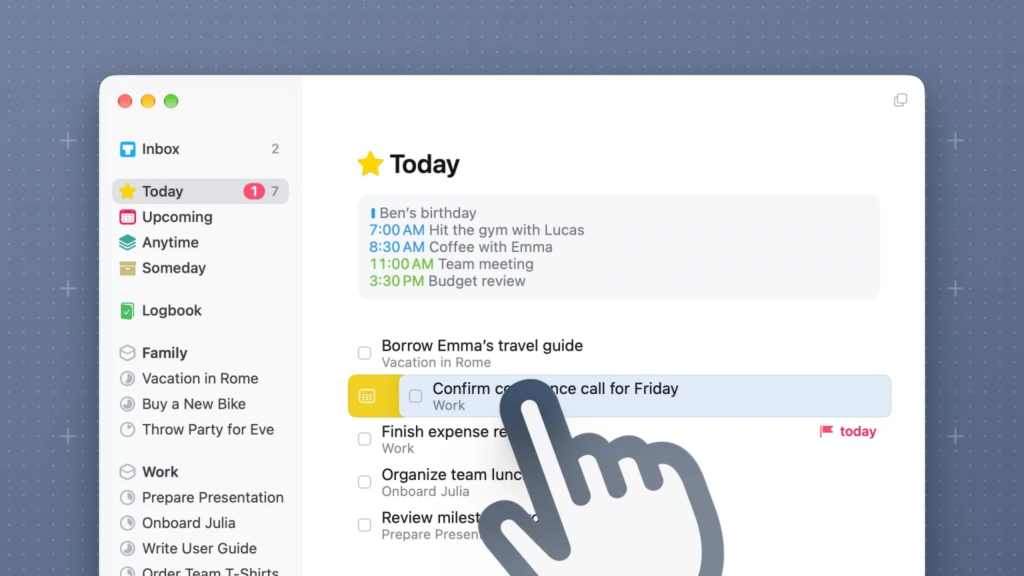
Here is how you can use the new gestures in the Mac app:
Don’t miss the best of The Mac Observer
Set us as a preferred source and our Apple reporting ranks higher in your Google Search results and Discover feed — one tap, no account changes.
- Schedule a task: Swipe right on any to-do to open the date picker. When you open this menu by touch, the rows grow taller so your fingers can tap dates without hitting the wrong line.
- Select single or multiple items: Swipe left on a to-do to select it, and swipe left again to unselect it. If you want to grab several items in a row, place two fingers on the list and swipe up or down.
- Move a whole group: Touch and hold any selected item to pick up the entire group together. You can drag individual to-dos, headings, or big groups smoothly, even if some of those tasks sit offscreen.
- Open and cancel entries: Tap a to-do once to highlight it, then tap again or double-tap to expand its details. You can also press and hold a checkbox to cancel a to-do or a single checklist item.
Bigger buttons and wider menus make finger navigation much easier
Beyond new gestures, Cultured Code adjusted the layout across the entire app so it works better on a touchscreen MacBook. Custom menus automatically add extra breathing room between options whenever you open them with a finger instead of a cursor. Buttons throughout the workspace also feature larger tap targets, and resizing the sidebar by touch takes much less effort. Inside an open to-do, rearranging checklist items with your finger works far more reliably than before.
This release builds directly on the Siri AI and Spotlight updates that arrived in Things 3.24, along with earlier improvements to repeating tasks in version 3.23. Cultured Code says touch input is currently limited to the new MacBook Pro models, and the update is ready to download now on the Mac App Store.



Discussion