
Instagram rolled out a new archival feature to hide any photo you no longer want on your profile—without deleting it.
Tips

iOS: 3D Touch Folders to View Notifications
While reading news about Google I/O, Andrew Orr found that a feature coming to Android O that Apple already put into iOS. It’s a neat trick that should save you time while using iOS.

iCloud Drive: How to See the Status of Uploads
If you’ve ever uploaded a bunch of files to iCloud Drive from your Mac, you may have wondered how to track the progress of your file transfer. This Quick Tip will cover just that (plus a couple of other handy tricks for the Finder)!

macOS: Great Wallpaper is Hidden in Your Mac's Screensaver Collection
Many people love to change their wallpaper often, but finding terrific images usually requires scouring the Internet for photographs the right size. Jeff Butts has learned, courtesy of Reddit, that there are some perfect images right on the Mac, hidden in the Screensaver folder.

iCloud and iWork: Using On-Demand Downloads
Using iCloud Drive? Then you need to know how to download all of your Pages, Numbers, or Keynote files to your iOS devices automatically. This’ll definitely save you some headaches if you need access to your spreadsheets when you head out into an area with sketchy cell coverage!

Amazon's Alexa Calling Feature Works From Your iPhone, too
Amazon’s Alexa Calling feature works great on the Echo and Echo Dot, from the testing TMO staff have done so far. Jeff Butts and Jeff Gamet also took the time to check out how the feature works from the Alexa app on the iPhone. Here’s what they found out, and how you can use it, too.
macOS: Use Spotlight to Directly Search Google with this Shortcut
Andrew Orr has another cool tip from Reddit. Using a simple keyboard shortcut, you can use your Mac’s Spotlight to directly search using your default search engine. It saves you from manually going to Safari and searching from the address bar.

4 Tricks for Using Bookmarks Folders in Safari
For today’s Quick Tip, we’re going to cover some features of bookmarks folders in Safari on the Mac. Using a few handy-dandy shortcuts, you can open a bunch of your sites in new tabs or replace the existing ones! Just don’t do one thing when you meant to do the other, all right?
How to Remove Conexant Keylogger Found on HP Laptop Models
Modzero, a security firm in Switzerland, has discovered a Conexant keylogger pre-installed on certain laptop models. It’s an audio driver located in the Windows system folder. This driver automatically loads every time a user logs in. Andrew Orr shares which HP models are affected.
How to Prevent Photos and iTunes from Opening Automatically
If you’re getting sick of watching programs bounce in your Dock just because you plugged your iPhone into your Mac to charge it, then boy, have we got a Quick Tip for you! Melissa Holt’s going to tell us how to stop Photos and iTunes from opening automatically.

iOS: How to Remove Location Data From Photos on Your iPhone
If you’re a privacy conscious individual like Andrew Orr, you’ve probably wanted to remove location data from your photos before sharing them to social media. It’s possible to do this on macOS, but did you know you can do it on iOS too? Here’s how to remove photo metadata.
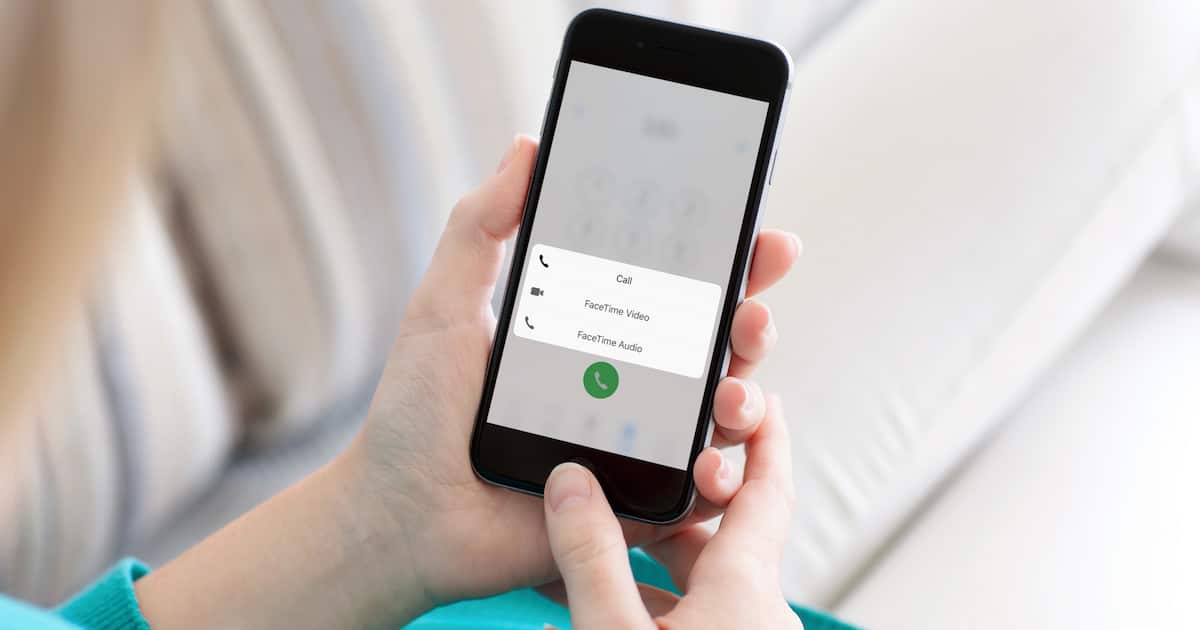
iOS: If You 3D Touch Call from Phone App, Fun Stuff Happens
Jeff Butts found a cool new trick his iPhone could do this weekend. From the Phone app, you can 3D Touch call a number to bring up quick and useful actions. Check out how it works and decide whether it’s useful for you or not.

macOS: Finding the Hidden Advanced Display Preferences
When you look at Display Preferences in macOS and remember what choices you used to have, you may wonder what happened to things like Detect Displays. Jeff Butts has found that a simple keypress is all it takes to get that option, and more, for advanced tweaking of your Mac’s display.
macOS: How To Use Apple Watch to Auto Unlock Your Mac
Andrew Orr recently bought his first Apple Watch, and wanted to set up auto unlock for his MacBook. He shows us how to do it so you can have a password on your Mac without having to type it in.

iOS: How To Back Up Voice Memos To iCloud
Andrew Orr found that voice memos aren’t backed up to ICloud Drive. Instead, it’s something you have to do manually. There are multiple locations to choose from, and Andrew shows us how to back up voice memos to iCloud.
iCloud: Uploading Files from a Browser
Want to grab some photos off of your work machine and send them to your Mac at home? Need to get some files from a friend’s computer? If so, check out this Quick Tip from Melissa Holt. She’s going to tell us how to use the upload feature of iCloud.com to sync files and pictures right from any browser!

watchOS: Don't Automatically Install Apple Watch Apps
When first setting up an Apple Watch, you have to decide whether or not to install all apps or not. If you configured your iPhone to automatically install Apple Watch apps, you might have learned you don’t like that option. Jeff Butts provides you quick instructions to stop your iPhone from automatically cluttering your Apple Watch with every available app.

How to Require a Password to Wake Your Mac from Sleep or Screen Saver
This Quick Tip is about a very, well…quick setting to change to make your Mac more secure. If you can just unlock your Mac after it’s been sleeping without needing a password or your fingerprint, you’ve gotta read this! And make the change! We pretty much insist.
macOS: Recover Lost Tabs and Windows in Safari
In this Quick Tip, Melissa Holt’s gonna go over how to restore tabs or windows you accidentally closed in Safari. So if you’re one of those folks who keeps 75 tabs open and would be devastated if they went away, this trick’s for you!

macOS: Make Your Spotlight Searches Better with the Kind Operator
When you are looking for something specific on your Mac with Spotlight, you might get overwhelmed with the search results. Jeff Butts has become a Spotlight search pro thanks to a simple operator. Read along as he shows you how it works and some of what you can do with it.

AirPort Utility: Adjusting Basestation Preferences (And Why You Might Want To!)
Melissa Holt’s Quick Tip for today is all about some changes you could make to the way AirPort Utility works for any networks you manage. If you don’t want your users installing new firmware at random, then this article’ll show you one way you could avoid that!
A Network Scanner Helps You Secure Your Wi-Fi Router
When you secure your Wi-Fi or wired router, a network scanner is an essential utility you should have on your Mac and iOS device. Jeff Butts has explored several options for letting you know what devices are connected to your network, and gives you an overview of what they can and cannot do.

Evade the macOS 'Too Many Open Files' Error by Pushing the Limits
Here at Mac Observer, we’re penultimate geeks. We push our Macs to the limits, and then find ways to surpass those limits. macOS has limits put in place that result in occasional error messages about “too many open files,” which one of the team ran afoul of. Jeff Butts dove deep into the core of macOS and found out how to increase the limits Apple has imposed upon us.

macOS: How to Copy Files as Pathnames
If you need to reference a file or a folder with a really long pathname, then don’t waste your time typing out the whole thing when there’s a shortcut to help you! Today’s Quick Tip is about a better, faster way to point people toward items on their Macs, and Melissa Holt’s got the scoop.